
Apple introduced back-tap on iPhone with iOS 14 and it became one of those features that iPhone users mention whenever someone asks what they'd miss switching to Android. Tapping the back of the phone twice triggers a shortcut. Practical, fast, and genuinely useful for one-handed operation.
Samsung Galaxy phones have the same capability. Most people have no idea because it's buried inside Good Lock, not in the main settings menu.
RegiStar is the module that surfaces it—along with side key remapping, a Settings app overhaul, and a system change log that proves more useful than it sounds. It's part of Samsung's Good Lock suite and covers the advanced input and system-level customizations that don't fit neatly into any other module.
What is RegiStar?
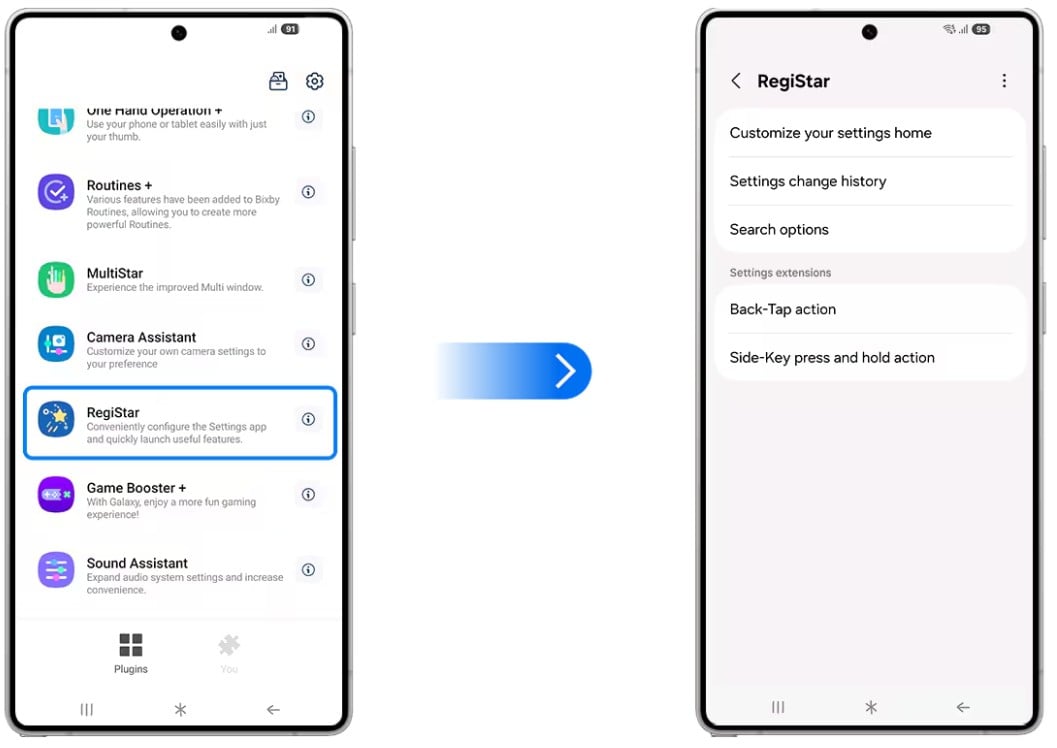
Image: Samsung
RegiStar is a free Good Lock module that adds back-tap gesture shortcuts, lets you reassign the side key's long-press behavior, gives you full control over how Samsung's Settings app is organized, and logs every settings change made to your device. On Galaxy S and Z Flip devices, back-tap actions use the device's accelerometer to detect single and double taps on the rear panel.
What is Back-Tap?
The Back-Tap feature maps any action to a single tap or double tap on the rear panel. Some of what you can do includes:
- Taking a screenshot
- Launching a specific app
- Toggling the flashlight
- Adjusting brightness
- Controlling volume
- Triggering a Bixby Routine
- Opening the notification shade
- Locking the screen
The practical value depends heavily on which action you assign. Screenshot on double-tap is the most popular choice because it replaces the awkward simultaneous side button and volume down press that Samsung requires by default. Flashlight toggle is another strong option for anyone who reaches for it regularly. For one-handed phone use, having a high-frequency action mapped to back-tap removes a navigation step you'd otherwise repeat dozens of times a day.
The sensitivity is adjustable, so you can tune it to avoid accidental triggers when you set the phone down or grip it normally. It takes a few minutes of calibration to get right, but once set, it reliably distinguishes intentional taps from incidental contact.
Side key remapping: Getting rid of the Bixby long-press
By default, long-pressing the side key on a Galaxy phone launches Bixby. Samsung has made this harder to change over time, and most users who don't use Bixby find it an annoying feature they trigger by accident.
RegiStar lets you reassign the side key long-press to any action you'd actually use—launch a specific app, open the power menu, trigger a Bixby Routine (without going through Bixby), or run any other available shortcut. For users who've spent time trying to get rid of the accidental Bixby launches, this is the clean fix.
Settings app reorganization and the change history log
RegiStar gives you control over the Settings app's home screen:
- Reorder sections.
- Hide items you never use.
- Group settings into custom categories.
It also controls how your Samsung account is displayed at the top of Settings. For anyone who navigates Settings frequently, reducing it to the sections you actually use makes the app feel significantly faster.
The settings change history log is the feature most people don't expect to need until they do. It's a timestamped record of every settings modification made on the device—which is useful after a software update that rearranges things, after someone else has used your phone, or when something stops working and you can't remember what you changed. It won't catch app-level setting changes, but it covers One UI system settings comprehensively.
How to get RegiStar
- Cost: Free
- Available on: Samsung Galaxy S series and Z Flip devices (back-tap); all Galaxy devices (settings features)
- Requires: Good Lock main app installed first
- One UI compatibility: One UI 4.0 and above
RegiStar only works on Galaxy phones. Here are the best phones to run it on.
RegiStar only works on Samsung Galaxy devices, so if you're not already in the ecosystem, here are the most popular Galaxy phones worth considering:
Moto G 5G (2026) 128GB
- 6.7 inch display
- Rear Cameras: 50MP, 2MP
- Front Camera: 32MP

Galaxy A26 5G
- 6.7 inch display
- Rear Cameras: 50MP, 8MP, 2MP
- Front Camera: 13MP

Galaxy A27 5G 128GB
- 6.7 inch display
- Rear Cameras: 50MP, 5MP, 2MP
- Front Camera: 12MP

Galaxy A37 5G 128GB
- 6.7 inch display
- Rear Cameras: 50MP, 8MP, 5MP
- Front Camera: 12MP

Edge (2026) 128GB
- 6.3 inch display
- Rear Cameras: 50MP, 50MP, 10MP
- Front Camera: 50MP

RegiStar: FAQ
Does back-tap work on all Samsung Galaxy phones?
Back-Tap Action is available on Galaxy S series and Z Flip devices—it requires the accelerometer configuration that those models use. Galaxy Z Fold and A-series availability varies by model and the version of One UI.
Will accidental back-taps trigger the action constantly?
RegiStar includes adjustable sensitivity settings specifically to prevent false triggers—a few minutes of calibration when you first set it up prevents most unintentional activations.
Can RegiStar fully disable Bixby?
Not fully. RegiStar lets you reassign the side key long-press that would normally launch Bixby, but it doesn't disable Bixby entirely—it just removes the accidental launch trigger that most people find frustrating.
Does the settings change log save history across factory resets?
No, the change log is stored locally on the device and does not persist through a factory reset. It's useful for tracking recent changes, not as a long-term configuration archive.
Is RegiStar available on Samsung Galaxy tablets?
The Settings app customization features are generally available on Galaxy tablets running One UI. Back-Tap availability on tablets varies and depends on the specific tablet model's hardware configuration.
Scott Houghton
Jr. Staff Writer

Thousands of cell phone plans unpacked. All the facts. No surprises.
Related Articles


Related Topics
AndroidPopular Topics
Featured App Reviews iOS News Coverage Device Reviews Device Explainers Carrier Explainers App Roundups T-Mobile


Free iPhone 18 Pro, up to $1,200 off, with a trade-in in any condition or a line switch on Experience Beyond


.png?w=280&h=280&usm=20&usmrad=0.8&fit=crop "Best Cell Phone Deals for October 2026: Get the New iPhone 18 Pro for Free")




