

Switching to Total Wireless (previously known as Total by Verizon) is straightforward and hassle-free.
Total Wireless stands out due to its superior service, offering exceptional coverage without the hefty price tag of major carriers. Furthermore, when you opt to bring your own device, you not only maintain the familiarity of your current phone but also sidestep the additional expense of a new one. Here's how you can seamlessly transition to Total Wireless with your own phone (BYOP). But before we delve into the specifics, let's look at some preliminary steps to kickstart your migration journey.
|
#1
|
Total Wireless (previously Total by Verizon)

Total MAX 5G BYO Plan
$20.00/mo
with AutoPay ($30 for the first month)
+ $0.99 Upfront
|
|
#2
|
Total Wireless (previously Total by Verizon)
Total STARTER Plan
$35.00/mo
with AutoPay ($40 for the first month)
+ $0.99 Upfront
|
|
#3
|
Total Wireless (previously Total by Verizon)
Total MAX 5G Plan
$50.00/mo
with AutoPay ($55 for the first month)
+ $0.99 Upfront
|
|
#4
|
Total Wireless (previously Total by Verizon)
Total ALL ACCESS Plan
$60.00/mo
with AutoPay ($65 for the first month)
+ $0.99 Upfront
|
Before You Bring Your Phone to Total Wireless
Before you switch to Total Wireless, there are some steps to take to make the transition as smooth as possible:
- Make sure your device is compatible with Total Wireless' network (more on this later).
- Check with your current carrier to see if you meet their unlock eligibility requirements.
- Gather any information that may be required to transfer your number to Total Wireless—account number, SSN, and/or your account PIN number.
- Use our coverage tool to assess Total Wireless coverage at your home, work, and other places you frequent.
Once you have all this information on hand, you’ll be well on your way to calling Total Wireless your new mobile carrier.
Total Wireless Phone Compatibility/IMEI Check
The first step to bringing your phone to Total Wireless is making sure your current phone works with Total Wireless' network. Note that you’ll need either a Verizon-compatible device or an unlocked CDMA device for this to be possible, but you’ll still want to go through the process of verifying compatibility regardless of the type of phone you have.
An IMEI/compatibility check on Total Wireless' website is the easiest way to check if your phone will work with Total Wireless' network, and the quickest way to locate your phone’s IMEI number is by dialing *#06#. The number should pop up on your display right away for most Android phones, however, iPhones users can find the IMEI number by doing the following:
- Navigate to "Settings”
- Select “General”
- Find the “About” section (your IMEI number should be located here)
After you’ve found your IMEI number, take the following steps to check your phone’s compatibility:
- Head to Total Wireless' “Keep Your Own Phone” page.
- Click on “Check Compatibility.”
- Enter your IMEI number and click “Continue.”
Alternatively, you can text BYOP to 611611 from the device you’re looking to transfer. You'll get instant feedback on whether you can bring your phone to Total Wireless with either method. If it isn't compatible and you still want to switch to the carrier, you'll need to buy a new phone to go with your Total Wireless plan.
Unlocking Your Current Phone
After you’ve determined your phone’s compatibility, you’ll want to unlock your device from your current network. Carriers will unlock your device once you’ve met their requirements; however, each carrier’s unlocking policy is slightly different. Generally speaking, unlock requirements are based on the following:
- Your tenure with your carrier and current line
- Whether your phone:
- Was originally bought from your current carrier
- Has ever been reported lost or stolen
- Is paid for in full
- Your account status (i.e., in good standing and not delinquent)
If you already have a Verizon-compatible or CDMA phone, you’ll still need to unlock it the same as you would for any other carrier. Most carriers list specific unlock requirements on their websites, however, you can also contact them directly for info.
If your phone is eligible to be unlocked, you can request an unlock code, which you'll usually receive either by email or text. Once you get your unlock code, you may still need to complete the unlock process, and depending on your phone, you'll do this by using your new Total Wireless SIM, an Android account app/ iTunes, or by doing a factory reset.
Like we mentioned above, carrier requirements can vary depending on which one you’re with, so we went ahead and included a handful of carrier unlock guides below to help make the process less arduous. Remember, your phone must be CDMA compatible, otherwise unlocking it will do you no good.
Unlock requirments by carrier
Keep in mind, that while Total Wireless requires CDMA-compatible devices, most newer phones are built to work on all major network technologies when unlocked. If you have an older phone, however, you’ll want to refer to the compatibility check section above.
Activating Your Total Wireless BYOD
To activate your phone with Total Wireless, you’ll need a Total Wireless SIM card. You can buy a SIM kit online directly from the Total Wireless website or at your local Walmart store (this would be your fastest option!)
Once you have your SIM in hand, follow the steps below to activate your phone:
- Navigate to Total Wireless' “Activate” page and select “Bring your own device.”
- Enter your phone’s IMEI number.
- Enter your current phone number, if you're keeping it, or follow the prompts to get a new phone number (keep reading below for more on this process).
- Choose a Total Wireless phone plan, or enter your Service Plan info if you bought one at a local Walmart retailer (or another brick-and-mortar store).
- Create a Total Wireless account and set up your phone.
Bringing Your Phone Number to Total Wireless
Keeping your number is usually a priority for most when switching carriers, and bringing your number to Total Verizon is a pretty simple process. To keep your old number all you need to do is:
- Enter your new Total Wireless SIM card number
- Input the phone number you want to transfer
- Provide your account information (from your old account) such as your:
- Account number
- Account PIN
- Contact information
- Enter your Service Plan PIN if you've already bought a plan, or purchase a new one
- Create your Total Wireless account, or log in to your existing one
- Finish setting up your device
Be sure to keep your old account active until the number transfer is complete, as canceling your account can create some difficulties when looking to port your number over—or worse, result in you losing your current number altogether.
Buying a Total Wireless Service Plan
Since Total Wireless has no contract and is prepaid, there are a few things to keep in mind when shopping for a service plan. For instance, Total Wireless sells both SIM kits and plan refills, and although they are related, these are two entirely separate things to be aware of.
- “SIM kits” are the physical SIM card you’ll need to place inside of your phone once you’re ready to start using your plan. These kits, however, do not come preloaded with a plan and you’ll need to purchase service separately
- Service plans or refills can be purchased in person and online through partnered retailers (namely Walmart, Best Buy, etc.), or directly from Total Wireless.
Total Wireless also offers multi-line service packages, which is essentially the carrier's family plan option. You must still purchase a SIM kit separately, but your service plan will include everything you need to get multiple lines up and running.
Picking the Right Total Wireless Plan
Total Wireless operates on Verizon’s robust and reliable network, yet its plans are significantly cheaper than if you signed up directly with Verizon. Plans on Total Wireless range from as low as $30/month for a modest 5GB, all the way up to $60/month for its unlimited with 20GB of mobile hotspot plan. But keep in mind that some Total Wireless plans have deprioritization thresholds.
Deprioritization temporarily slows down your high-speed 5G or 4G LTE data. Once you’ve met your specific plan's allotment, your data speeds will drop. This is only temporary—your speeds will return to normal once your new billing cycle begins. Here's a quick glance at Total Wireless' plan throttling thresholds:
Total Wireless plans compared
| Plan | High-speed allotment |
|---|---|
| $30 Plan | 5GB |
| Total 5G Base Unlimited | 15GB |
| Total 5G Unlimited | Unlimited (up to 5G nationwide speeds) |
| Total 5G+ Unlimited | Unlimited (up to 5G UWB speeds) |
Picking the right plan, however, will depend on your specific needs, and how you use your phone from month to month. If you’re a relatively light user, Total Wireless' lower-tier plans—such as the $30 Plan or the $40 Total Base Unlimited plan—will likely be the best bargain for what they offer. They'll have just enough data to get you through the month, so long as you’re mindful of your overall usage.
For high data users, you may be able to save a bit more with the $50 Unlimited Plan, as you’ll only be paying $10 less than its $60 Plan for unlimited talk, text, and data but with 15GB versus unlimited mobile hotspot data.
On the other hand, power users will find themselves needing much more than 15GB of mobile hotspot data each month. If this is you, consider the highest-tier $60 Unlimited Plan with unlimited hotspot data. This allows for relatively carefree hotspot usage, but still keep in mind that data-heavy activities like video streaming, online gaming, and large downloads can run your data numbers up pretty quickly. You'll also enjoy up to 5G ultra-wideband (UWB) speeds.
Here’s a peek at the full suite of Total Wireless' plan options.
|
#1
|
Total Wireless (previously Total by Verizon)
Total MAX 5G BYO Plan
$20.00/mo
with AutoPay ($30 for the first month)
+ $0.99 Upfront
|
|
#2
|
Total Wireless (previously Total by Verizon)
Total STARTER Plan
$35.00/mo
with AutoPay ($40 for the first month)
+ $0.99 Upfront
|
|
#3
|
Total Wireless (previously Total by Verizon)
Total MAX 5G Plan
$50.00/mo
with AutoPay ($55 for the first month)
+ $0.99 Upfront
|
|
#4
|
Total Wireless (previously Total by Verizon)
Total ALL ACCESS Plan
$60.00/mo
with AutoPay ($65 for the first month)
+ $0.99 Upfront
|
Why Switch to Total Wireless?
If you want to save money and not sacrifice on great coverage, Total Wireless is a great option. The carrier operates on Verizon’s network, which offers the best overall 4G LTE coverage out of all the major carriers. And where available, its 5G speeds are blazing fast. Not only do Total Wireless plans provide reliable coverage, but select options offer additional features like hotspot allotments and even Disney+ streaming subscriptions.
While Total Wireless is a great alternative to Verizon’s more expensive plans, there are a few other options available with different Verizon MVNOs—like Visible. Even though Visible doesn’t have the plan variety of Total Wireless, its unlimited plans only cost you $25/month, $35/month, or $45/month—these include mobile hotspot as well as 5G access, although on the $25 plan, you can be deprioritized at any time. Compare this to Total Wireless' $50 or $60 monthly unlimited plans, and you’ll notice you’re paying considerably more versus Visible.
|
#1
|
Visible

$25 Visible Plan
$25.00/mo
Taxes & Fees included
|
|
#2
|
Visible
$30 Visible+ Plan
$30.00/mo
Taxes & Fees included
|
|
#3
|
Visible
$40 Visible+ Pro Plan
$40.00/mo
Taxes & Fees included
|
|
#4
|
Visible
$275 Visible Annual Plan
$275.00
Regular rate at $300/year<br>Taxes & Fees included
|
|
#5
|
Visible
$375 Visible+ Annual Plan
$375.00
Regular rate at $420/year<br>Taxes & Fees included
|
Total Wireless Phones
If you can't bring your own phone to Total Wireless, don't abandon your idea to switch—instead, consider getting a new device! Total Wireless offers a generous number of phones to choose from, many of which are regularly discounted. Bear in mind that Total Wireless focuses on budget-friendly models in particular, but you can still consistently find the latest iPhones in its line-up. Take a look at some of the coolest phones you can find from Total Wireless:
iPhone Duo 512GB
- 7.6 inch display
- Rear Cameras: 48MP, 48MP
- Front Camera: 12MP

iPhone Duo 1TB
- 7.6 inch display
- Rear Cameras: 48MP, 48MP
- Front Camera: 12MP

iPhone Duo 2TB
- 7.6 inch display
- Rear Cameras: 48MP, 48MP
- Front Camera: 12MP

Moto G 5G (2025) 128GB
- 6.7 inch display
- Rear Cameras: 50MP, 2MP
- Front Camera: 16MP

Moto G Power (2026) 128GB
- 6.8 inch display
- Rear Cameras: 50MP, 8MP
- Front Camera: 32MP
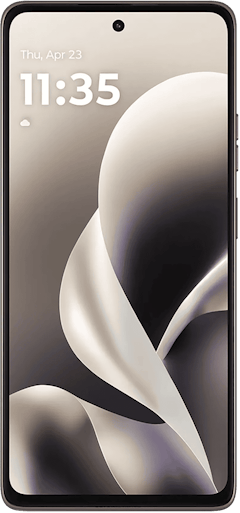
Moto G 5G (2025) 64GB
- 6.7 inch display
- Rear Cameras: 50MP, 2MP
- Front Camera: 16MP
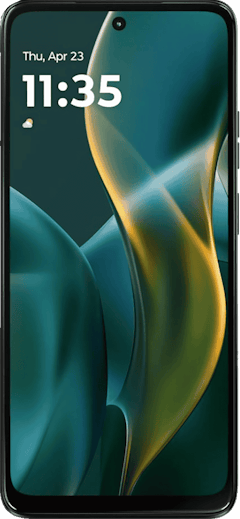
Moto G 5G (2026) 128GB
- 6.7 inch display
- Rear Cameras: 50MP, 2MP
- Front Camera: 32MP

Galaxy A27 5G 128GB
- 6.7 inch display
- Rear Cameras: 50MP, 5MP, 2MP
- Front Camera: 12MP

Pixel 10a 128GB
- 6.3 inch display
- Rear Cameras: 48MP, 13MP
- Front Camera: 13MP

Galaxy A37 5G 128GB
- 6.7 inch display
- Rear Cameras: 50MP, 8MP, 5MP
- Front Camera: 12MP


Switching to Total Wireless: FAQs
What network does Total Wireless operate on?
Total Wireless piggybacks on Verizon’s powerful network, with some of the best overall coverage in the wireless industry—hands down.
Is my phone compatible with Total Wireless?
Your phone may be compatible with Total Wireless.
The model, make, and year of your phone determines if your phone can work on the Total Wireless (read: Verizon) CDMA network. Newer phones tend to have no issues with cross-carrier compatibility, but older devices may only be compatible with the network it was originally intended for (i.e. GSM vs CDMA).
You can check for carrier compatibility by doing the following:
- Go to Total Wireless' “Keep Your Own Phone” page.
- Select “Check Compatibility.”
- Input your IMEI number and click “Continue.”
You can also begin this process by texting “BYOP” to 611611.
What is an IMEI number?
International Mobile Equipment Identity—IMEI, for short—is a unique identifier for any given device. IMEI numbers operate similarly to serial numbers and help prevent things like fraud with lost/stolen devices in particular. For instance, carriers can blacklist IMEI numbers once reported to ensure that no one can use them on their networks. Some carriers refer to their device numbers as ESNs (Electronic Serial Numbers) or MEIDs (Mobile Equipment Identifiers), although these are a bit more archaic, and typically are used in older devices.
Does Total Wireless offer 5G?
Yes, Total Wireless does offer 5G at up to ultra-wideband speeds on its top-shelf $60/month unlimited tier, and nationwide 5G on all other plans.
Where can I buy a Total Wireless plan or SIM kit?
Quite a few places offer Total Wireless plans and SIM kits for purchase. In addition to Total Verizon's website, you can find SIM kits at plenty of partnered retailers, such as:
- Walmart
- Target
- Amazon
- Best Buy
Does Total Wireless have family plans?
Yes, Total Wireless offers multi-line family discounts with increasing savings for up to five lines of service.
Angelo Ilumba
Senior Writer

Thousands of cell phone plans unpacked. All the facts. No surprises.


.png?w=160&h=160&usm=20&usmrad=0.8&fit=crop "How to Switch Phone Carriers and Keep Your Phone and Number")





.png?w=280&h=280&usm=20&usmrad=0.8&fit=crop "The Best Cheap Phone Plans for 2026: We Tested Them All to Help You Save")


