

Apple Cash is a digital cash card available to Apple customers. It’s one of the easiest ways to pay for something or transfer money on iPhones. However, as your Apple Cash balance grows, you may wonder how to transfer funds back into your bank account or a debit card. Luckily, it’s an easy process that can get you access to your money in as little as 30 minutes.
Read on to learn how to transfer Apple Cash to your bank account or debit card using your iPhone.
How to Transfer Apple Cash to Your Bank Account
Transferring Apple Cash to your bank account is completely free. However, the money can take one to three days to deposit into your account.
How to transfer Apple Cash to your bank account:
- Open the Apple Wallet app.
- Select your Apple Cash card.
- Press the More Options symbol in the top right corner.
- Select Transfer to Bank.
- Enter the balance you want to transfer and press Next.
- Select 1-3 Business Days. This is the bank account option.
- Enter your bank account information if it’s not already on file.
- Tap Transfer.

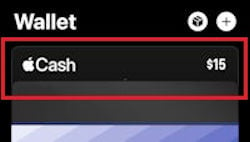
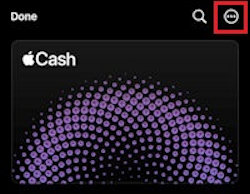
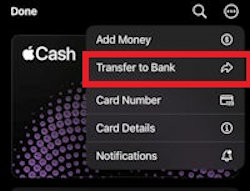



The money will instantly be deducted from your Apple Cash balance, but it probably won’t be accessible on the same day of the transfer. Apple states it takes one to three days for a transfer to complete, but it may take longer during a weekend or bank holiday. It's important to note that if you have difficulties transferring your account, you might need to verify your identity.
If you need your cash quicker, you should do an instant transfer to a debit card instead.
How to Instant Transfer Apple Cash to Your Debit Card
Transferring Apple Cash to your debit card is an instant process that’ll get you your money within 30 minutes.
How to transfer Apple Cash to your debit card:
- Open the Apple Wallet app.
- Select your Apple Cash card.
- Press the More Options symbol in the top right corner.
- Select Transfer to Bank.
- Enter the balance you want to transfer and press Next.
- Select Instant Transfer and Tap Transfer. This is the debit card option.
- The money will transfer to the primary debit card used with your Apple Pay.

While the debit card transfer is a much faster process, it does come at a cost. Apple charges a 1.5% fee for every instant debit card transfer, though it’s capped at $15.
Refilling your Apple Cash balance
You can also refill your Apple Cash balance to add money from your bank account or debit card. Learn how to refill your card and how to use these services with your iPhone and Apple Watch in our setting up Apple Pay guide. While you can refill, you can't withdraw money from Apple Cash.
Need a New iPhone?
Most Apple devices have access to Apple Pay unless your device is extremely old. However, even if your old iPhone has Apple Pay, it’s still worth looking into upgrading. Apple is constantly innovating new features for its devices. As Apple continues to advance, your old phone will eventually struggle to keep up.
The new iPhone 15 is a fantastic upgrade option. It comes with all the regular features you’ve come to expect from an iPhone, like a powerful A16 Bionic processor and camera features that make taking pictures a breeze. Plus, the iPhone 15 series now includes the Dynamic Island previously only featured on the Pro models of the iPhone 14 series. These features make this a must-have device for anyone who spends time traveling or exploring the outdoors.
iPhone 15 128GB

| Description | |
|---|---|
| Screen Size | 6.1" |
| Available On | 123 Plans from 15 carriers |
| Available From |


|
| Priced From | $629.99 upfront |
| View Full Details |
 Apple's 2023 model featuring their best camera system yet, new A16 Bionic chip, all-day battery life, Dynamic Island, and a sleek design using recycled materials

If you’re looking for a budget iPhone you can consider the iPhone SE 2022. This device includes many of the same features as the iPhone 13 series, like the basic A15 Bionic processor and 12MP camera, but at a fraction of the price. It’s perfect for anyone who wants the features of an iPhone but doesn’t want to pay big bucks for the newest model.
iPhone SE (2022) 64GB
| Description | |
|---|---|
| Screen Size | 4.7" |
| Available On | 23 Plans from 3 carriers |
| Available From |

|
| Priced From | $5 per month + $198 upfront |
| View Full Details |
 2022 version of the iPhone SE features 5G connectivity, a powerful A15 Bionic chip, 4.7" Retina HD Multi-Touch display, 12MP rear camera, 4K video recording and home button with Touch ID

There are plenty of other iPhone models to choose from. Older models, like the iPhone 13 and 14 frequently go on sale from carriers. While they don’t have the newest bells and whistles, they are still reliable and powerful phones. Check out the most popular iPhones on the market below:
iPhone 16 128GB
- 6.1 inch display
- Rear Cameras: 48MP, 12MP
- Front Camera: 12MP
iPhone 18 Pro 256GB
- 6.3 inch display
- Rear Cameras: 48MP, 48MP, 48MP
- Front Camera: 18MP

iPhone 18 Pro Max 256GB
- 6.9 inch display
- Rear Cameras: 48MP, 48MP, 48MP
- Front Camera: 18MP

iPhone 18 Pro 512GB
- 6.3 inch display
- Rear Cameras: 48MP, 48MP, 48MP
- Front Camera: 18MP

iPhone 18 Pro Max 512GB
- 6.9 inch display
- Rear Cameras: 48MP, 48MP, 48MP
- Front Camera: 18MP


Transferring Apple Cash: FAQs
How long does it take to transfer money from Apple Cash to a bank account?
Transferring Apple Cash to your bank account takes 1–3 business days.
Is transferring Apple Cash instant?
Transferring Apple Cash to your debit card is instant and takes less than 30 minutes.
Can I send money from my Apple Card to my bank account?
No, your Apple Card is a credit card. It can't be used to transfer cash.
Can I withdraw my Apple Cash balance?
Yes, you can withdraw Apple Cash if you transfer it to your bank account first.
How can I see my Apple Cash balance?
Your Apple Cash balance is visible in the Wallet app.
What happens if I remove Apple Cash?
If you're under 18 and either removed from Apple Cash Family or choose to leave, your balance goes to the organizer, and your account is closed. If you're over 18 and take ownership of your account, you keep your balance.
Why can't I transfer money from Apple Pay to my bank?
If you are unable to transfer money to your bank and have followed all the steps, you may need to verify your identity.
Do I need my Apple ID to transfer Apple Cash?
No, you do not need your Apple ID. However, you will need your passcode or Face/Touch ID to get into the Wallet App to initiate the transfer.
Max McCaskill
Sr. Staff Writer

Thousands of cell phone plans unpacked. All the facts. No surprises.





.png?w=280&h=280&usm=20&usmrad=0.8&fit=crop "The Best Cheap Phone Plans for 2026: We Tested Them All to Help You Save")


