

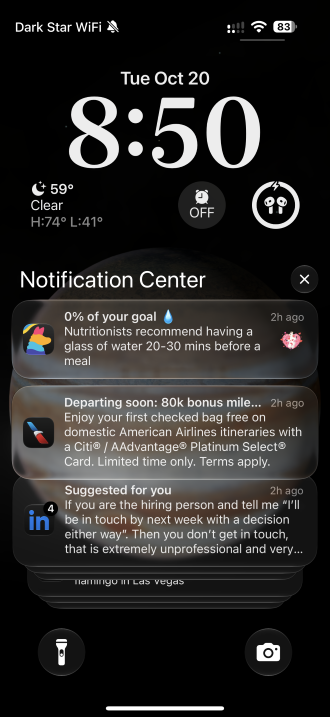
iPhone’s Notification Center.
Image: Max McCaskill
Whether you realize it or not, there’s a good chance your smartphone’s notification feed has been hijacked. Instead of showing you important information like text messages, emails, or news alerts, it’s been overrun by ads, engagement bait, and low-effort spam messages from the apps on your phone. This is called push notification slop, and it’s rapidly become a silent driver of digital fatigue.
The tech news worth knowing, what it means for you, and what everyone else is getting wrong, delivered right to your inbox.
Here’s the situation: Apps want user interactions, and developers have discovered one of the easiest ways to get users to open their apps is to send clickbait push notifications to lock screens. They’re basically delivering ads or engagement reminders to your device in a way that bypasses spam filters.
Most of these notifications are useless and will simply push more important alerts down the screen, forcing you to scroll through ads just to see your messages from friends, missed calls from family members, verification codes, and work emails. After a while, they can even leave you ignoring most of the notifications that pop up on your phone, causing you to miss things.
The situation has gotten bad enough that AI assistants like Gemini and Siri AI can now select which notifications to prioritize to help users sort through the bloat. But sorting digital spam notifications doesn’t stop them or keep your phone from buzzing every time one arrives.
Even worse, the volume has grown so large that many users don’t even realize the true number of notifications pinging their phone every day. Instead, most people ignore them, not knowing that this is something they can easily fix.
Hi there! I'm Max, and I'm a wireless industry expert. What does that mean? For one thing, I get paid to play on my iPhone. But more than that, it means I've spent years reviewing carriers, testing smartphone hardware, and reporting on the news that impacts your phone bill.
Smartphones and wireless plans are some of the most important pieces of technology in most people's lives, but you probably don't think about them until your plan is too expensive or it's time to upgrade to the newest phone. Unfortunately, that means you miss a lot of interesting and important stuff that can affect your life and wallet. The WhistleBlower is our way of cutting through the noise and flagging the things we think you need to know about.
Want The WhistleBlower in your inbox? Sign up below.
What is push notification slop?
First, let’s define what push notification slop is, because you’ve probably been getting it for years and never knew it had a name. Push notification slop is any low-effort notification that’s designed to get you to open an app or make a purchase. These notifications don’t pass along messages or important information. Instead, it’s your own apps hijacking your lock screen for advertisements and engagement bait.
Some examples of push notification slop include:
- Shopping apps sending ads about products you may be interested in or warning you there’s only a limited supply of something you’ve previously viewed
- Social media apps pinging you with messages of “someone viewed your profile” or “you may know this person”
- Food delivery apps suggesting restaurants or offering small discounts to incentivize you to make an order
- Mobile games sending ads about a digital currency or informing you rewards are waiting if you open the app
- News apps sending out clickbait headlines or low-impact stories that aren’t relevant to your interests
- Dating apps warning you about losing a match or offering a free boosted profile for a limited time
I’m willing to bet you've seen many of these notifications on your own phone. However, you may not have realized they're basically spam. After all, these notifications are coming from apps you’ve put on your phone, so it feels like you should be able to trust them. Plus, they’re often linked to reputable apps like LinkedIn, Amazon, Duolingo, DoorDash, or Candy Crush.
That familiarity is what these apps are exploiting. While you may like these apps and frequently use them, they're blasting your lock screen with useless notifications every single day. Essentially, when you agreed to receive notifications after initially downloading an app, you opted into all forms of their messaging, from important alerts to ads and clickbait.
To be clear, these notifications are not scams or fakes, but they are low-effort, easy to repeat, and designed to get you to engage with an app when you weren’t planning to. And since push notifications go to your lock screen and not an inbox, there is no spam filter to hide them. They simply get mixed in with the important notifications you actually want to see.
I’m not reading half the notifications on my phone every day
All of this means you’re likely getting a ton of notifications you don’t need and won’t interact with. You can easily find how many notifications you’re getting in your iPhone’s Screen Time statistics or your Android’s Digital Wellbeing controls.
When I audited my own notification count, I was shocked to see I was averaging 150 notifications per day, and many of them were useless. On one recent day, I received 152 notifications, and only 75 of them were things like messages or important alerts. The rest were mostly clickbait news stories, social media posts I had nothing to do with, game notifications, and ads.
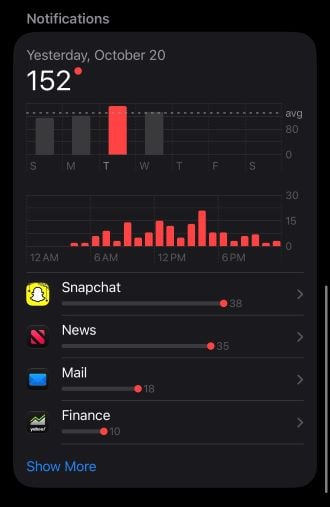
I average 150 notifications per day.
Image: Max McCaskill
The numbers paint a pretty stark picture: On any given day, I’m ignoring half the notifications that hit my phone because they’re spam. These notifications are also incredibly exhausting and tend to pile up in my Notification Center because there’s very little value in sorting through them.
You already have the tools to reclaim your Notification Center
The good news is that you don’t have to suffer through push notification slop. Many apps let you opt out of advertisement-style notifications, which cuts off most of the bloat. However, the option is typically buried in the settings of the app itself, so you may have to hunt for it or look up how to find it.
From there, you should also think hard about which apps even need notification permissions. For example, unless your mobile game has a daily reward or alerts that require you to interact with something to progress, you probably don’t need constant reminders to play.
Shopping apps are another great example. If Amazon or Temu is bombarding you with ads, you can disable their notifications entirely and rely on your email for important things like shipping updates. You can also change the types of stories that are shared from news apps to ensure it’s only breaking news that hits your screen.
Unfortunately, push notification slop is likely to continue and may even get worse. AI has made it extremely easy to churn out massive numbers of targeted notifications that have just enough of your data to get you to interact. Plus, since developers know on-device AI features are now acting like spam filters and sorting out their junk notifications, they’ll likely look for ways to make them seem like important information or emergencies, tricking their way into your priority messages.
So here’s your job going forward: The next time you get an irritating notification, immediately open the app and figure out how to disable it. Slop notifications are sent out constantly, so you won’t have to wait long. If you adjust each app’s permissions every time you get one, you’ll probably have your notifications cleaned up in just a few days.
More from WhistleOut on notifications
Notifications can be incredibly helpful or really annoying. Here are some of our top guides to help you tame your smartphone’s notification section.
- How to Use the Notification Center on Your iPhone: Wondering what all the different settings in your iPhone’s Notification Center are? We’ll show you the settings you’re missing and how to best use them.
- How to Silence Notifications on Your iPhone Until You’ve Watched the Game: Watching football or maybe a new movie? Nobody wants their phone going off and distracting everyone. Here’s how to keep your notifications silent so you can focus on what you’re watching.
- How to Silence Notifications on Android for Spoiler-Free Football: Android phones have different notification settings depending on your model. Our crash course in silencing them can help whether you’ve got a Google Pixel, Samsung Galaxy, Motorola, or OnePlus.
Max McCaskill
Sr. Staff Writer

Thousands of cell phone plans unpacked. All the facts. No surprises.

Related Articles


Related Topics
Featured Op-EdPopular Topics
Featured App Reviews iOS News Coverage Device Reviews Device Explainers Carrier Explainers App Roundups T-Mobile


Free iPhone 18 Pro, up to $1,200 off, with a trade-in in any condition or a line switch on Experience Beyond


.png?w=280&h=280&usm=20&usmrad=0.8&fit=crop "Best Cell Phone Deals for October 2026: Get the New iPhone 18 Pro for Free")




