
Multiple research studies have concluded that smartphone use before bed is abjectly bad for our sleep. Smartphone use disrupts the production of the important sleep hormone melatonin, which tricks one's mind into thinking it needs to stay awake.
To help curb this, the National Sleep Foundation recommends 30 minutes of gadget-free time before bed. Before declaring this advice too difficult to put into practice, check out the best apps to manage your screen time and these five tips for emancipating yourself from your smartphone screen at night.
Listen to a Podcast Instead of Watching Video
Television and movies have been an integral part of the after-work routines of millions of Americans for decades. However, with the advent of streaming apps like Netflix and Amazon Prime Video, it’s easier than ever to take this habit to the bedroom. As a result, many of us zone out on our phones while we’re lying semi-comatose.
While video watching may seem to be helping us to relax before bed, it's actually engaging our brains and telling us to stay alert. But there’s a way around this corrosive routine: podcasts.
We can get a little nighttime entertainment with podcasts before drifting off without absorbing the light from our smartphone screens. There are even podcasts specifically designed to relax you before bed.
If you sleep next to a partner, the best method for taking in a podcast is undoubtedly via headphones. However, a Bluetooth speaker is an alternative solution if you’re trying to keep your phone away from the immediate proximity of your bed (as you should be). Of course, a speaker works best if you sleep alone or your partner doesn’t mind it. Either way, you’ll be setting yourself up to fall asleep faster than you would be watching episodes of Better Call Saul.
Skip the social scrolling
According to our survey, nearly half of Americans report social media as being their primary form of socialization. That dependence on scrolling all day long is affecting everything from our wallets to our health—including our sleep.
Use An Internet Blocker
Almost all the stuff that keeps us up at night on our phones comes to us via WiFi or cellular signal. So there’s a straightforward solution: use an internet/app blocker.
With apps like Freedom, you can select which apps or websites you wish to block and set a timeframe for doing so. Writers who need to block out distractions when they work use Freedom and other similar apps. So, there’s no reason you can’t use the apps to limit overall screen time before bed, too.
Use An Auditing App
One solution to decreasing smartphone use, in general, is to track your personal usage and shame yourself into curbing it after reaching certain thresholds. But, unfortunately, shaming can only help to convince ourselves that we've used our phone enough by the time 10pm rolls around.
There are several iOS and Android auditing apps that can help with this:
- Moment (for iPhones) gives you an overall breakdown of your usage but allows you to set limits that, once reached, block you from using the device any further that day.
- Quality Time (for Android) serves a similar function to Moment but allows you to break down usage by app.
Put Your Phone Out of Reach
This a decidedly more analog solution than the first three, but no less effective, provided you have the discipline to put it into practice.
Clearing your bedroom of all devices can help you follow the National Sleep Foundation’s recommendation of 30 minutes of gadget-free time before bed. Maybe you'll foster new habits in its place, like reading a book instead.
Try leaving your phone in a designated space in another room, and keep doing so until it becomes a habit.
Use Night Mode Or Blue Light Blocking Glasses
If you must use your phone in bed before sleeping, one solution for reducing screen effects includes activating night mode. Apple's Night Shift, for example, converts the on-screen color spectrum from blue to yellow. Night Shift is supposed to be easier on the eyes and improve sleep (reports have called into question its actual efficacy, though).
Another solution is wearing blue-light-blocking glasses. There are a few on the market today; of these, the Uvex Skyper model was the most effective in tests run by Consumer Reports.
Keep in mind that neither of these solutions prevents the pulse-quickening effects of reading a worrying email or watching an exciting movie.
You’ll Spend Almost 9 Years of Your Life Staring at Your Phone
We wanted to see exactly how much time we spend staring at our smartphone screens. So, after surveying 1,000 smartphone users, here’s what we found.
Average Lifetime Phone Use: 9 Years
.png "Average lifetime phone use")
The average person spends a little over 76,500 hours on their smartphones over the course of their lifetime—which works out to 8.74 years of their life. This stat computes the average age of acquiring a phone—now just over ten years old—with 3.07 hours of average daily use.
Daily Screen Time by Generation

Millennials spend the most time on their phones, clocking an average of 3.7 daily hours. However, average daily screen time decreases as the age of users increases, with Gen Xers reporting 3 hours of daily phone use and Boomers spending just 2.5 hours per day staring at their screens.
For perspective, this works out to around 56 days each year for millennials, compared to 39 days per year for Boomers.
Working From Home Increases Screen Time
The pandemic drastically increased screen time for all of us. While we don’t have exact data on how much screen time increased by, we know that the number of people working from home in the U.S. tripled during the pandemic (to nearly 30 million people).1 This number was the highest in nearly two decades, with the District of Columbia, Washington, Maryland, Colorado, and Massachusetts holding the highest share of home-based workers.1
Even though we don’t know what adult screen time looked like during the pandemic, we do know about adolescent screen time. Kids and teens were home from school for months, and their screen time doubled to 7.7 hours per day.2 The Journal of the American Medical Association found that kids and teens spent most of their hours spent watching or streaming videos, movies, and TV shows, and playing video games.2
For the 160 days between schools closing in March 2020 and beginning to reopen in August 2020, that’s 1,232 hours of additional screen time for kids and teens—aka 51.3 days lost to screen time.
Screen Time Dominates Millennials’ Waking Hours
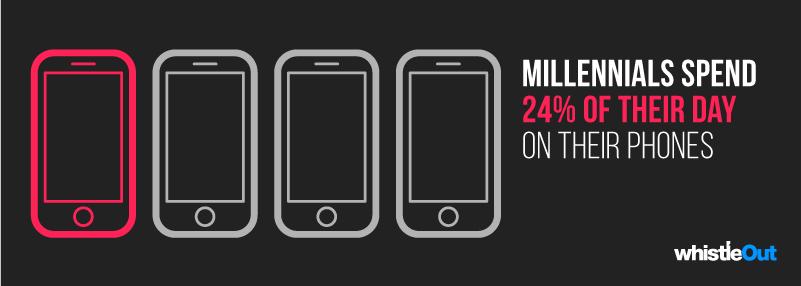
When factoring out average sleeping time (around 9 hours), millennials spend nearly a quarter of their waking lives—23.1%—on their smartphones. Gen X again falls in the middle of the pack with 16.5% of their day spent scrolling, while Boomers bring up the rear with 9.9% of their waking hours.
This stat may not be all that surprising, considering millennials were born and raised during one of the most innovative technological periods in history. As a result, Digital learning and communication tools have been available far earlier for millennials than for previous generations. Similarly, many millennials find themselves in tech-centric professions that often require heavier smartphone use to perform their jobs and communicate with teammates.
Methodology & Sources
We surveyed 1000 people about their cell phone screen time, 166 of which were Baby Boomers (born 1946-1964), 270 were Generation X (born 1965- 1980), and 449 were millennials (born 1981-1996). The remaining respondents were born outside these generation age ranges. We then factored in the average number of years we own a smartphone and the current average life expectancies, and calculated them against the average number of waking hours for most adults (around 15 hours).
Additional Sources
- United States Census Bureau, “U.S. Census Bureau releases new 2021 American Community Survey 1-year estimates for all geographic areas with populations of 65,000 or more,” September 15, 2022. Accessed November 17, 2022.
- Nagata, Jason M., Cortez, Catherine A., Cattle, Chloe J., et al. “Screen Time Use Among US Adolescents During the COVID-19 Pandemic: Findings From the Adolescent Brain Cognitive Development (ABCD) Study.” JAMA Pediatriatrics, November 1, 20221. Accessed December 1, 2022.
Chris Holmes
Staff Writer

Thousands of cell phone plans unpacked. All the facts. No surprises.





.png?w=280&h=280&usm=20&usmrad=0.8&fit=crop "The Best Cheap Phone Plans for 2026: We Tested Them All to Help You Save")


