

T-Mobile offers several upgrade programs that let you get a new phone (that you're financing in installments) before you've finished paying off your current one:
- JUMP! (as part of the Protection 360 insurance plan) lets you upgrade once you've paid off 50% of your device. T-Mobile covers the rest of the balance.
- Yearly Upgrade is included in premium plans like Experience Beyond and existing Go5G Next, and allows you to upgrade once a year. There’s a catch: You have to use your phone for six months and have paid off 50%.
- New in Two comes with Experience More and existing Go5G Plus plans, allowing you to upgrade every two years.
No matter which method you choose, you can manage the entire upgrade process through the T-Life app. That means you can check eligibility, select devices, and handle trade-ins—all from the comfort of your couch.
Three ways to upgrade your T-Mobile phone
T-Mobile offers three upgrade paths depending on your plan and how frequently you want a new device: Yearly Upgrade, New in Two, and JUMP!
T-Mobile Early Upgrade Options
| Type | Cost | Upgrade after | Learn more |
|---|---|---|---|
| Yearly Upgrade Included with Experience Beyond |
$100/mo. | Every year | See at T-Mobile |
| New in Two Included with Experience More |
$85/mo. | Every two years | See at T-Mobile |
| JUMP! Included with Protection 360 |
$7–$25/mo. | 50% phone is paid off | See at T-Mobile |
Can I upgrade my T-Mobile phone every year?
Yes, you can upgrade your T-Mobile phone every year if you have Experience Beyond or an existing Go5G Next plan. Both premium plans include automatic Yearly Upgrade, allowing you to get a new device once a year.
However, to qualify for your yearly upgrade, you must have had your phone for at least six months and paid off 50% of what you owe. Only then can you trade it in for a new device. T-Mobile covers the remaining balance on your payment plan, and you can start fresh with a new phone.
Get the latest tech with T-Mobile
Upgrade to the newest flagship devices with T-Mobile, including the most recent iPhones, Samsung phones, Pixels, and much more.
Here are the latest and greatest models for your next upgrade:
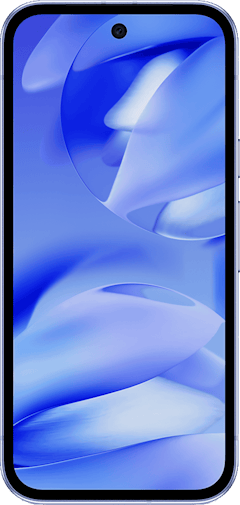
Galaxy A37 5G 128GB
- 6.7 inch display
- Rear Cameras: 50MP, 8MP, 5MP
- Front Camera: 12MP

Pixel 10a 128GB
- 6.3 inch display
- Rear Cameras: 48MP, 13MP
- Front Camera: 13MP

Pixel 9a 128GB
- 6.3 inch display
- Rear Cameras: 48MP, 13MP
- Front Camera: 13MP

What is T-Mobile’s New in Two?
New in Two is an upgrade perk included with Experience More and existing Go5G Plus plans. This option is best for those who like a new phone but don’t need the latest models on the market. It includes a standard two-year upgrade cycle.
You’ll probably have your phone paid off in two years (depending on your installment plan), so you can use it for trade-in credit and upgrade as soon as you hit the two-year mark.
Can I upgrade my T-Mobile phone early with a cracked screen?
No, unfortunately, you can’t trade in your phone if it has a cracked screen. Your phone has to be in working condition if you want to use it for an upgrade. That said, it depends on the crack. T-Mobile doesn’t accept hairline cracks, chips, missing glass, or shattered screens. But smudges and scratches are accepted.
Other conditions for upgrade:
- “Find my phone” is disabled.
- The front screen is not cracked or damaged.
- There is no liquid damage or internal moisture.
- Your device powers on and stays on.
Still unsure if your phone meets T-Mobile’s standards? Check out the trade-in value of your phone with T-Mobile’s value checker.
How do I upgrade with JUMP!?
JUMP! is part of T-Mobile's Protection 360 device insurance plan. It costs anywhere between $7–$25 per month, depending on your device. To qualify for an upgrade with JUMP!, you have to be enrolled—and you can only enroll in Protection 360 within 30 days of purchasing a T-Mobile phone.
You are eligible to upgrade with JUMP! Once 50% of your T-Mobile device is paid off your Equipment Installment Plan (EIP). Once you reach that threshold, and your phone is in good working order, you can trade it in for a new device.
Along with upgrade benefits, Protection 360 also includes:
- Standard cell phone protection
- Unlimited cracked screen replacements
- Security features (McAfee Security and ID Protection)
What Happened to JUMP! On Demand?
T-Mobile discontinued the JUMP! On Demand (JOD) lease program on December 1, 2025. This program previously allowed customers to swap phones as frequently as every 30 days, but T-Mobile has transitioned entirely to 24-month Equipment Installment Plans.
Is T-Mobile JUMP! worth paying for?
If you upgrade your cell phone often, then yes, T-Mobile's JUMP! program is worth the small monthly fee.
Let's say you're currently paying off a phone with an outright price of $600 on monthly installments of $25. You'll be eligible to upgrade to a new cell phone once you've paid off 50% of your installments—$300. So you essentially won't have to pay the full price for your phone, since you'll be upgrading before you've fully paid it off.
If you're paying the maximum of $15 for your JUMP! program, you'll be paying $180 for the year, but you'll be saving $300 in remaining phone payments. Yes, your monthly bill will be slightly higher each month, but if you can't wait 2 years before upgrading to a new phone, then it may well be worth it.
Remember, you'll also be getting device protection for your phone with T-Mobile JUMP! If this is something you want for your phone anyway, you might as well sign up for JUMP!
If however, you don't plan on upgrading your phone within 2 years and you don't need phone insurance, then JUMP! isn't worth the extra cost.
T-Mobile plans with upgrade perks
Your plan might already include upgrade benefits, so it's worth understanding the differences.
- I want to upgrade every year: Experience Beyond ($100/month) is your best bet. It includes Yearly Upgrade automatically, giving you the fastest path to new devices without having to shell out the full price. You can trade in after six months once you've paid off 50% of your device.
|
T-Mobile

Experience Beyond 2.0
$100.00/mo
with Auto-Pay + Taxes and fees
|
- I prefer upgrading every two years: Experience More ($85/month) comes with New in Two. You get 24-month financing and T-Mobile's best device deals when you're ready to upgrade after completing your payment plan.
|
T-Mobile
Experience More 2.0
$85.00/mo
with Auto-Pay + Taxes and fees
|
- I’m not sure I want to upgrade: The Essentials plan ($60/month) provides 5G access and 50GB of premium data. What it doesn’t have is early upgrades. You'll be able to upgrade when your device is paid off.
|
T-Mobile
Essentials 2.0
$60.00/mo
with Auto-Pay - Taxes & Fees NOT included
|
- I want upgrade flexibility without a premium plan: Protection 360 with JUMP! (starting at $7/month depending on your device) gives you the ability to upgrade once you've paid off 50%.
Switch to T-Mobile and start saving
If you're not currently a T-Mobile customer, the Easy Switch process only takes 15 minutes, and you can do it all on the T-Life app.
Download the app, tap the switching banner, and select your current carrier. Upload a recent bill, and T-Mobile's system will recommend a plan and automatically port your number. New customers can even get free same-day phone delivery.
See at T-MobileHow to upgrade in the T-Life app
You can check your upgrade eligibility and begin the process through the T-Life app or T-Mobile’s webpage in a few simple steps:
- Open the T-Life app and tap the Manage tab.
- Select the phone line you want to upgrade.
- Tap Upgrade or Device Details.
- Browse available phones, select your preferred color and storage size, and review the purchase summary.
- Prep your phone to ship in or take it to your local retailer.
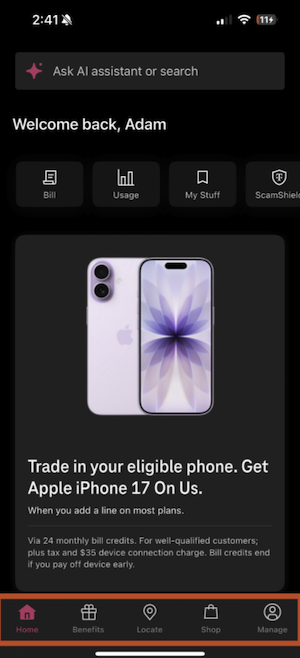
Image: Adam Roach | WhistleOut
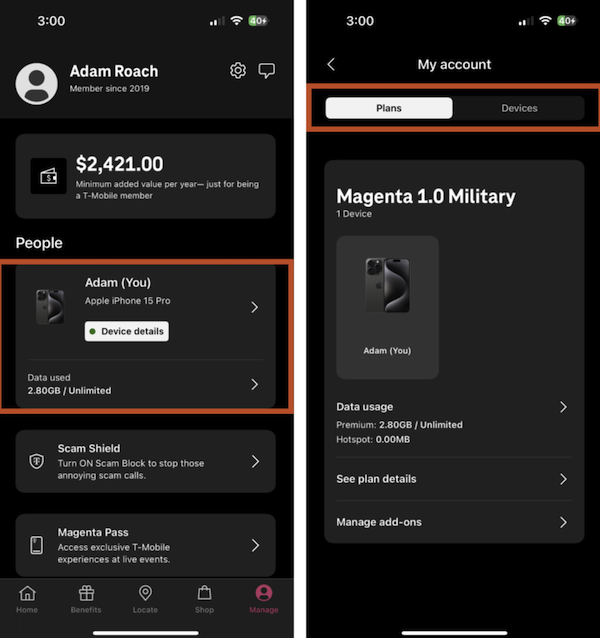
Image: Adam Roach | WhistleOut
T-Mobile offers more than early upgrades
A T-Mobile membership includes several perks. Beyond device upgrades, you also get access to:
- T-Mobile Tuesdays: Weekly offers give you free food, movie tickets, and travel discounts through the Benefits tab in the T-Life app.
- Free entertainment: Premium plans like Experience Beyond include Netflix and Hulu at no additional cost.
- Satellite connectivity: Experience Beyond includes satellite connectivity (for free) powered by Starlink, allowing you to send texts and access basic messaging even when you're off the cellular grid. You can also add it to other plans for $10/month.
T-Mobile early upgrade programs: FAQs
Jessica Santero
Staff Writer

Thousands of cell phone plans unpacked. All the facts. No surprises.





.png?w=280&h=280&usm=20&usmrad=0.8&fit=crop "The Best Cheap Phone Plans for 2026: We Tested Them All to Help You Save")


