
As the second-largest carrier in the U.S., AT&T's cellular network is expansive and, for the most part, incredibly reliable. But, like any carrier, there is still the occasional cellular outage. And if you're on one of AT&T's MVNOs, chances are you will also experience an outage if AT&T's network goes down.
If your AT&T phone suddenly loses connection, your phone may go into SOS mode or you may see an error message when trying to make calls, send texts, or use apps. Here's how to confirm if there's an AT&T outage and what you can do to stay informed.
How to find out if AT&T is down
There are several steps you can take to check whether there's an AT&T outage near you.
Check AT&T's website or the app for known outages. On AT&T's outage page, there is an outage map, where you'll be able to see if AT&T has reported any known issues with their cellular network and if there are outages near you.
Sign up for service alerts
In your AT&T app or on the carrier's website, sign in to your MyAT&T account and head to the "My Wireless" section.
If you're using the MyAT&T app:
- Go to Account Settings or Profile (depending on your app version).
- Select Contact Info.
- Select Communication Preferences.
- Toggle Service Alerts to "on".
How to stay connected during an AT&T outage
Enable Wi-Fi calling and texting
Wi-Fi calling and texting allows you to make calls and send texts over a Wi-Fi network rather than relying on AT&T's network. Here's how to enable it on both iOS and Android devices:
On iOS:
- Go to Settings and tap Cellular
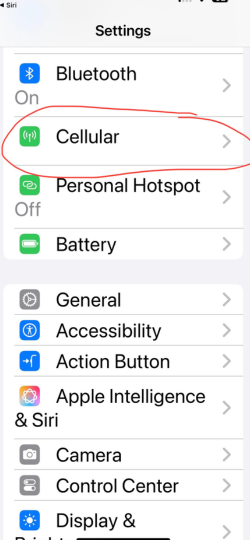
Image: Aletta Cooke - Select Wi-Fi Calling
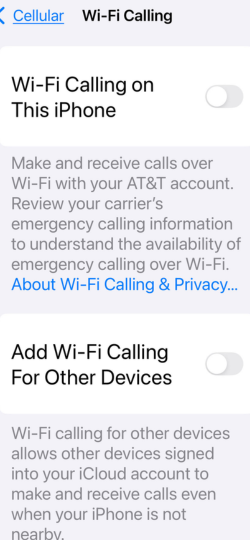
Image: Aletta Cooke - Toggle Wi-Fi Calling on This iPhone to "on"
.jpg)
Image: Aletta Cooke
On Android:
- Go to Settings and tap Connections. Then select Wi-Fi Calling

Image: Aletta Cooke - Toggle Wi-Fi Calling feature on
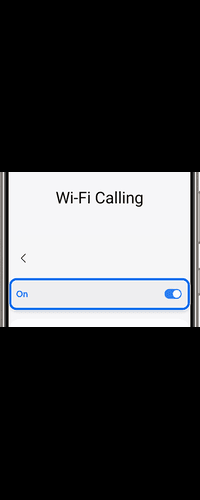
Image: Aletta Cooke
Use messaging apps over Wi-Fi
Wi-Fi-supported messaging apps are great alternatives for staying connected. Popular messaging apps like WhatsApp, Facebook Messenger, and Skype allow you to message and make voice or video calls without cellular service, helping you to keep in touch with family and friends during an AT&T cellular outage.
Use public Wi-Fi
Public Wi-Fi is another option if you aren't at home or don't have Wi-Fi set up on your home network. That said, make sure to take measures to protect yourself from bad actors that use public Wi-Fi to steal personal data.
One way to ensure your online privacy is using a VPN (virtual private network). A VPN protects your personal information by encrypting your data while using public networks, making it safer to communicate and browse without risking your privacy. There are many VPN options available, including both free and paid versions. Check out our picks for the top VPNs for your phone for some ideas to get you started.
Cellular data vs. Wi-Fi: What's the difference?
Cellular data and Wi-Fi are both ways to connect to the internet. Cellular data uses cell towers, while Wi-Fi is typically provided through cable, fiber, or satellite and broadcasted via a Wi-Fi modem.
See our Wi-Fi vs. cellular data guide for details and pros/cons of each option.
On Android:
- Go to Settings and tap Connections. Then select Wi-Fi Calling
Image: Aletta Cooke - Toggle Wi-Fi Calling feature on
Image: Aletta Cooke
Use messaging apps over Wi-Fi
Wi-Fi-supported messaging apps are great alternatives for staying connected. Popular messaging apps like WhatsApp, Facebook Messenger, and Skype allow you to message and make voice or video calls without cellular service, helping you to keep in touch with family and friends during an AT&T cellular outage.
Use public Wi-Fi
Public Wi-Fi is another option if you aren't at home or don't have Wi-Fi set up on your home network. That said, make sure to take measures to protect yourself from bad actors that use public Wi-Fi to steal personal data.
One way to ensure your online privacy is using a VPN (virtual private network). A VPN protects your personal information by encrypting your data while using public networks, making it safer to communicate and browse without risking your privacy. There are many VPN options available, including both free and paid versions. Check out our picks for the top VPNs for your phone for some ideas to get you started.
Phone still not connecting? Troubleshooting tips
If there's no AT&T outage but you still have connectivity issues, there might be a problem with your phone itself. Here are some tips to diagnose why your AT&T phone is not working.
Restart your phone
Restarting your device can reset the connection to AT&T's network and potentially resolve any temporary issues.
Update your carrier settings
Outdated carrier settings can sometimes cause connectivity issues. Here's how to update.
To update your carrier settings on an iPhone:
- Open Settings
- Go to General and select About
- If a carrier update is available, tap Update when prompted
To update your carrier settings on an Android phone:
- Go to Settings
- Tap About Phone or More (depending on your phone model)
- Select Mobile Networks and choose Carrier Settings
- If an update is available, follow the prompts to install it
For a deeper understanding of how cellular networks work and what can impact connectivity, check out our guide on cell phone networks and frequencies.
Check for issues with your AT&T account
Occasionally, service issues can be due to unpaid bills or account restrictions. Make sure your AT&T bill is current by logging into your MyAT&T account and checking your payment history. Additionally, if you're traveling or in an area without AT&T coverage, enable data roaming so your device can connect to other networks temporarily.
To enable data roaming on an iPhone:
- In your Settings menu, tap Cellular
- Select Cellular Data Options
- Turn on Data Roaming
To enable data roaming on an Android phone:
- Open your Settings and tap Network & Internet
- Choose Mobile Network
- Toggle Roaming to "on"
If you still have difficulties connecting, consider our comprehensive guide to cellular data troubleshooting for further tips to help.
AT&T alternatives: Saving with an MVNO
If you're experiencing frequent outages or service issues, it might be time to explore other carriers that might offer better reliability or cost savings, particularly those that don't operate on AT&T's network.
Instead of jumping directly to an expensive plan from Verizon or T-Mobile, though, consider a smaller Verizon or T-Mobile MVNO, or mobile virtual network operator. MVNOs operate on the exact same towers as the major carriers, but since they don't own or maintain the towers, they pass on those savings to their customers.
This means you get the same coverage as a major carrier without the premium cost.
Mint Mobile is a T-Mobile MVNO that offers access to the best 5G network in the country. Their unlimited plan is just $30 per month—less than half the price of AT&T and T-Mobile's unlimited options.
Our guide to AT&T vs. Mint Mobile has a full breakdown of how Mint stacks up against in terms of coverage, cost, and features.
|
Mint Mobile

Unlimited Data Plan
$10.00/mo
$60 for 6 months of service
|
On Verizon's network, Visible provides unlimited data, talk, and text starting at $25 per month. Their premium unlimited plan, Visible+, includes guaranteed high-speed data that makes it a competitive alternative to AT&T.
|
Visible

$25 Visible Plan
$25.00/mo
Taxes & Fees included
|
If you still prefer AT&T's service, you can get the same coverage for half the price with an AT&T MVNO like US Mobile. Their Unlimited Premium plan is our top pick for the best unlimited plans on the market, costing just $44 per month for 100GB of premium data.
We tested US Mobile for a full month to explore its pros and cons and found that it's fast, reliable, and a seriously great deal compared to the expense of an AT&T plan.
If you're considering switching, check each carrier's coverage map below to search for availability in your area and see if another network might provide stronger or more reliable coverage.
FAQs
How do I reset my AT&T cell phone signal?
To reset your AT&T phone signal, you'll need to reset your network settings.
- Open Settings on your iPhone or Android phone.
- Tap General (for iOS) or Connections (for Android).
- Select Reset (on iOS) or Mobile Networks (on Android).
- Choose Reset Network Settings. This will restore your phone's network configurations to default, helping to improve your connection.
After resetting your phone signal, your phone will restart. Once it's back on, try connecting again to see if your signal improves.
Is AT&T providing credits for recent service outages?
During extended outages, some carriers offer credits. Contact AT&T to inquire about available compensation.
Aletta Cooke
Staff Writer

Thousands of cell phone plans unpacked. All the facts. No surprises.





.png?w=280&h=280&usm=20&usmrad=0.8&fit=crop "The Best Cheap Phone Plans for 2026: We Tested Them All to Help You Save")


