

Spam callers are incredibly annoying. According to the FCC, U.S. consumers receive approximately 4 billion robocalls per month. By manually blocking their numbers, using carrier services to block them, and utilizing third-party blocking and ID apps, you can considerably cut down the number of unwanted calls you get.
Registering your number on the National Do Not Call Registry is a start in reducing unwanted calls. But unfortunately, you’ll have to take other steps, like the ones outlined below, to see a significant reduction in spam callers as the registry only blocks sales calls.
What Are Spam Calls?
Spam calls, fraud calls, or robocalls are unwanted calls to your cell phone. These suspicious calls can be pre-recorded messages attempting to sell you something, obtain personal information, or prompt interaction.
If you happen to pick up the phone remember to never give your personal information out to anybody you don’t know. If the person on the other end of the call claims to be working for a company you do some sort of business with, verify that they really are from that company before working with them.
Also, some scam callers will impersonate government agencies to try to get information or money from you. Note that government agencies' primary form of communication is through official mail not random calls to your cell phone.
How to manually block spam callers
If you have an Apple phone or Android phone, you can manually block these numbers. Both operating systems allow you to add the phone numbers of unwanted callers to an automatic rejection list. The problem with this tactic is that these spam callers use phone spoofing—a method of masking the actual number they're using by mimicking a number close to your own.
This tactic increases the likelihood that you will answer the spam call, as you are more trusting of a number in your own area code. With phone spoofing, no matter how long your call block list gets, it can seem that the spam calls just keep coming. With the introduction of AI in smartphone operating systems, your phone can now screen your calls for you to let you know if they are worthy of your time. But if you are too nervous about AI features, blocking numbers still works.
Here's how to block spam calls on Android and iOS!
How to block a call on Android
The easiest way to block a number on Android is with the phone app, but you can also block numbers from the contacts tab or Messages app.
- Launch the dialer app.
- Tap the three-dot more menu.
- Choose Call history.
- Pick a call from the list.
- Select Block/report spam.


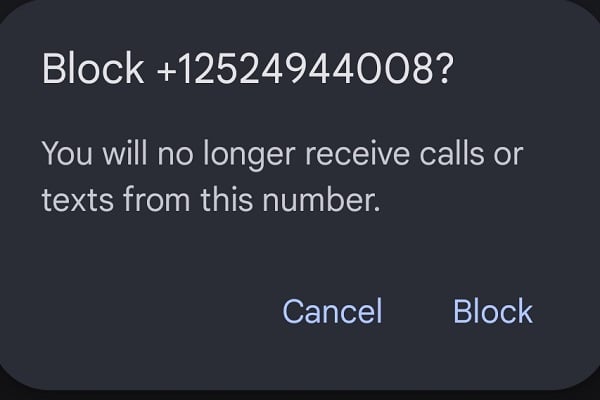
Alternatively, you can block a number using your contacts tab:
- Open the phone app and navigate to the Contacts tab.
- Select a contact to block.
- Hit the three-dot menu.
- Tap Block numbers.
- Tick the report as spam box or press block.
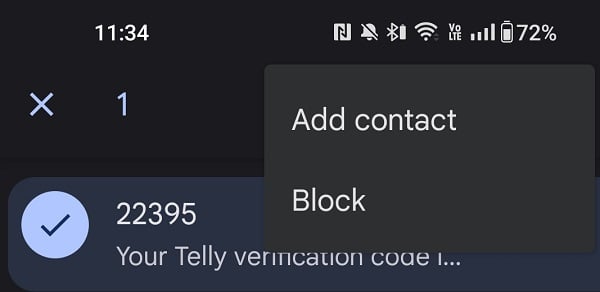
You can also block a number from the Messages app:

- Open the Android Messages app.
- Long-press (press and hold) a text message thread.
- Hit the three-dot menu and choose block.
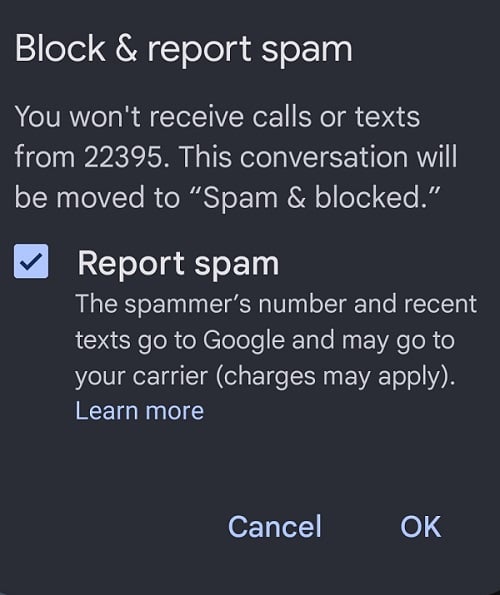
How to block phone calls on iPhone
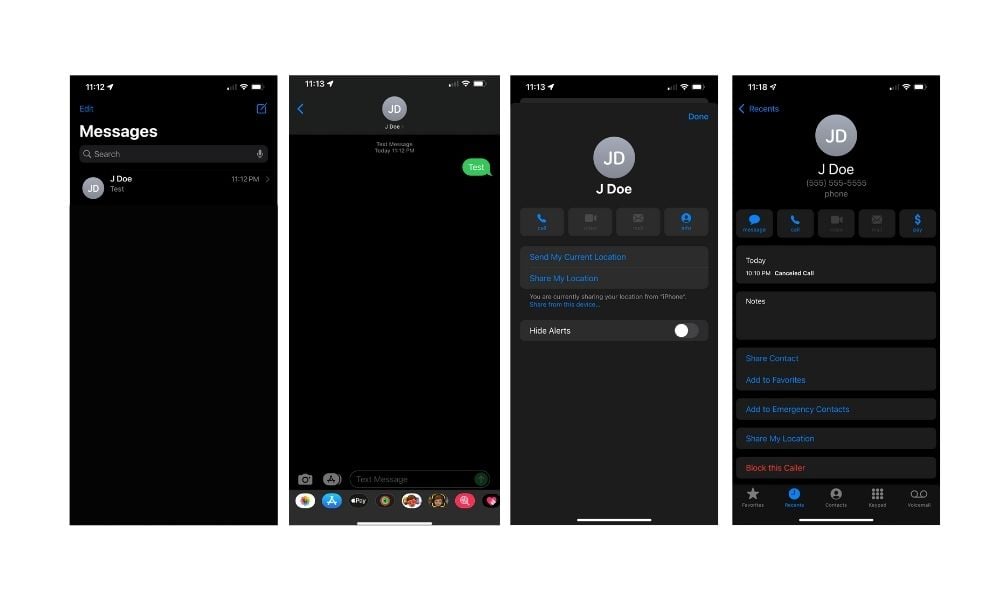
Apple's iOS lets you quickly and simply block a call. Here's how to block a number on iPhone:
- Launch the Phone app.
- Pick Favorites, Recents, or Voicemail.
- Tap the Info icon (which is a circle with an "i") beside the contact or phone number you wish to block.
- Tap Block Number and follow the prompts to confirm number blocking on iOS.
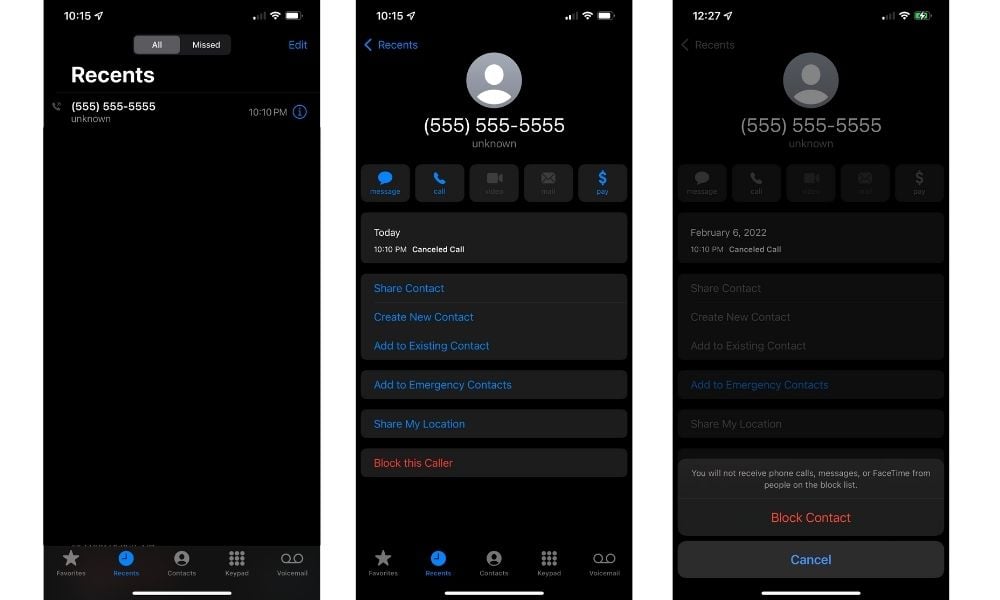
You can also block numbers from the Messages app on your iPhone:
- Open the Messages app.
- Pick a text message thread with the number or contact you wish to block.
- Press the number or name on that text thread you want to block.
- Choose the Info ("i" with a circle around it) option.
- Tap Block Caller and follow the prompts to confirm blocking.
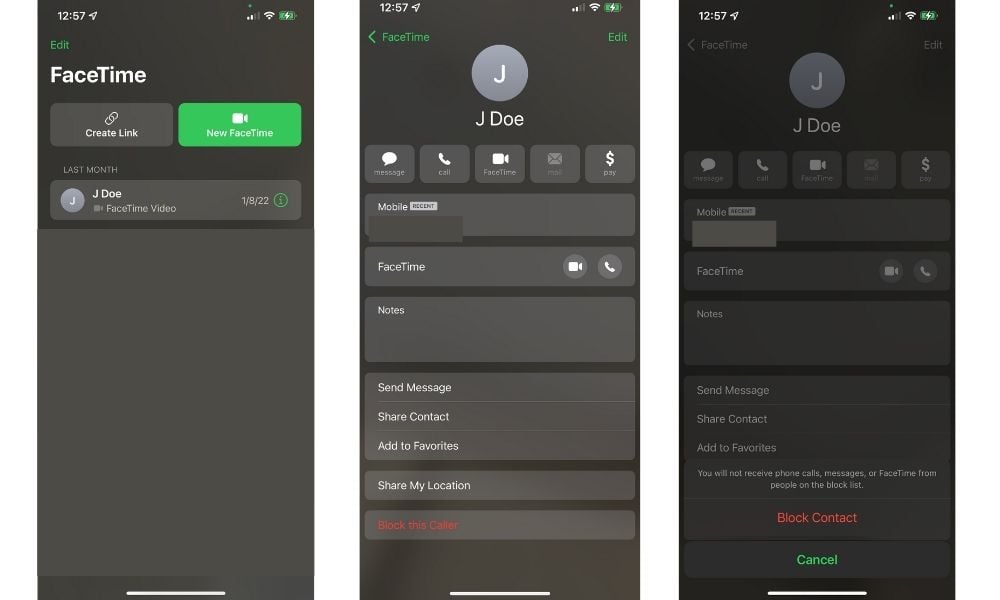
If you're an iPhone user, you probably use FaceTime frequently, and luckily, there's a quick way to block numbers from FaceTime:
- Fire up FaceTime.
- Choose a recent FaceTime conversation from the person you wish to block.
- Hit the Info icon (green circle with an "i.").
- Press Block Caller and follow the prompts to block that person.
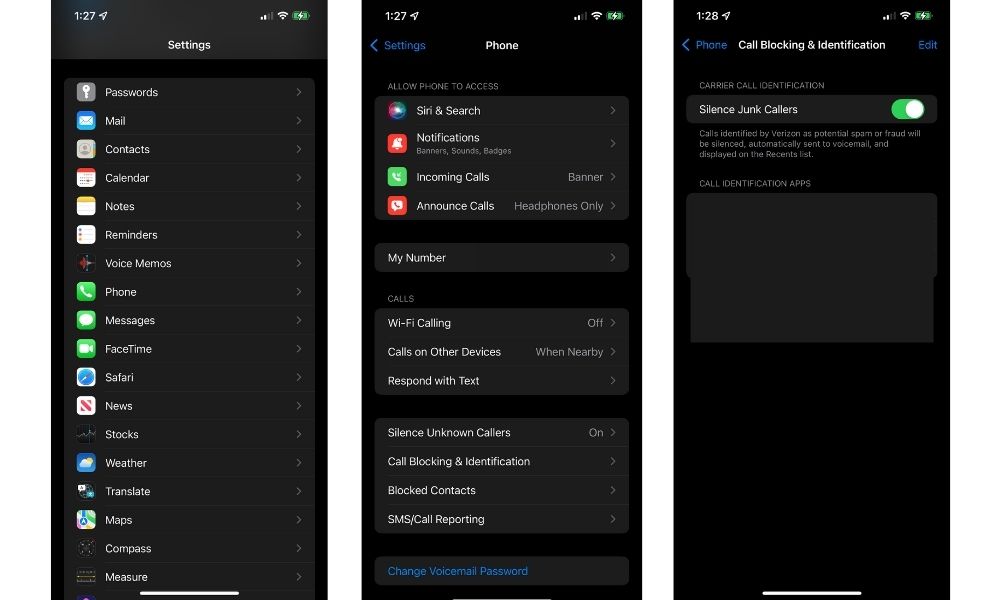
You can automatically block known spam callers in iOS. Go to Settings > Phone > Call Blocking & Identification and enable Silence Junk Callers.
Carrier Spam Blocking Services
Unwanted phone calls have become such a common problem that even the big cell phone carriers have had to address them, each providing methods to help keep spam callers from becoming troublesome nuisances.
T-Mobile Scam Blocking and Name ID
The “un-carrier” offers three avenues to help mitigate spam phone calls.
The first is Scam ID which informs you when a call is likely a scam. While Scam ID won’t block the call, it will warn you that maybe you shouldn’t take the call. This feature is included with any phone that already has Caller ID capabilities and comes with no extra charge.
Secondly, T-Mobile offers up Scam Block which will block all calls that are likely to be scams. This feature is also free, but you will have to activate it by simply dialing #662#. Be warned, Spam Block could potentially block calls that are not scams or spam,
Lastly, Name ID is available through T-Mobile. With Name ID you can see the name of who is calling you, from where they are calling, and the type of organization they are. You’ll also be able to block numbers that aren’t in your address book. You can sign up for the Name ID feature for $4 per month.
AT&T Call Protect
AT&T offers up two security plans that aim to help you deal with spam callers. Each plan works with the AT&T Call Protect app. The Basic plan is free and includes Automatic Fraud Blocking, Suspected Spam Warning and Manual Call Blocking.
The Plus security plan costs $3.99 per month and includes everything in the Basic plan plus Enhanced Caller ID, Reverse Number Lookup, Custom Call Blocking, and extra mobile security features.
Verizon Spam Controls
With Verizon you might be able to slow the wave of spam callers by using Spam Controls. This free feature will enable you to block numbers for up to 90 days. Additionally, you’ll be able to block email addresses that might be spamming you with text messages.
Third-Party Apps for Detecting and Blocking Spam
There are several third-party apps available that attempt to help rid our lives of spam callers. Some apps can automatically block robocallers and known spam callers, while others will have enhanced caller ID features that will warn you when calls are likely to be spam—several apps do a combination of both.
Some of the top spam blocking and detecting apps include the following:
- Hiya – This app blocks callers from continually growing lists of known spammers and scammers. It can also block callers using the “neighbor scam” where the phone number is spoofed to look almost identical to yours and give you detailed information about the callers that do get through.
- RoboKiller – A tad vindictive, a whole lot of sweet fun justice. RoboKiller attempts to spam the spammers by answer their calls with pre-recorded nonsense. You can even make a custom recording of your own.
- Truecaller – Like Hiya, Truecaller blocks calls from an ever-growing list of known spammers and scammers.
Using a third-party app is probably the most effective way of blocking spam callers. Keep in mind, however, that no app is perfect, and some spam calls are bound to come through.
Angelo Ilumba
Senior Writer

Thousands of cell phone plans unpacked. All the facts. No surprises.





.png?w=280&h=280&usm=20&usmrad=0.8&fit=crop "The Best Cheap Phone Plans for 2026: We Tested Them All to Help You Save")


