
The mental health features in Apple’s Health app are a great first step for monitoring your mental health, but it’s not always obvious how share your results with someone else. This is an important feature to use if you’re planning to visit a doctor and want to share your tracked data.
iOS supports exporting and sharing your mental health questionnaire results directly from the Health app. You simply need to save them as a PDF and share them from your device.
We can walk you through how to prepare that data ahead of a doctor’s visit, so it’s accessible, readable, and ready when you need it.
What iPhone mental health data can you export?
You can share virtually all of your health app data with doctors, including features like exercise, heart monitoring history, and blood oxygen levels. However, the process for mental health data is slightly different.
The Health app includes built-in mental health questionnaires, including clinical-level anxiety and depression risk assessments. When you complete one of these questionnaires, your results save directly to your Health app data history and become available as a downloadable PDF. You simply need to save this PDF to your iPhone. From there, you can email it to your doctor or print it out for a physical copy.
To be clear, this method is for exporting your recorded results. Your health data remains encrypted and it does not give a doctor live access to your Health app and data.
Wondering what kind of mental health data Apple tracks? Check out this guide on the Health app’s mental health questionnaires.
Step-by-step: Exporting your mental health questionnaire results
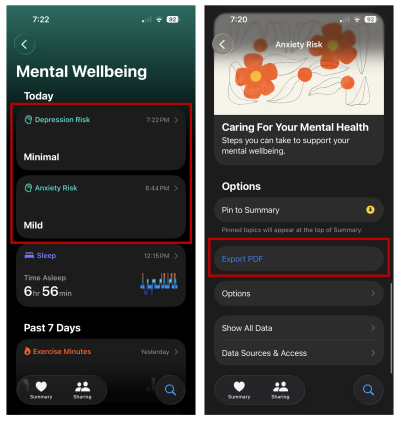
To export your mental health questionnaire results:
- Open the Health app.
- Go to the Mental Wellbeing section.
- Select Depression Risk or Anxiety Risk
- Scroll down to Export PDF
From there, you’ll be able to select the save location on your iPhone, email it, or print from a connected printer.
Why exporting beats in-app sharing during appointments
In theory, in-app sharing sounds convenient. In practice, it often breaks down at the exact wrong moment due to poor reception, short appointment windows, or confusion about where the data lives.
Exporting your results ahead of time gives you control. You walk in with something tangible your doctor can read, reference, and keep on file.
It also reduces the risk of miscommunication. Instead of summarizing how you felt over the past two weeks, you’re working from the same data your phone captured.
Recap: Exporting data is the next step for helping your mental health
If you’re already using your iPhone to track mental health questionnaires, exporting those results is one of the most practical steps you can take before a doctor’s visit. It’s simple, comes in a PDF format that's easy to share, and is far more reliable than trying to explain everything from memory.
Max McCaskill
Sr. Staff Writer

Thousands of cell phone plans unpacked. All the facts. No surprises.

Related Articles


Related Topics
iOS FeaturedPopular Topics
Featured App Reviews iOS News Coverage Device Reviews Device Explainers Carrier Explainers App Roundups T-Mobile


Free iPhone 18 Pro, up to $1,200 off, with a trade-in in any condition or a line switch on Experience Beyond





.png?w=280&h=280&usm=20&usmrad=0.8&fit=crop "The Best Cheap Phone Plans for 2026: We Tested Them All to Help You Save")

