
The Health app on your iPhone can track almost all aspects of your well-being, including exercise data, your heart rate, and even your mental health. That said, since mental health data is incredibly personal, it raises a different set of questions than step counts or heart rate logs. You may be wondering how secure it is and if anyone can see this information.
Within iOS, the mental health tracking tools come with explicit privacy features designed to prevent sensitive data from being exposed or reused. Your data is encrypted and can only be shared if you choose to export or sync it.
Let’s talk about how privacy works for mental health data on your iPhone’s Health app, and how you can share that data if you want.
Mental health data is encrypted inside the Health app
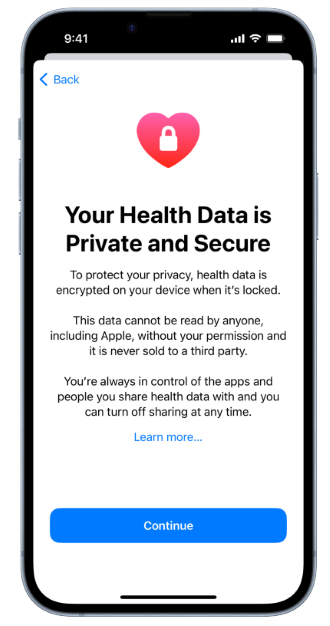
Image: Apple
Apple treats mental health information as part of your overall Health data, not as a separate feature. State of Mind mood logs, questionnaire results, and related records are stored within the Health app alongside all your other personal health information.
By default, mental health data is private, encrypted, and saved directly to your device. If you also want this data saved or backed up to your iCloud account, you must manually opt in to that feature. Additionally, if data is sent to iCloud, it travels through end-to-end encryption, so it can’t be read even if it’s intercepted.
Sharing data requires manual approval
Mental health data does not leave the Health app unless you take the deliberate step to share it.
When you export or share questionnaire results, you choose:
- What information is shared
- When it’s shared
- How it’s shared
Additionally, there’s no background syncing to third-party apps or passive data flow to healthcare providers unless you approve that kind of sharing.
How to export your mental health data
If you decide you want to share your mental health data with a doctor, the easiest method is by exporting the data as a PDF. This is especially true for the PHQ-9 and GAD-7 questionnaires, which are clinical-level tools used by some doctors to screen for anxiety and depression.
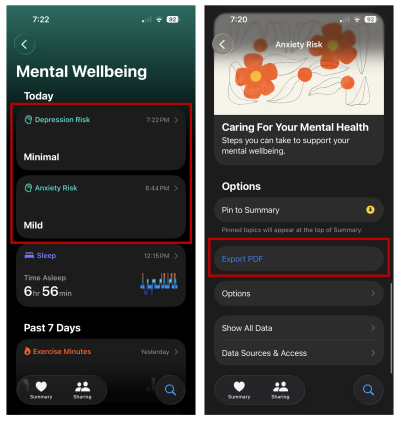
To export your mental health questionnaire results:
- Open the Health app.
- Go to the Mental Wellbeing section.
- Select Depression Risk or Anxiety Risk.
- Scroll down to Export PDF.
After that, you can select the save location on your iPhone, email it, or print from a connected printer.
Sharing mental health data with apps
Other apps can request access to Health data. Popular examples of these kinds of apps are third-party apps designed to help you follow a mental health routine, or an app connected to your healthcare provider.
You control whether another app can sync with or access your mental health data, and those permissions can be reviewed or revoked at any time.
The bottom line: Your mental health data is safe
Apple’s mental health features are designed with privacy in mind. Your data stays private by default, sharing is always deliberate, and access is governed by clear permissions.
If privacy concerns have been holding you back from using these tools, it’s worth understanding that nothing is shared unless you choose to share it. You can feel comfortable embracing Apple’s mental health tools without worrying that your data can be accessed by others.
Max McCaskill
Sr. Staff Writer

Thousands of cell phone plans unpacked. All the facts. No surprises.

Related Articles


Related Topics
iOSPopular Topics
Featured App Reviews iOS News Coverage Device Reviews Device Explainers Carrier Explainers App Roundups T-Mobile


Free iPhone 18 Pro, up to $1,200 off, with a trade-in in any condition or a line switch on Experience Beyond





.png?w=280&h=280&usm=20&usmrad=0.8&fit=crop "The Best Cheap Phone Plans for 2026: We Tested Them All to Help You Save")


