
Meditation apps, breathing exercises, online therapy—whatever your wellness regimen, adding more zen to your routine is never a bad idea. With your iPhone's Health app, these resources are now built into your device for easy access.
Apple’s Health app offers access to several mental health resources, including features like:
- Anxiety screenings
- Depressive disorder questionnaires
- Daily mood journaling
Whether you’re new to the wellness scene or a longtime subscriber like me, these metrics make it easy to take your wellness temperature right from your phone.
While more screen time might seem counterintuitive to mental wellness, we assure you that these tools can be beneficial. Plus, since Apple is always introducing new wellness features with iOS updates, you can always count on having plenty of ways to monitor your health.We personally tested these mental health features for several weeks to see how they work and make us feel. Check out our full experience below.
iOS mental health features
The native Health app first began offering mental health resources with the release of iOS 17 in 2023.
As Apple has expanded the app and reorganized its features, this category is now called “Mental Wellbeing.” It features two primary tools: the State of Mind daily log and Mental Health Questionnaires. They are designed to help you identify your feelings and correlate them with other life factors.
Rest assured—your health data is encrypted and unreadable by outsiders, including Apple and third-party apps, so long as you lock your phone with a passcode, Touch ID, or Face ID. Your mental health data will only be shared with others if and when you decide to.Tracking your mood with State of Mind
According to research, identifying our feelings is the first step in building emotional regulation and resilience, while low emotional awareness can negatively affect our work, relationships, and overall mental health. iPhone’s State of Mind log is a simple and intuitively designed tool that can help you build emotional intelligence right at your fingertips.
How to use Apple’s State of Mind log
I tried Apple’s State of Mind log for two weeks and found it to be insightful and refreshing. From the get-go, Apple makes logging convenient and time-efficient. The four-step process will take you only a minute at most and requires little effort.
After your first log, State of Mind will appear on your main Summary page for easy access. State of Mind will then prompt you to log your feelings at various intervals throughout the day. You will get to choose if and when you would like these reminders (more on this later).While I am not usually a fan of iPhone alerts, these didn’t bother me. In fact, I found myself taking a deep breath when the reminder appeared and appreciated the chance to take a step back and consider how I was feeling.
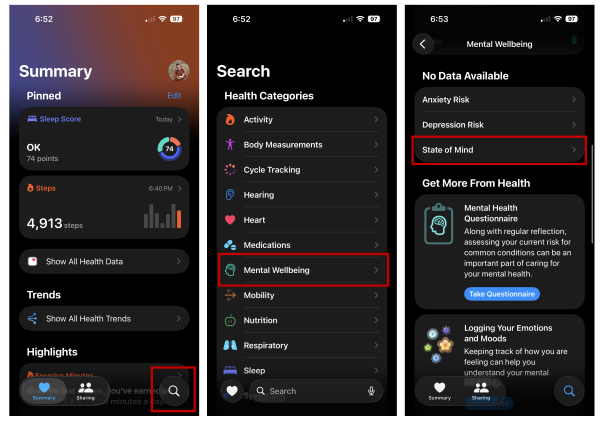
To use the State of Mind log:
- Open the Health app.
- Select the Search button at the bottom right corner.
- Choose Mental Wellbeing from the health categories.
- Select State of Mind.
Then scroll down to the section titled Logging Your Emotions and Moods. Select Get Started, and follow the prompts to log your mood, beginning by logging how you feel now or how you’ve felt all day.
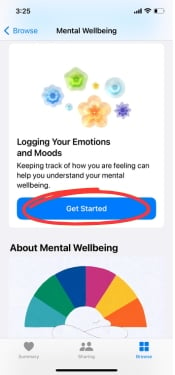
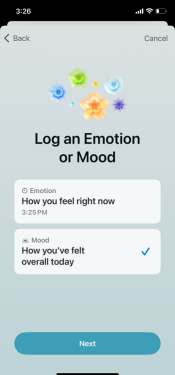
Image: Alissa Bird
You will then see a set of rings and a sliding scale ranging from Very Unpleasant to Very Pleasant, with Neutral in the middle. As you toggle right or left, the rings will change color and adopt a softer or more jagged shape, depending on your mood. I found the visual display calming, even when toggling to the left.
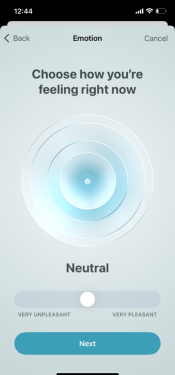
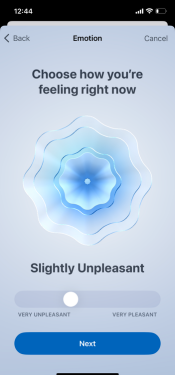
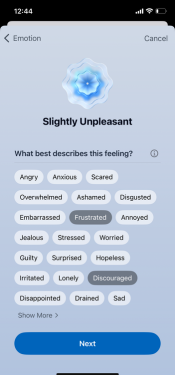
From there, you can choose words that best describe your feelings and the life factors impacting you most, ranging from family to the weather. You can always select Show More for additional options. The aim here is to narrow down your feelings so that you can better understand their origin. If you are like me, the pre-selected options make it easy to respond from the gut without too much overthinking.
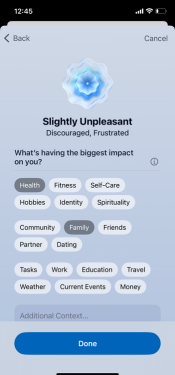
And just like that, you have completed your first log. This simple process can help you identify the root cause of your emotions and observe patterns across time.
Setting your preferences in State of Mind
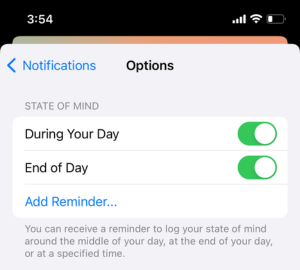
Upon finishing your first log, you can choose if and when you would like logging reminders.
You can always change these preferences by revisiting your State of Mind home screen, scrolling to the bottom, and selecting Options. From there, you can toggle reminders on and off or add reminders for specific times of the day.
The more you log, the more helpful your data will be.
Using your logged State of Mind entries
While logging your mood can offer clarity at the moment, viewing your logged data over time can give you more insight into causes and contributing factors.
You can view your logged data in a calendar, chart, or list, but I found the chart to be the most helpful as it tracks your logged entries alongside other life factors, like sleep and exercise. For example, you may notice a correlation between unpleasant days and poor sleep or a trend of pleasant days associated with more exercise. You can view your chart by week, month, six months, or year.
To use the chart feature:
- Go to the State of Mind home screen.
- Select the Show in Charts button.
- Choose between States, Associations, and Life Factors to determine other contributing factors.
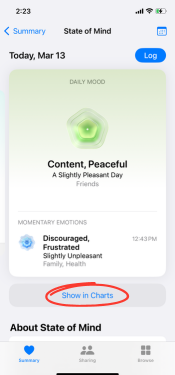
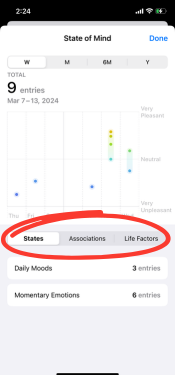
The States features show you which data points are associated with Daily Moods or Momentary Emotions. Select the States tab and tap on either of the two options to highlight related entries. It was interesting for me to see how often my momentary emotions affected my overall daily mood.
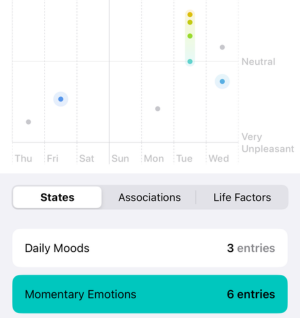
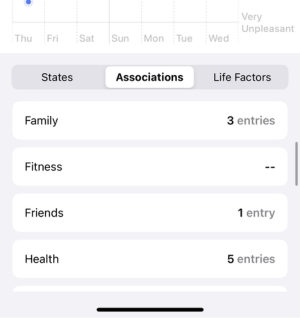
With Associations, you can see what life forces most affect your mood.
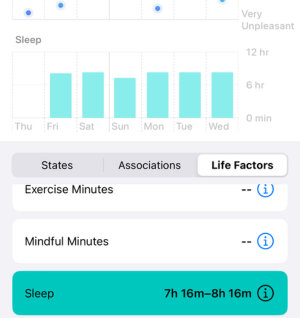
The Life Factors option considers how other factors, like sleep, might affect your mood.
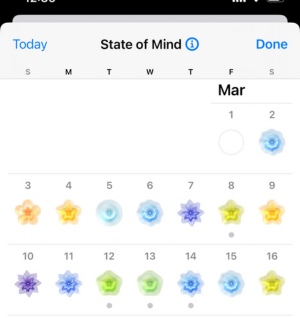
To view logged entries in a calendar setting, revisit your State of Mind home screen and tap the calendar icon in the right-hand corner. From there, you can add and view entries. The color-coded days make it easy to get a snapshot of your mood over time. What you see may or may not surprise you; it can help to have a visual reference.
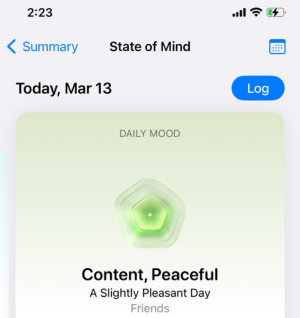
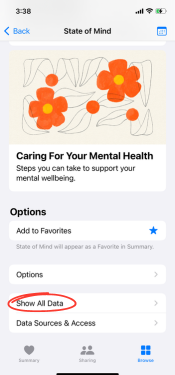
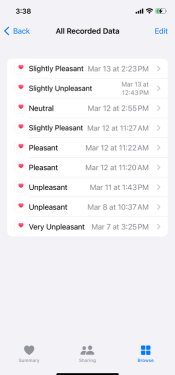
Lastly, you can view your logs in a list format. To do view the list, open State of Mind, scroll to the bottom, and tap Show All Data.
Help! Why am I not seeing other health data on my chart?
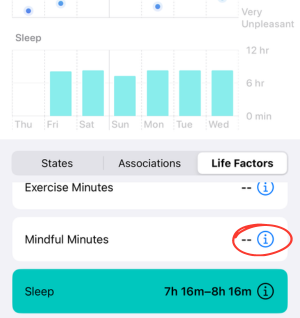
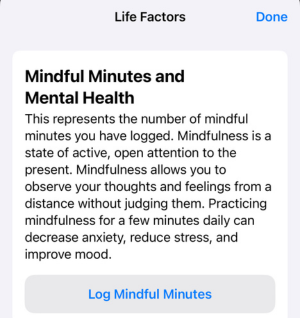
Correlating your mood with other life factors can be helpful, but it is only possible if your iPhone tracks other health metrics. If you don’t see any data under Exercise Minutes, Mindful Minutes, Sleep, or Time in Daylight, you have not enabled those features on your iPhone. This data can come from both native and third-party apps.
To see which of your apps are compatible with the Health app:
- Visit your Health app.
- Tap on your profile picture in the top right corner.
- Under Privacy, select Apps and Services.
- Here, you can see which apps are compatible with your Health app.
Using your iPhone’s Mental Health Questionnaires
In addition to the State of Mind log, Apple’s new mental health features include two Mental Health Questionnaires: the Patient Health Questionnaire-9 (PHQ-9) and the Generalized Anxiety Disorder Questionnaire-7 (GAD-7). These are the same clinically validated assessments many doctors use to screen for anxiety and depressive disorders over a given two-week period.
Both assessments take less than five minutes to answer and gauge your risk on a scale of minimal to severe. While these results are not a diagnosis, they can provide insightful information.
Most importantly, you can easily share the results with your physician. No need to get a referral or make an appointment; simply download and email a PDF of your results or send them to your doctor straight from the app. The only complication is that you must connect to your healthcare system, and many providers still need to enable Apple sharing on their end. Case in point: I have Kaiser Permanente, and even Kaiser (a healthcare giant) wasn’t available at that time.
To use either of the two questionnaires:
- Go into your Health app.
- Tap Search in the bottom right corner.
- Select Mental Wellbeing from the Health Categories.
- Choose Anxiety Risk or Depression Risk.
- Select Take Questionnaire.
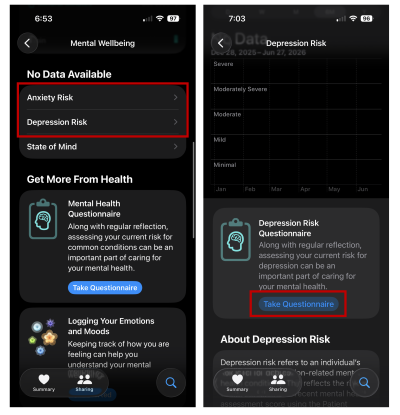
Image: Alissa Bird
To share your results with your physician:
- Complete a questionnaire.
- Scroll to the middle of your Results page.
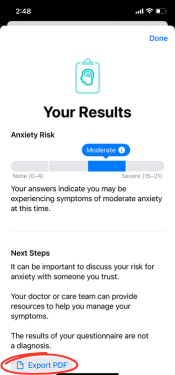
- Select Export PDF.
- From there, select the share button in the top right corner and choose how you would like to share it (email, text, etc.)
As mentioned earlier, you can also attempt to share your results with your doctor by tapping the Sharing menu button within the Health app and selecting the option Share with your doctor.
At the end of the day, this data can be a helpful measure of your mental well-being, whether you’re seeking professional help or not.
Our take: I think Apple’s mental health features are helpful
| Pros | Cons |
|---|---|
|
|
Overall, I found Apple’s mental health features to be beneficial, particularly the daily log. The process took less than a minute and helped me consider the quality of my mental health at any given moment. If you’re looking for a quick and convenient mindfulness tool, the log is a great place to start.
I will say taking full advantage of the log requires consistent engagement with the Health app as a whole. If you are not interested in tracking other health metrics, such as sleep, exercise, and mindfulness minutes, your State of Mind results will be less comprehensive.
The Mental Health Questionnaires are solid. You may not need them often, but they can help you understand if and/or when you may need professional help. Sharing them with your doctor via a PDF is fairly straightforward, though the in-app method is not yet fleshed out. In general, the Health app has a way to go in terms of user-friendliness, from syncing health metrics from third-party apps to finding the necessary tools and resources you need.
In the end, it’s nice to be able to access mental health resources right from your iPhone, whether for yourself or for a friend who might need them.
Alissa Bird
Staff Writer

Thousands of cell phone plans unpacked. All the facts. No surprises.





.png?w=280&h=280&usm=20&usmrad=0.8&fit=crop "The Best Cheap Phone Plans for 2026: We Tested Them All to Help You Save")


