
Not everyone has the time—or the desire—to answer expansive questions every day about their mental health. For these kinds of users, the power of State of Mind is that it’s an easy, lightweight habit builder for tracking your feelings and moods.
The feature is free and built directly into Apple’s Health app. It’s quick, painless, and doesn’t require deep introspection. You’re simply prompted to check in with how you feel, then get on with your day.
While it may not seem like much, spending just a minute a day with State of Mind can still teach you a lot about your mental wellbeing and overall wellness through the Health app’s data integration.
What State of Mind does for you
State of Mind lives inside the Health app and lets you log how you’re feeling either in the moment or as a reflection on your day.
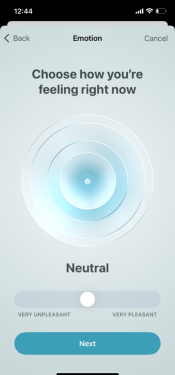
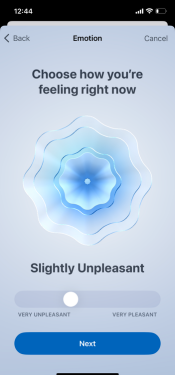
Image: Alissa Bird
Each entry starts with a simple scale, where you rate how you’re feeling from Very Unpleasant to Very Pleasant. From there, you can tag emotions and contributing factors such as work, sleep, relationships, or other health issues.
The process is intentionally quick. A full entry takes under a minute, and you’re never required to explain yourself in text. Remember, this isn’t journaling. It’s closer to a structured check-in that prioritizes consistency over depth.
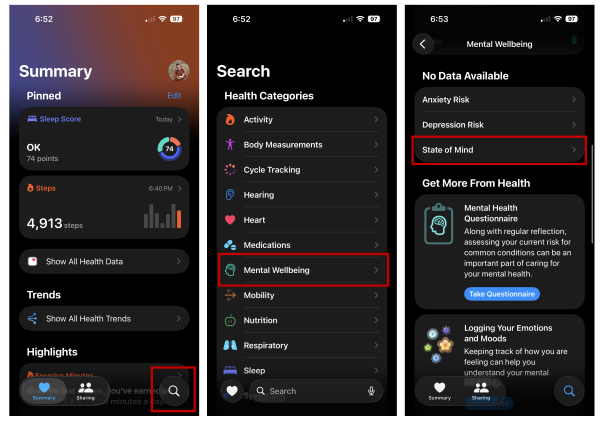
To try out the State of Mind log:
- Open the Health app.
- Select the Search button at the bottom right corner.
- Choose Mental Wellbeing from the health categories.
- Select State of Mind.
How the data becomes meaningful
A single mood entry doesn’t tell you much. The value shows up once entries start to accumulate.
State of Mind displays your logs in chart and calendar views, and places them alongside other health data your iPhone may already be tracking, such as sleep or exercise. If you develop a habit and complete the tracker daily, it makes it easier to notice patterns over time, categorized into States, Associations, and Life Factors. You may notice your bad moods correlate with poor sleep, or you have better days when you exercise.
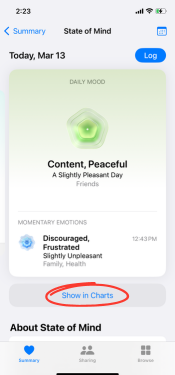
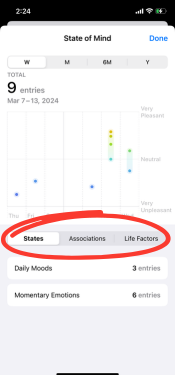
Image: Alissa Bird
That said, the Health app is careful not to draw conclusions for you. There’s no automated analysis or advice layered on top of your data. Apple’s approach is observational and designed to help you find patterns, not diagnose a problem.
For some users, that’s a strength. It avoids overreach and keeps interpretation in your hands. For others, it may feel like the app stops just short of being helpful.
Customization, reminders, and privacy
State of Mind gives you control over how often you log, when reminders appear, and which factors are available to tag. This flexibility keeps the feature from feeling rigid or guilt-inducing if you miss a day.
Privacy is handled the same as your other data in the Health app. Sensitive health data is encrypted. It isn’t shared unless you choose to export it, like if you want a copy when visiting your doctor or other healthcare professional.
Where State of Mind falls short
While State of Mind can be extremely helpful, it’s not perfect. The Health app isn’t the easiest place to navigate, and the feature can feel buried if you’re not already familiar with it. There’s also very little guidance once you’re in the app.
Additionally, while the minimalism of the feature is perfect for people who want to easily monitor their mental health, it’s less helpful for anyone looking for interpretation or for next steps. Remember, this is part of your mental health toolkit, not a replacement for professionals.
State of Mind may help your mental health
State of Mind works best when expectations are realistic. It won’t diagnose anything, and it won’t tell you what to do. What it does offer is a quick and low-effort way to notice how you’re feeling over time.
This feature is most useful for people who appreciate simple data, already engage with the Health app, and want more awareness without added friction. When it becomes a consistent habit, it can surface patterns that are easy to miss.
Overall, for a free feature built into Apple’s native Health app, it’s a quick and effective way to keep tabs on your mental health.
Max McCaskill
Sr. Staff Writer

Thousands of cell phone plans unpacked. All the facts. No surprises.

Related Articles


Related Topics
iOS FeaturedPopular Topics
Featured App Reviews iOS News Coverage Device Reviews Device Explainers Carrier Explainers App Roundups T-Mobile


Free iPhone 18 Pro, up to $1,200 off, with a trade-in in any condition or a line switch on Experience Beyond





.png?w=280&h=280&usm=20&usmrad=0.8&fit=crop "The Best Cheap Phone Plans for 2026: We Tested Them All to Help You Save")

