
Apple’s State of Mind mood tracking tool is an iOS mental health feature that lives inside the Health app. As a daily tracker, just using it occasionally won’t do much for your mental health. You need consistent entries to get a full picture of your moods over time.
For some people, whether mood tracking becomes a useful habit or forgettable task comes down to how well they use the Health app’s reminders. Set them well, and the feature can become an important part of mindfulness during your day. Set them poorly, and they can quickly disappear from your routine.
Here’s how to set State of Mind reminders and how to make sure they actually work for you and your schedule.
How to set mood tracking reminders on iPhone
Unlike other notifications options that live in the Settings app, the State of Mind reminders are located directly in the Health app.
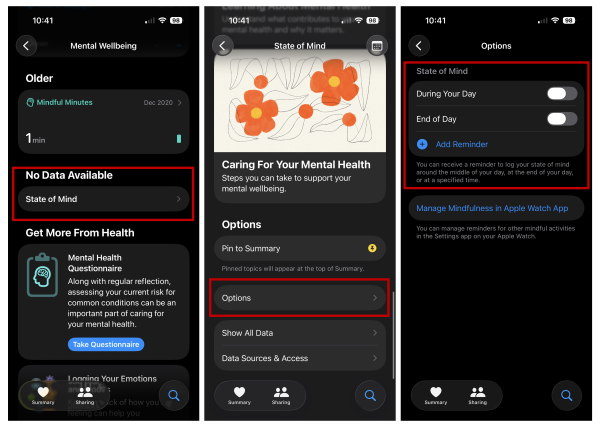
To set State of Mind reminders on iPhone:
- Open the Health app.
- Tap Search in the bottom-right corner.
- Select Mental Wellbeing.
- Choose State of Mind.
- Scroll down to Options.
- Adjust your reminders.
We recommending setting reminders during parts of your day where you know you’ll have a few minutes to reflect. For most people, this is in the morning when they start their day or in the evening just before bed.
iPhone mood tracking reminder tips
State of Mind reminders work best when they fit seamlessly into your routine. They're one of the best ways to get into the mood tracking habit.
Here are some other factors to keep in mind for picking the right time.
Identify a realistic check-in moment
The best time for a State of Mind reminder is when you’re most likely to notice and respond without being distracted.
Start by looking at your day honestly. When do you already have a natural pause? Is it first thing in the morning, during a lunch break, or later in the evening when things slow down?
Choose one consistent reminder
It’s tempting to set multiple reminders “just in case,” but that usually backfires. We all know the person with too many morning alarms who still manages to sleep through most of them. In the same way, setting too many State of Mind prompts can start to feel like nagging and allow you to ignore them.
For most people, one well-timed reminder is enough. It creates a simple expectation for when you check in, which is great for building habits.
Avoid high-friction times
Reminders that interrupt meetings, commutes, or focused work are easy to dismiss.
Unfortunately, this is how many people eventually stop using State of Mind. The reminder still appears, but it no longer carries any urgency or intention to act.
Treat the reminder as a quick check-in
State of Mind is designed to be quick. You don’t have to commit to reflection, journaling, or analysis every time you use it. In most cases, you’re just noting how you feel right now.
Keeping the mental bar low makes it much easier to respond consistently, even on busy days. Plus, remember that you’re still allowed to think deeper and more reflectively whenever you want. It’s just not a requirement every time.
Revisit the timing when it stops working
Keep in mind your schedule may change. A reminder that worked a month ago might no longer fit your day.
If you realize you’re ignoring your State of Mind reminder more often than completing it, that’s a sign it’s no longer fitting with your schedule. Adjust the timing to get back on track.
Why should I set iPhone mood tracker reminders?
State of Mind is a great tool for monitoring your mental health, but it’s only as effective as its reminders. When they match your real day, mood tracking feels easy. When they don’t, the feature fades into background noise.
Set one reminder that fits your routine, keep the check-in simple, and adjust when life changes. Get the timing right, and State of Mind can quickly become your next healthy habit.
Max McCaskill
Sr. Staff Writer

Thousands of cell phone plans unpacked. All the facts. No surprises.

Related Articles


Related Topics
iOS FeaturedPopular Topics
Featured App Reviews iOS News Coverage Device Reviews Device Explainers Carrier Explainers App Roundups T-Mobile


Free iPhone 18 Pro, up to $1,200 off, with a trade-in in any condition or a line switch on Experience Beyond





.png?w=280&h=280&usm=20&usmrad=0.8&fit=crop "The Best Cheap Phone Plans for 2026: We Tested Them All to Help You Save")


