
Mood tracking only works if you keep doing it. That sounds obvious, but it’s where most people fail.
The issue isn’t usually motivation, but friction with the tracking process itself. Too many reminders, poorly timed prompts, or notifications that feel disconnected from your day can all turn a useful mental health tool into just more background noise on your iPhone.
Apple’s State of Mind feature in iOS is more flexible than you think. You have several ways you can shape how and when mood tracking shows up, which can make the difference between a short-lived experiment and a lasting habit.
Here’s how to adjust those settings so mood tracking works with your routine, not against it.
1. Set reminders that match your day
State of Mind allows you to log how you’re feeling through scheduled prompts, but the timing of these prompts is crucial.
If reminders fire when you’re busy, commuting, or trying to disconnect, they’re likely to be ignored. iOS lets you adjust when these prompts appear so they align with moments you’re already reflective, such as early evening or the end of the workday.
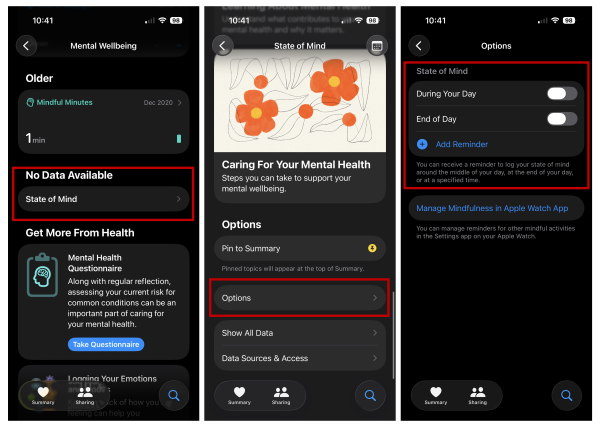
To adjust your State of Mind reminders:
- Open the Health app.
- Press the Search symbol on the bottom right.
- Select Mental Wellbeing.
- Choose State of Mind.
- Scroll down to Options.
- Adjust your reminders.
2. You may not need to log entries every day
Daily check-ins sound reasonable in theory. In practice, they can feel excessive if you’re busy or already juggling notifications from multiple apps.
State of Mind doesn’t require you to log constantly for it to be useful. Fewer, well-timed entries are often easier to maintain than an aggressive daily schedule that burns out after a week.
If you find yourself skipping entries, that’s usually a signal to reduce frequency, not abandon the feature altogether.
3. Treat prompts as quick mental check-ins, not lengthy tasks
State of Mind doesn’t force long explanations. Logging how you feel is quick, which makes it easier to treat reminders as brief check-ins rather than a lengthy task you have to accomplish.
If mood tracking starts to feel like homework, it probably won’t last. Keeping the interaction brief makes the process easier, even on days when you’re tired or distracted. You can always spend more time with your responses at a future date when you aren’t as busy.
4. Review trends occasionally
As you accumulate State of Mind entries, you’ll start to see visual summaries that show how your mood changes over time. These are useful, but you probably don’t need to monitor them constantly.
Checking trends too frequently can make normal mood fluctuations feel more significant than they are. Remember, the Health app incorporates other health and activity data in its mental health analysis. Stressing yourself out because you see a day when your mental health took a hit can cascade to the rest of your overall well-being.
Reviewing patterns periodically keeps the data grounded and reduces the temptation to overinterpret short-term changes.
5. Adjust notifications settings if they become irritating
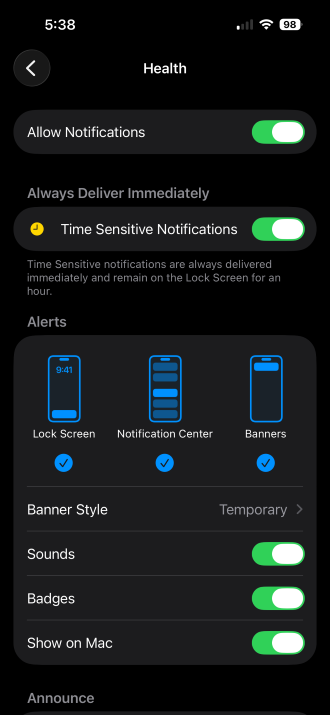
Image: Max McCaskill
If reminders begin to feel intrusive, iOS gives you the option to dial them back rather than turning them off completely. You can find these options in the Notifications section of the Settings app.
That might mean fewer prompts, quieter notifications, or revisiting where they appear on your device. Adjust the notification settings to match your needs. Small adjustments here can extend how long you stay engaged with mood tracking far more effectively than powering through alert fatigue.
Why these settings matter
Mood tracking works best when you create a low-effort system that you’re willing to use over time. Apple’s State of Mind feature supports that approach, but only if it’s set up properly.
The more the experience fits into your existing routine, the more likely it is to last and become a genuinely useful tool for your mental health.
Max McCaskill
Sr. Staff Writer

Thousands of cell phone plans unpacked. All the facts. No surprises.

Related Articles


Related Topics
iOS FeaturedPopular Topics
Featured App Reviews iOS News Coverage Device Reviews Device Explainers Carrier Explainers App Roundups T-Mobile


Free iPhone 18 Pro, up to $1,200 off, with a trade-in in any condition or a line switch on Experience Beyond





.png?w=280&h=280&usm=20&usmrad=0.8&fit=crop "The Best Cheap Phone Plans for 2026: We Tested Them All to Help You Save")


