

Whether you’re running low on your monthly mobile data allotment or want to turn off your cellular data for any other reason, it’s super easy to turn off your data. All you have to do is go into your phone's settings, find the Cellular section, then toggle off the cellular data. Once your cell data is off, you can use Wi-Fi to do all of your streaming and browsing without cutting into your monthly limits.
You can easily turn off your mobile data (also called cellular data) on your phone in under a minute.
- Open your phone's Settings.
- Search for Cellular Data or Mobile Data.
- Toggle off the cellular data.
Even with your mobile data off, you can still use your phone’s data features with Wi-Fi.
Keep reading for more info about why you might want to turn off your cellular data, and I’ll also cover how to turn off cellular data on both iPhones and Android devices.
Is it better to turn off cellular data?
It’s better to turn off your cellular data if you want to conserve your monthly data, avoid international roaming rates while overseas, conserve battery, or simply disconnect from your device.
Turn off iPhone or Android cellular data
You can turn off your mobile data through your phone’s settings, but the steps will vary depending on your device and current iOS or Android software.
Turning off your mobile data won’t turn off your phone’s calling or texting capabilities—as long as you keep your device’s cellular radios turned on (i.e., not in Airplane mode or similar), you can still make and receive calls and send texts without a hitch.
How to turn off cellular data on an iPhone
- Under your Settings, tap Cellular or Mobile Service (depending on your iPhone model).
- Select Cellular Data or Mobile Data.
- Tap or toggle to Off.
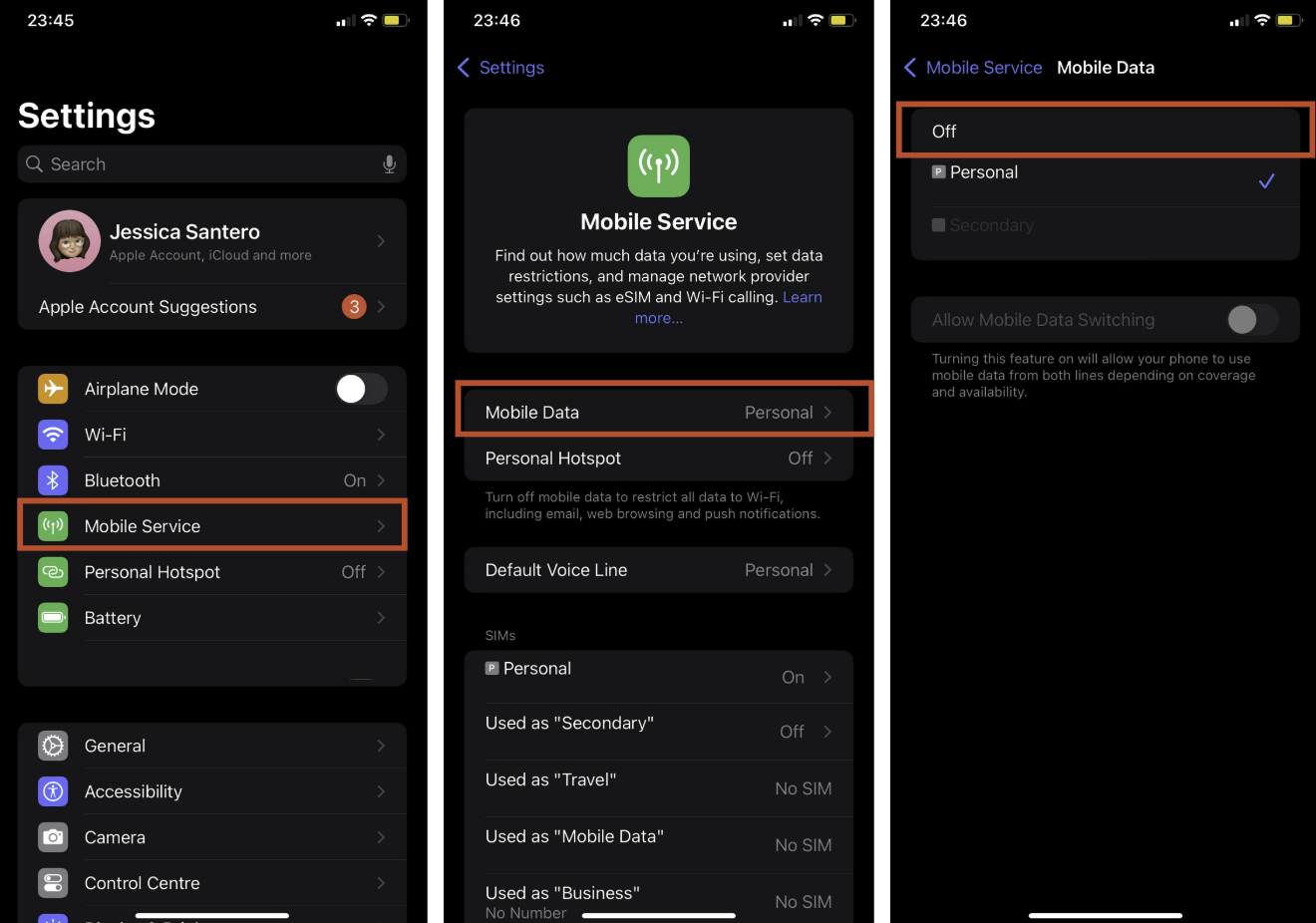
Image: Jessica Santero | WhistleOut
How to turn off cellular data on an Android device
- Open your Settings.
- Tap Network and Internet or Connections.
- After selecting SIMs or Data Usage, toggle off Mobile Data.
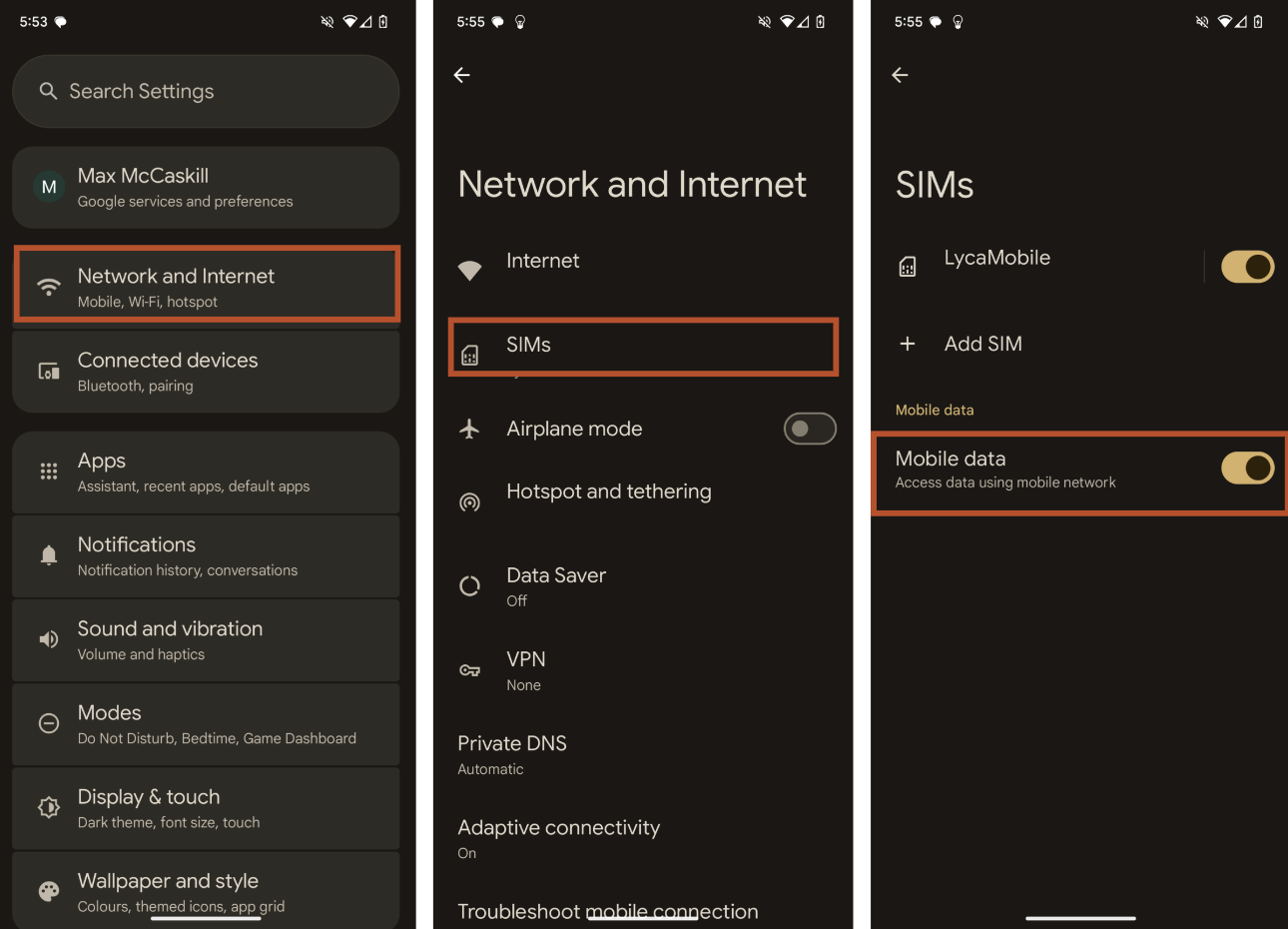
Image: Max McCaskill | WhistleOut
Using Wi-Fi in place of mobile data
As long as your phone is connected to a Wi-Fi network, you can still access the internet and use your favorite apps while your mobile data is turned off.
To turn on Wi-Fi for an iPhone:
- Open Settings.
- Tap and toggle on Wi-Fi.
- Choose a Wi-Fi network and enter the password.
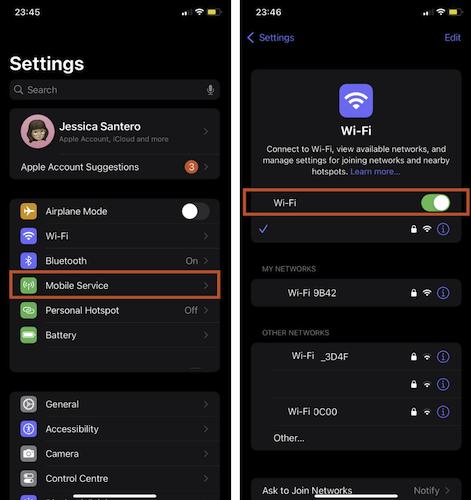
Image: Jessica Santero | WhistleOut
To turn on Wi-Fi for an Android device:
- In Settings, tap Network and Internet or Connections.
- Select Internet.
- Toggle on Wi-Fi and choose your network.
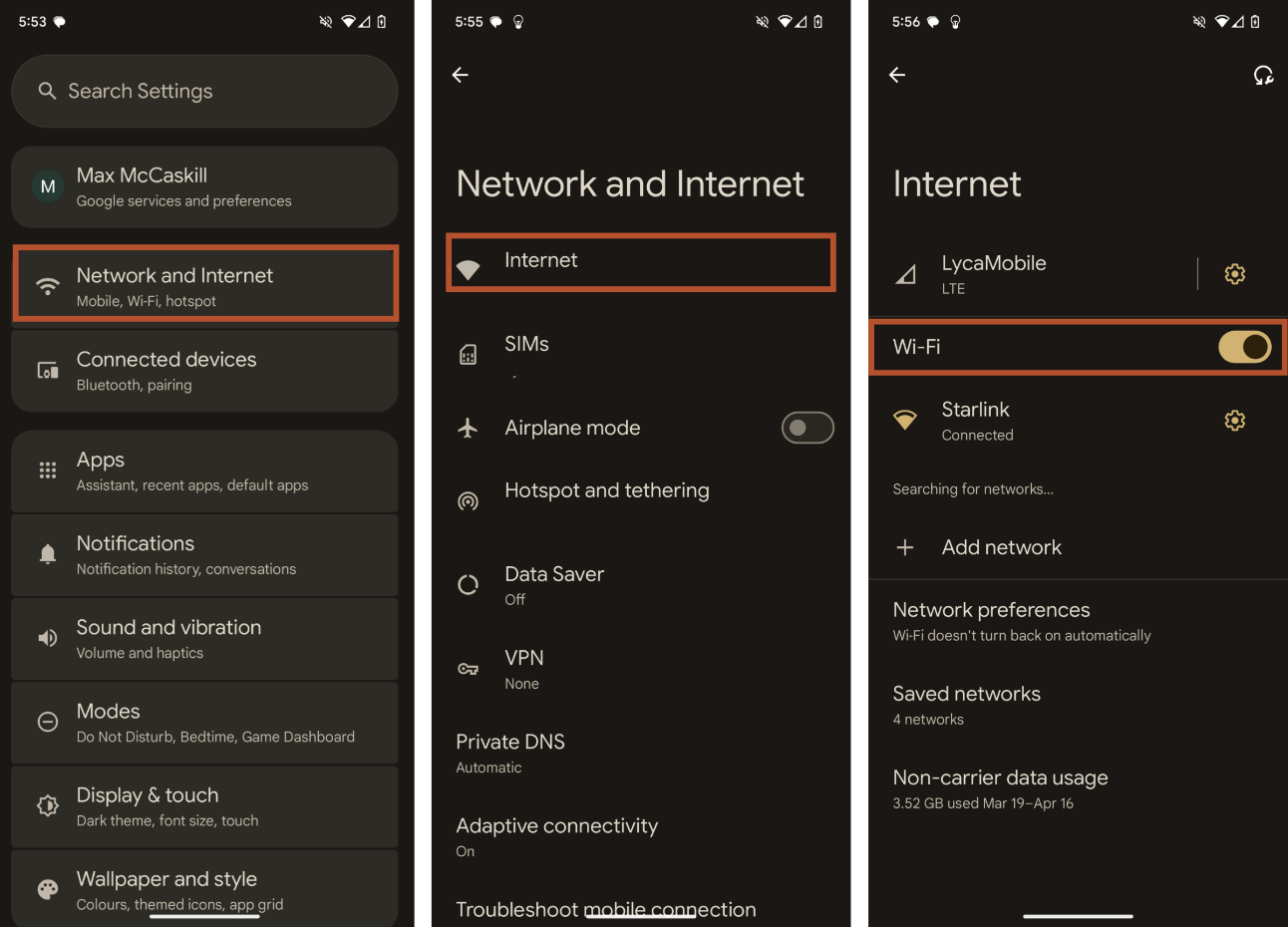
Image: Max McCaskill | WhistleOut
How to turn iPhone and Android cellular data back on
You can easily turn your mobile data back on by following the same steps as turning it off, with the exception of the final toggle. Tap or shift the toggle to On in order to enable your phone’s cellular data.
If you are having trouble reconnecting to your cellular network after turning off your mobile data, follow our quick guide to reconnect your cellular data.
Why should I turn off my mobile data?
Turning off your mobile data can be useful in several situations. You might want to turn off your mobile data to:
- Save data in your plan’s monthly allowance
- Avoid roaming fees while traveling abroad
- Disconnect and enjoy device-free time
- Save battery and maximize your phone’s charging speed
Let’s dive into why you might choose each of these four reasons to shut off your mobile data.
Monitor your data usage
Monitoring your data usage is a smart habit, whether you’re on a limited data plan with a set monthly amount, or an unlimited plan.
Going over your limited data allowance could mean hitting a hard data cap, leaving you without data until the end of the month when your cycle resets, or facing throttled speeds so slow that even simple tasks become difficult. It all depends on your plan’s fine print.
Unlimited plans aren’t exempt from restrictions either. Most unlimited plans aren’t truly unlimited at full speed. Oftentimes you’ll find a premium data limit, after which your connection may be deprioritized during peak times or slowed for the rest of the billing cycle. First, check what your plan sets as any data thresholds. Then you can keep an eye on your usage to avoid unexpected slowdowns, pace your data use during your billing cycle, and make sure you always have enough high-speed data when you need it most.Remember, if you are close to reaching your data limit, you can turn off cellular data and use Wi-Fi instead. Do this whenever you can hop on a trusted Wi-Fi network and reduce your data consumption. Once you’ve checked your data habits a few times, you can plan out which apps and tasks to do over Wi-Fi and which you can complete with your data.
How to check your data usage
To check your current data usage on an iPhone:
- Open your iPhone’s Settings.
- Tap Cellular or Mobile Service.
- Scroll down to your personal data usage.
- If you don’t automatically see the breakdown of your data usage, you may need to scroll down further and toggle on Enable Mobile Data Usage Statistics.
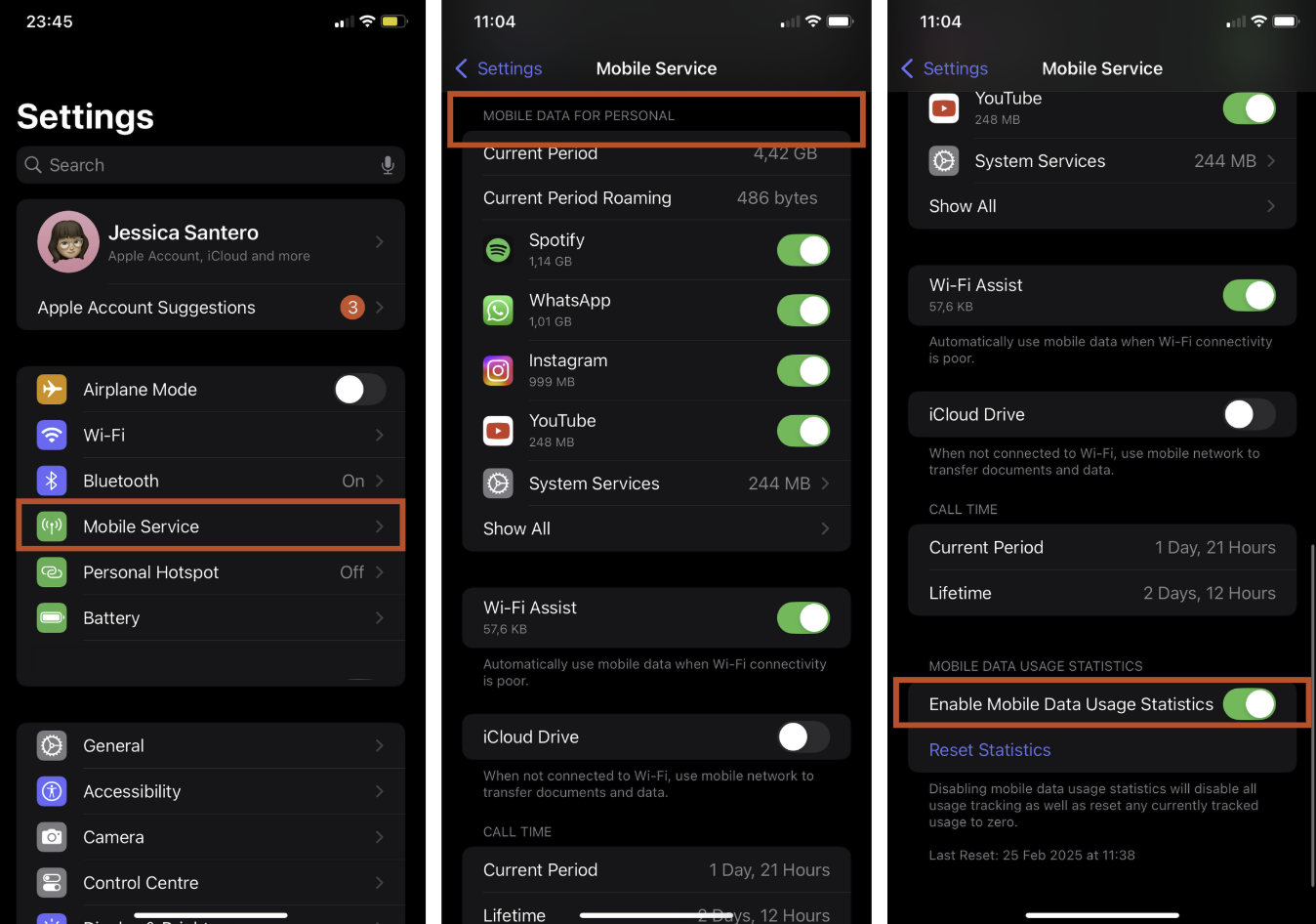
Image: Jessica Santero | WhistleOut
To check your current data usage on an iPhone:
- Open your iPhone’s Settings.
- Tap Cellular or Mobile Service.
- Scroll down to your personal data usage.
- If you don’t automatically see the breakdown of your data usage, you may need to scroll down further and toggle on Enable Mobile Data Usage Statistics.
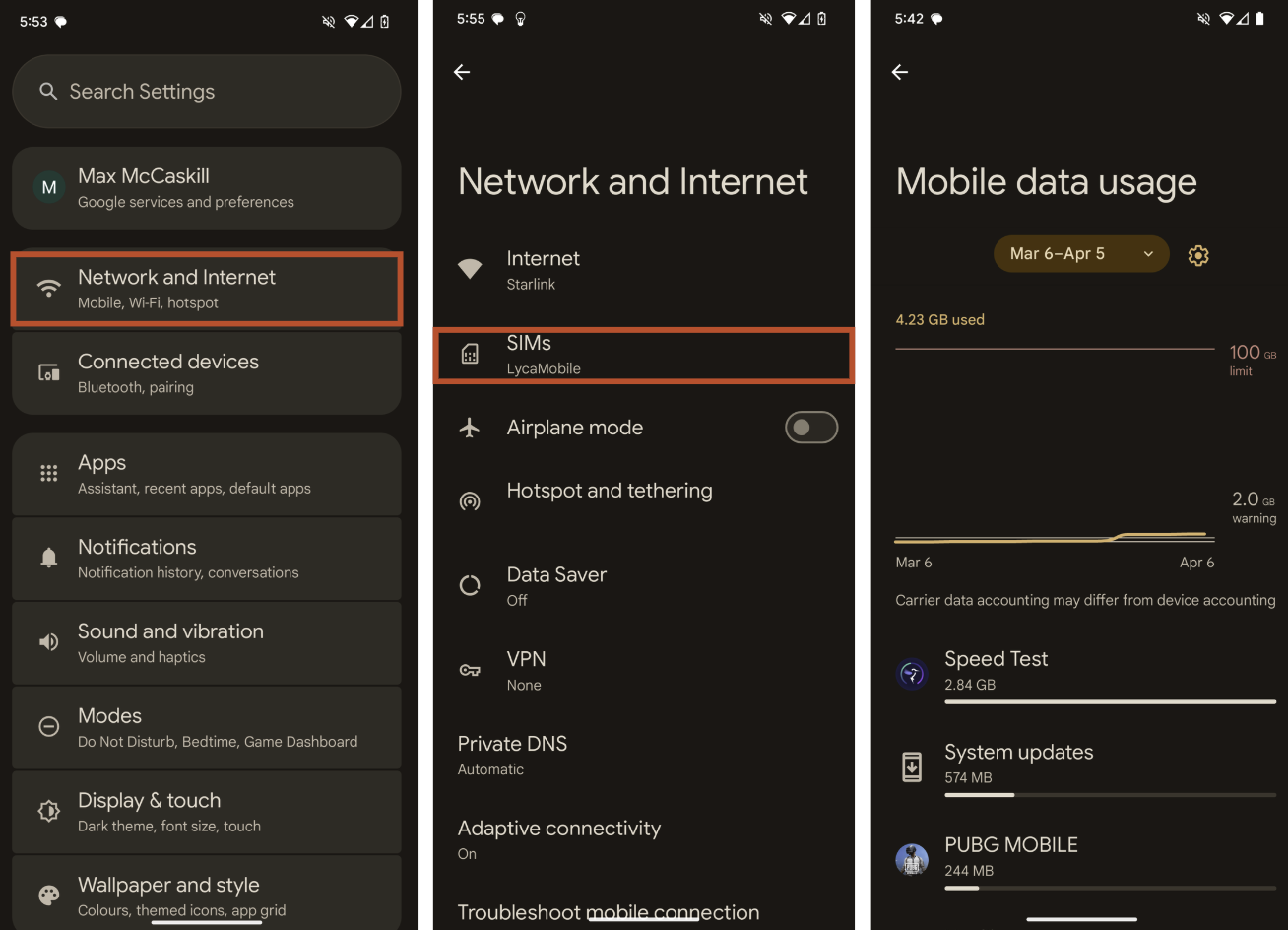
Image: Max McCaskill | WhistleOut
Avoid international roaming charges
When you travel abroad and venture away from your home network's coverage, international data roaming kicks in to keep your phone connected. Your phone will automatically search for an available network, which could be bad for you. If your home provider has partnered with one in the country you're visiting, you might connect with no issues. But your home carrier might charge you for roaming, and the costs can stack up quickly.
While some carriers now offer more affordable daily roaming options, the safest way to avoid unexpected charges is simple: Turn off your phone's mobile data before you land. This straightforward step completely prevents roaming fees from accumulating, giving you time to find another option if needed.
If you do need connectivity, you can always seek out Wi-Fi hotspots for internet access without risking expensive cellular charges. Remember, even checking email or social media can trigger roaming fees, so keeping mobile data disabled is the most reliable way to avoid any extra charges.Save battery life and charge faster
You can turn off your mobile data to conserve battery life and boost charging speed. You might notice your battery draining quickly when mobile data is left on, especially in areas with weak or inconsistent coverage.
Depending on your network’s coverage map, your phone may work overtime to keep searching for the best network connection, and these background efforts consume significant power. Turning your data off instantly stops your phone's signal hunting and prevents apps from refreshing in the background, ultimately extending your battery life.
Turn off 5G to save battery
If you need access to data but want to save battery, try toggling off your 5G data. Your phone won’t waste energy trying to connect to an unavailable network, and will instead connect to 4G LTE.
While 5G excels in speed, coverage isn’t as extensive as 4G. By switching to 4G in areas with spotty 5G, you preserve battery life without sacrificing a reliable connection.
Disconnect from your device
Turning off your mobile data lets you disconnect from your phone and focus on building healthier digital habits. Without constant notifications and background app updates, you might find it easier to step away from mindless scrolling and be more intentional with your screen time.
Note that when your cellular data is turned off and you aren’t connected to Wi-Fi, you won’t be able to:
- Access the internet.
- Use your phone’s apps that need data.
- Send texts via iMessage or Google Messages.
- Stream videos or media.
Turning off your mobile data allows you to disconnect from data-dependent apps (like TikTok or Instagram) but still allows for bare minimum communication like texting and calling.
If turning off your mobile data is too radical, consider using your phone’s built-in tools to limit your screen time and data usage. iPhone users can activate Screen Time for insights into data usage and for customizable app limits, while Android users can try the tool Digital Wellbeing to pause distracting apps or add specific limits.Downgrade to a basic phone
Switching to a basic phone to escape endless notifications, mindless scrolling, and digital overload. A dumb phone is a simpler device for calling, texting, and the essentials—but not much else. If you're craving a true disconnect, a basic phone can help you break free from constant connectivity.
Check out these basic phones to disconnect digitally:
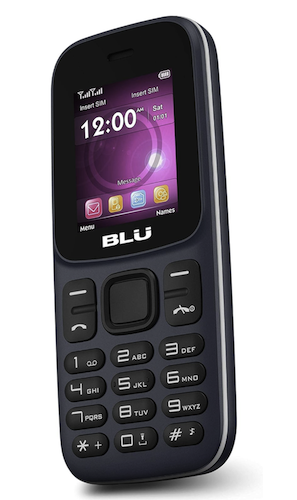
BLU Z5
A simple brick phone with buttons.

With basic features like calls, texts, an FM radio, and a simple camera, it keeps you connected without distractions. Its compact design, long battery life, and dual SIM support make it ideal as a minimalist phone. No apps, no social media, just reliable communication when you need it.
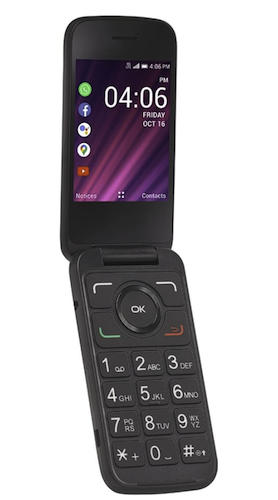
TLC Go Flip 2
Flip phone with basic functions.
The TCL Go Flip 2 is a basic phone that keeps things simple. It handles calls, texts, and light internet use without fancy features found on smartphones. The large screen is easy to see, the battery lasts, and it won't tempt you with unnecessary apps. It’s a good choice if you want smartphone essentials without the distractions.
How much data do I need?
Light-data users should account for between 3–5GB of data per month. That’s enough to frequently check your feed, browse the web, and use GPS. Heavy-data users should double the data allowance and aim for 12GB of data per month, especially if you stream videos or game on your phone every day.
If you frequently run low on mobile data every month and must resort to turning off your cellular data, consider switching to a plan with more data.A larger data plan is especially useful if the bulk of your data usage revolves around streaming, gaming, or scrolling through social media platforms.
Most apps use up between 60MB and 300MB of data every hour, which can certainly add up quickly. For you aspiring data savers out there, here’s a look at how much data per hour each app uses.| Data per Hour | Risk | Suggested Plan | |
| Online gaming | 20MB and above | At least 1GB | |
| Podcasts | Approx. 60MB | At least 2GB | |
| Web Browsing | Approx. 60MB | At least 2GB | |
| FaceTime | Approx. 200MB | At least 3GB | |
| Approx. 80MB | At least 3GB | ||
| Music Streaming | Up to 150MB | At least 5GB | |
| Snapchat | Approx. 160MB | At least 5GB | |
| YouTube | Approx. 300MB | Unlimited | |
| Netflix | From 700MB | Unlimited | |
| Approx. 720MB | Unlimited | ||
| TikTok | Approx. 840MB | Unlimited |
By monitoring your monthly data usage, you can learn your realistic data needs and adjust your mobile plan as necessary. You can opt for more data, or (for mobile minimalists) opt for less data if you don’t come close to hitting your data limit.
Switch to an unlimited data plan
Unlimited data plans remain one of the most popular choices for smartphone users, offering the freedom of uncapped data without worrying about ever running out. However, not all unlimited plans are created equal. Many unlimited plans have the following speed restrictions:
- Network deprioritization: Intentionally slowed speeds at high-traffic times
- Premium data thresholds: Slower speeds after surpassing your premium (or high-speed) limit
Truly unlimited high-speed data does exist, though, and several plans are extremely affordable. Visible and US Mobile currently lead the market with truly unlimited premium data plans that won’t ever slow you down, all of which are under $50/month.
- Visible’s mid-tier Visible+ plan and top-tier Visible+ Pro plan unlimited plans both offer premium data on Verizon’s fastest 5G Ultra Wideband and 4G LTE network, along with unlimited mobile hotspot data that’s 2–3 times faster than the basic unlimited plan hotspot speeds (depending on which plan you choose).
- US Mobile’s Unlimited Premium Plan offers unlimited premium data, as long as you opt for service on its AT&T-powered Dark Star network (though the Verizon and T-Mobile-backed versions of the plan each offer a very high 100GB limit before possible deprioritization). You also get unlimited hotspot data and 20GB of international roaming data.
|
#1
|
Visible

$40 Visible+ Pro Plan
$40.00/mo
Taxes & Fees included
|
|
#2
|
Visible
$30 Visible+ Plan
$30.00/mo
Taxes & Fees included
|
|
#3
|
Visible
$450 Visible+ Pro Annual Plan
$450.00
Regular rate at $540/year<br>Taxes & Fees included
|
Both budget-friendly options eliminate the worry of hitting data caps or experiencing slowdowns, making them ideal for heavy data users and anyone who needs to stay connected always, like remote workers.
Mint Mobile is another great option for cheap unlimited data on T-Mobile’s network. While not offering completely unlimited high speeds, Mint’s Unlimited plan does guarantee 35GB of premium data before any risk of slowdowns.|
Mint Mobile

Unlimited Data Plan
$10.00/mo
$60 for 6 months of service
|
Check out which plan is best for you from our top-rated unlimited data plans.
Jessica Santero
Staff Writer

Thousands of cell phone plans unpacked. All the facts. No surprises.


.png?w=160&h=160&usm=20&usmrad=0.8&fit=crop "Cell Coverage Near You: Who Has the Best 5G Network?")





.png?w=280&h=280&usm=20&usmrad=0.8&fit=crop "The Best Cheap Phone Plans for 2026: We Tested Them All to Help You Save")


