
Image: Max McCaskill
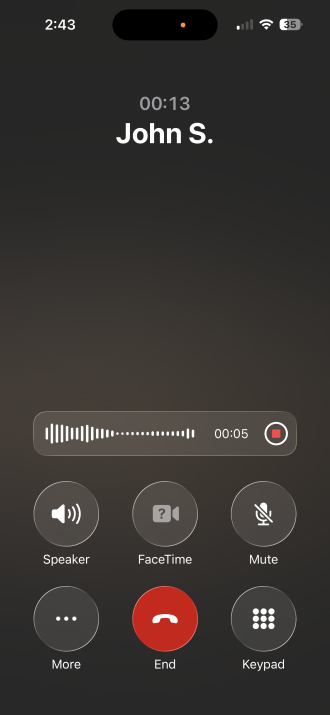
Your iPhone can record phone calls for free, right inside the Phone app. It's one of several hidden iPhone features most people don't realize they have, and once you know it's there, it's hard to believe you ever lived without it.
The days of needing a workaround or paying for a third-party app to record calls are over. Instead, Apple's recording feature is built directly into your call screen and saves your conversations right to your iPhone's Notes app.
How to use the iPhone's built-in call recorder
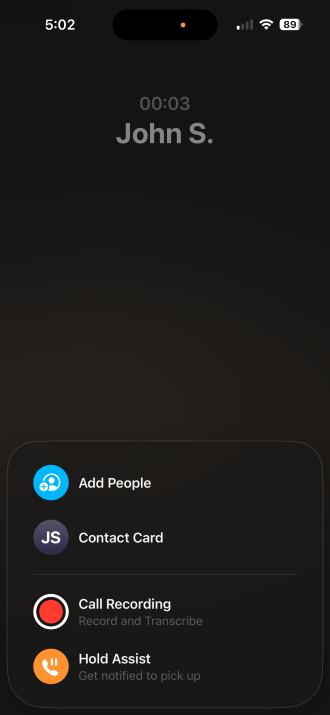
Image: Max McCaskill
The iPhone's call recorder lives on the call screen in a hidden extra features menu. You can only access it during an active call.
To enable the iPhone call recording feature:
- Open the Phone app and start or answer a call.
- Tap the More button.
- Tap the Record button.
- A voice announcement will play automatically, notifying both parties that the call is being recorded.
- Tap Stop Recording when you're done, or it will stop automatically when the call ends.
What if the record button isn't showing up on my iPhone?
The built-in recorder only works with standard phone calls on the most recent versions of iOS. If it's not showing up, make sure your iPhone is up to date with the latest iOS.
If you're trying to record a third-party app or video call, our full guide to recording calls on an iPhone covers your other options. You may need an additional app or hardware extension for those types of calls.
Can I record a call without the other person knowing on my iPhone?
No, you cannot record a call without the other person knowing when using the iPhone's built-in call recorder.
When you begin to record, your iPhone plays an automatic announcement to everyone on the call, and there is no way to bypass it.
Where to find your call recordings on iPhone
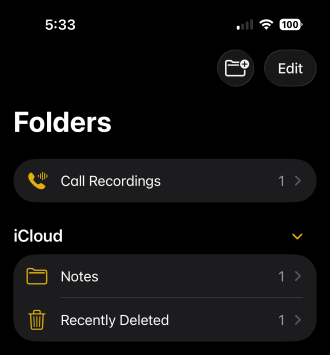
Image: Max McCaskill
Apple saves all phone call recordings directly to the Notes app, which makes them easy to find, search, transcribe, and share.
To access your iPhone's recordings:
- Open the Notes app.
- Look for the folder called Call Recordings.
- Tap any note to play the audio or read the full transcription.
The transcription is automatically generated and saved alongside the audio, which means you can search for specific words or phrases from the call without having to replay the whole thing.
Your iPhone can also record and transcribe voice memos
Need to record a personal note or get a written record of a meeting? Your iPhone can do that too with the Voice Memos app. Each time you record a voice memo, your iPhone automatically transcribes the audio and adds it to the recording in the Voice Memos app. It's a simple built-in feature that you don't even have to enable.
iPhone built-in call recording FAQs
Which iPhones support the built-in call recorder?
The iPhone native call recording feature requires iOS 18 or later. For specific devices, that means it only works on the iPhone XR or newer models.
Is it legal to record a phone call on iPhone?
In most US states, only one party on the call needs to consent to recording. However, a handful of states require all parties to consent, including California, Florida, and Illinois. Apple's automatic announcement helps with compliance, but it's worth knowing your state's rules before you attempt to record someone. Our full iPhone call recording guide includes a state-by-state breakdown if you need to check.
How long are iPhone call recordings saved?
iPhone call recordings are saved in Notes until you delete them. There's no automatic expiration. You can also share them like any other Note, export the audio, or copy the transcription, making them easy to archive or send to someone else.
Max McCaskill
Sr. Staff Writer

Thousands of cell phone plans unpacked. All the facts. No surprises.

Related Articles


Related Topics
iOS FeaturedPopular Topics
Featured App Reviews iOS News Coverage Device Reviews Device Explainers Carrier Explainers App Roundups T-Mobile


Free iPhone 18 Pro, up to $1,200 off, with a trade-in in any condition or a line switch on Experience Beyond





.png?w=280&h=280&usm=20&usmrad=0.8&fit=crop "The Best Cheap Phone Plans for 2026: We Tested Them All to Help You Save")


