
Think about how many times a day you glance at your phone without unlocking it. You check the time, see if there's a notification, and maybe check the date. Your lock screen is easily the most-viewed surface on your phone, and Samsung ships it with a fixed layout: clock in the upper middle, notification icons below it, shortcuts in the lower corners.
LockStar doesn't think that's good enough, and honestly, neither do I.
It's part of Samsung's Good Lock Suite, and it takes the lock screen from a static password prompt to something that functions like a personal information display.
What is LockStar?
LockStar is a free Good Lock module that removes Samsung's fixed lock screen layout constraints. It lets you reposition the clock, date, notification icons, and shortcuts freely, add widgets that display weather and calendar data, change the corner shortcut icons, adjust screen timeout, and synchronize the lock screen with the AOD (Always On Display).
How LockStar lets you reposition your Samsung lock screen
The baseline limitation LockStar removes is that Samsung's lock screen elements are anchored to fixed positions. LockStar treats every element as repositionable and lets you drag and place the clock, date, notification stack, and corner shortcuts anywhere on the screen that makes sense for how you actually hold and glance at your phone.
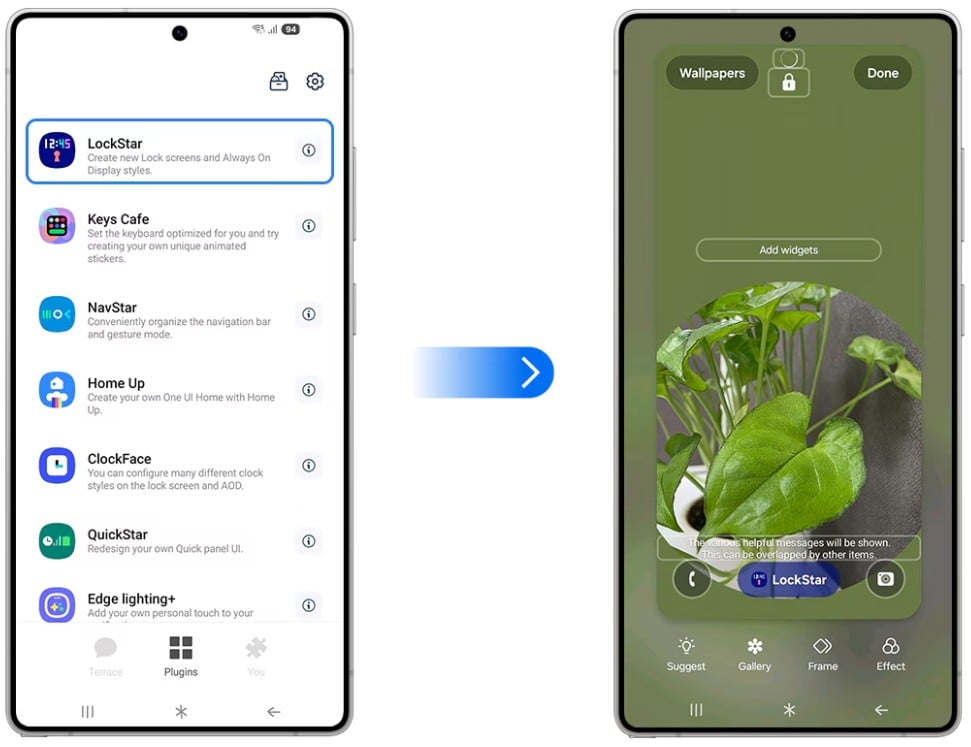
Image: WhistleOut
For large-screen Galaxy devices, there's a practical use for this as well. The center of a 6.9-inch screen on the new Galaxy S26 is not where your thumb reaches naturally. Moving the clock and key information to the lower portion of the screen means you can check the time and see notifications without adjusting your grip. It's the kind of ergonomic change that seems small until you've lived with it for a week.
LockStar widgets
LockStar supports widgets that display live data directly on the lock screen. Weather forcasts, calendar events, fitness data, and so much more. The information is visible at a glance without unlocking the device.
The corner shortcuts (the icons that default to Phone and Camera in Samsung's stock lock screen) are also remappable. So if you never launch the camera from the lock screen but regularly need a flashlight, that's a straightforward swap. LockStar's shortcut library covers a meaningful range of system functions.
How LockStar syncs your lock screen and Always On Display
Starting with One UI 8.0, Samsung synchronized the Always On Display and the lock screen under LockStar's control. Changes made in LockStar carry over to the AOD, so your phone maintains a consistent visual language whether the screen is dimly lit in AOD mode or fully awake at the lock screen.
The practical benefit is that before this change, users who wanted a specific clock position or widget layout had to configure the AOD and lock screen separately, and they didn't always match. One UI 8's integration removes that friction and makes LockStar the single control point for both surfaces.
How to get LockStar
- Cost: Free
- Available on: Samsung Galaxy devices via the Galaxy Store and Google Play
- Requires: Good Lock main app installed first
- AOD sync: Requires One UI 8.0 or later
LockStar only works on Galaxy phones. Here are the best phones to run it on.
LockStar only works on Samsung Galaxy devices, so if you're not already in the ecosystem, here are the most popular Galaxy phones worth considering:
Moto G 5G (2026) 128GB
- 6.7 inch display
- Rear Cameras: 50MP, 2MP
- Front Camera: 32MP

Galaxy A26 5G
- 6.7 inch display
- Rear Cameras: 50MP, 8MP, 2MP
- Front Camera: 13MP

Galaxy A27 5G 128GB
- 6.7 inch display
- Rear Cameras: 50MP, 5MP, 2MP
- Front Camera: 12MP

Galaxy A37 5G 128GB
- 6.7 inch display
- Rear Cameras: 50MP, 8MP, 5MP
- Front Camera: 12MP

Edge (2026) 128GB
- 6.3 inch display
- Rear Cameras: 50MP, 50MP, 10MP
- Front Camera: 50MP

LockStar: FAQ
Does LockStar work with Samsung's standard lock screen wallpapers?
Yes, LockStar can modify the layout and add widgets on top of whatever wallpaper you've set, so your existing lock screen image is unaffected.
Can LockStar display third-party app information in widgets?
LockStar's widget system supports a set of Samsung-approved data sources, including weather, calendar, fitness, and more. Third-party app integration depends on which apps LockStar supports in the current version.
Does LockStar affect the speed of unlocking the phone?
The unlock process (fingerprint, face recognition, PIN) operates independently of LockStar's layout customizations and is not affected by the module.
What is the Always On Display and does LockStar improve it?
The Always-On Display (AOD) shows a low-power clock and notification indicators when the screen is off. LockStar syncs the AOD appearance with your lock screen layout starting in One UI 8.0, so both surfaces match.
Can I use LockStar and ClockFace at the same time?
LockStar and ClockFace serve overlapping functions, but ClockFace focuses specifically on clock design, while LockStar handles the full lock screen layout. They can interact, and some users use ClockFace for clock styling and LockStar for element positioning and widgets.
Scott Houghton
Jr. Staff Writer

Thousands of cell phone plans unpacked. All the facts. No surprises.
Related Articles


Related Topics
AndroidPopular Topics
Featured App Reviews iOS News Coverage Device Reviews Device Explainers Carrier Explainers App Roundups T-Mobile


Free iPhone 18 Pro, up to $1,200 off, with a trade-in in any condition or a line switch on Experience Beyond


.png?w=280&h=280&usm=20&usmrad=0.8&fit=crop "Best Cell Phone Deals for October 2026: Get the New iPhone 18 Pro for Free")




