
If you're traveling internationally with your iPhone, data roaming is one of the most important settings to check before you leave.
Data roaming allows your iPhone to use cellular data on networks outside your carrier's normal coverage area. While this is helpful to maintain coverage when inside the United States, it means joining a foreign network when you travel abroad.
Depending on your mobile plan, using data on those networks may trigger roaming charges. Keeping your apps, maps, messages, and websites connected can rack up major charges while international roaming.
If you've ever seen horror stories on the news about people coming home from vacation to find a $1,000 phone bill, it's usually because they forgot to turn off data roaming.
We'll help you learn how to turn data roaming off so you can avoid major charges, and figure out the best way to stay connected while abroad.
How international data roaming actually works
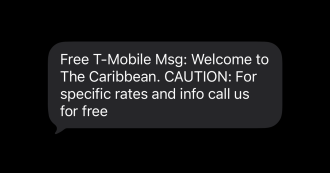
Image: Max McCaskill
Your iPhone normally connects to your home carrier's cellular network. Once you leave the country, that network isn't available anymore.
Data roaming is the feature that allows your phone to connect to partner networks in other countries instead.
From your perspective, the phone behaves exactly the same. Apps load, notifications appear, and the internet works just like it does at home. Behind the scenes, that traffic may be passing through a network your carrier charges extra to access.
How to turn off data roaming on iPhone

Image: Max McCaskill
Turning off data roaming on an iPhone only takes a few seconds:
- Open Settings
- Tap Cellular
- Select Cellular Data Options
- Toggle Data Roaming off
Why roaming data can add up quickly
The tricky part about roaming data is that it doesn't always require intentional use.
Even if you never open an app, your phone still performs background tasks throughout the day. Your iPhone's automatic processes can include:
- Background App Refresh
- Syncing with iCloud
- Checking for emails
- Refreshing notifications
- Automatically downloading updates
- Location tracking
Those small background actions happen repeatedly while your phone stays connected to a foreign network. Individually, they don't use up much data, but added together, the charges can add up fast.
International roaming charges can be incredibly expensive if you haven't prepared for them.
- Travel pass coverage can cost up to $12/day from major carriers. That's a flat rate no matter how much data you use.
- Pay-as-you-go rates can cost $2/MB or more. If you do the math, that's around $2,000 for using just 1GB of data.
Turning roaming off helps prevent carrier fees
Disabling data roaming prevents your iPhone from using cellular data on foreign networks in the first place. If your phone never pings on a foreign network, your carrier won't tack on expensive roaming charges and extra fees.
Remember, even with data roaming off, your phone can still connect to Wi-Fi networks normally. That means you can stay connected at places like the airport, restaurants, or your hotel without a phone signal.
Can I use data roaming while traveling internationally?
Yes, international roaming is incredibly useful if you properly prepare for it, and it doesn't have to be expensive.
Some international phone plans include international roaming as part of their service. That typically means there is a free allotment of built-in data you can use while abroad. T-Mobile's Experience Beyond or Google Fi's Unlimited Premium plans offer this.
Other plans or carriers may offer travel passes. These passes allow you to use your phone plan like normal while abroad for a daily fee. For example, AT&T's International Day Pass and Verizon's TravelPass cost $12/day.
Finally, other plans may allow you to purchase travel add-ons for a low, upfront rate. For example, Mint Mobile's Minternational Pass offers 1GB of data for as low as $5/day.
Bottom line: Data roaming doesn't have to be expensive
Data roaming can quietly drain your wallet while you're abroad, even if you never open an app. Turning it off before you travel is the easiest way to avoid unexpected charges.
That said, staying connected internationally doesn't have to be expensive. Whether through a plan with built-in international data, a daily travel pass, or an affordable add-on, there are smart options that let you roam without the sticker shock of unexpected international coverage.
Max McCaskill
Sr. Staff Writer

Thousands of cell phone plans unpacked. All the facts. No surprises.





.png?w=280&h=280&usm=20&usmrad=0.8&fit=crop "The Best Cheap Phone Plans for 2026: We Tested Them All to Help You Save")


