
With access to the Verizon, AT&T, and T-Mobile networks, US Mobile is a popular MVNO for customers looking to switch carriers and save on their phone bills. While it does have a limited collection of smartphones available for purchase, many customers choose to save money and bring their old phones with them to US Mobile.
Most newer-model smartphones, whether they use a physical SIM card or eSIM, will work on the US Mobile network. To see if your phone works, simply plug your phone's IMEI into the US Mobile compatibility checker. That said, you'll still need to make sure your phone is unlocked and you've picked the right plan before you switch.
Our guide will show you how to switch to US Mobile and bring your own phone. We've made the transition process simple by explaining the easiest process to follow and common pitfalls to avoid.
Before you switch to US Mobile
Switching to US Mobile is an easy process, but you do need to complete some tasks before you change service.
Before you switch to US Mobile, make sure that you:
- Check your device compatibility
- Meet current carrier unlocking requirements
- Select a new US Mobile plan
Check your device compatibility
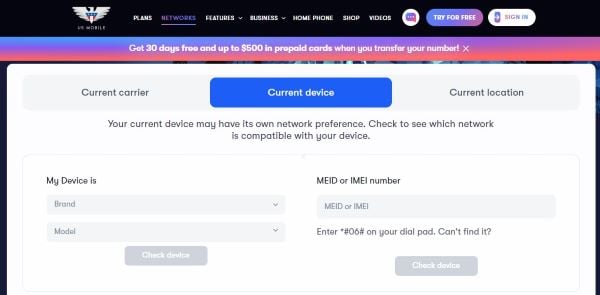
You need to ensure that your device works on US Mobile's networks. All you have to do is plug in your device's IMEI number in the US Mobile compatibility checker. If you can't find your phone's IMEI, you can also check using the brand and model of your phone.
If your phone is compatible, you can move on to the next steps. Unfortunately, if your phone is incompatible with the US Mobile network, you can't use that device if you switch carriers and will need to purchase a new one.
Meet current carrier unlocking requirements
Your device is typically locked if you purchased it directly from a carrier. To switch your device to US Mobile, you'll need to make sure it is unlocked.
Some carriers unlock devices automatically, but for most, you'll need to contact them directly and request it. While unlocking requirements are different for each carrier, most of them require you to:
- Pay the device off completely
- Be up to date on your phone bill
- Pay off any outstanding account balances
- Make sure the phone wasn't reported stolen or lost
Some carriers also require your device to stay on their network for a minimum amount of time before unlocking. For carriers like Verizon, AT&T, and T-Mobile this could be 40-60 days if you purchased the phone on an installment plan.
Select a new US Mobile plan
Finally, you need to pick a new US Mobile plan on the best network in your area. Remember that US Mobile offers service on all three major networks, so you have plenty of options to find the best coverage.
US Mobile offers two unlimited plans and a selection of limited data options. Its best plan overall is the Unlimited Premium plan with 100GB of premium data and a 50GB mobile hotspot for $44/month. This plan even competes with postpaid options from the big carriers by offering up to 10GB of international data and a streaming perk if you build a 3-line family plan.
If all that sounds like more data and perks than you need, US Mobile's Unlimited Starter plan is a no-frills option with 70GB of premium data and a 10GB mobile hotspot for $25/month.
|
#1
|
US Mobile

Unlimited Starter Plan
$25.00/mo
|
|
#2
|
US Mobile
Unlimited Premium Plan
$39.00/mo
|
US Mobile's limited data plans are excellent family options. Each plan comes with a specific allotment of high-speed data that can also be used with mobile hotspot. Adding friends and family is only $8/line.
|
US Mobile
2GB By the Gig Plan
$10.00/mo
Taxes and fees included
|
How to bring your phone and number to US Mobile
If you've completed the steps above, now you can switch to US Mobile. Bringing your old phone and porting your current number is easy, but the process is a little different depending on whether you pick a physical SIM card or eSIM.
To bring your phone and number to US Mobile using a physical SIM card:
- Purchase your desired plan from US Mobile.
- Select a physical SIM card during checkout.
- Wait for the SIM card to arrive in the mail.
- After it arrives, sign into your US Mobile account.
- Select "Activate SIM."
- Choose "Keep my number."
- Follow the directions to activate your SIM and port your number.
To bring your phone and number to US Mobile using an eSIM:
- Purchase your desired plan from US Mobile.
- Select eSIM during checkout.
- Sign into your US Mobile account.
- Select "Activate instantly with eSIM."
- Enter your device's IMEI for a final compatibility check.
- Select "I want to transfer my number."
- Follow the remaining instructions to activate your eSIM and port your number.
No matter which method you choose, make sure you cancel your previous carrier's service after you have successfully moved to US Mobile.
Why switch to US Mobile?
US Mobile is a great option for switching because it offers:
- Top-tier coverage: US Mobile allows you to choose access to T-Mobile, AT&T, or Verizon. T-Mobile offers the nation's largest 5G network while Verizon has the largest 4G LTE network. AT&T has the second-largest 4G LTE and 5G networks.
- Data allotments: The carrier has some of the largest premium data and hotspot allotments of any MVNO. Its Unlimited Premium plan offers 100GB of premium data and 50GB of mobile hotspot, which is more than some postpaid options from Verizon, AT&T, and T-Mobile.
- Perks: US Mobile is one of the only MVNOs that offers a streaming perk with select family plans.
- Family plans: US Mobile offers multi-line perks with its Unlimited Premium plan and shared limited-data options for customers who don't use as much data.
- Competitive pricing: US Mobile's Unlimited Starter plan at $25/month is one of the cheapest options available that doesn't include introductory pricing or require the purchase of multi-month blocks of service. Frequently, the carrier also offers deals that make its service even more affordable.
Max McCaskill
Sr. Staff Writer

Thousands of cell phone plans unpacked. All the facts. No surprises.


.png?w=160&h=160&usm=20&usmrad=0.8&fit=crop "How to Switch Phone Carriers and Keep Your Phone and Number")





.png?w=280&h=280&usm=20&usmrad=0.8&fit=crop "The Best Cheap Phone Plans for 2026: We Tested Them All to Help You Save")


