

A SIM (subscriber identity module) card contains a small chip that allows your device to connect to a carrier network. Without a SIM card, you cannot use a cellular network to make calls, text, or use data while mobile.
We’ll take a look at how to use and switch a SIM card, as well as the types of SIM cards—like GSM, CDMA, and eSIM—available right now.
SIM Cards Explained
Your SIM card is essentially your phone's way of connecting to your carrier's network and identifying your phone as yours. Every single SIM card has a unique international mobile subscriber identity (IMSI), which pairs it to your specific cell phone number and carrier plan. It also contains some storage space, allowing you to save contact numbers and SMS messages; however, most modern phones save these to their own internal storage.
When you switch phones on the same network, you'll also swap over your SIM card so that your cell phone number and carrier plan go with you. If you receive a new SIM card or switch networks and your old SIM is no longer required, it's best to destroy it so that it cannot be used by someone else. However, it should be deactivated when your plan ends.
Types of SIM Cards
The majority of SIM cards in use today are nano-SIM cards. They're the smallest physical SIMs available. Some devices can also work with dual SIMs (i.e., two SIM cards at once for two different numbers), one of which may be an eSIM. There are also different SIMs based on which type of carrier network you've subscribed to—GSM or CDMA.
eSIMs vs. dual SIMs
Many modern smartphones are dual SIM devices, which allow simultaneous use of more than one SIM card so you can juggle multiple phone numbers if you need to—perhaps for personal versus business use. This allows you to run two different plans and even two different carriers side by side if you like.
Some phones, such as the iPhone, combine a physical SIM card with an eSIM, or "embedded SIM," an electronic card stored on a chip inside the device itself. It activates by scanning a QR code from your carrier. Not all carriers or phones support eSIMs at the moment, in which case, these dual-SIM devices will simply have two physical SIM card slots.
Both approaches to using multiple SIMs have their advantages and disadvantages. While eSIMs can be simpler to activate and use, they're still not widely supported and cannot be easily transferred to another device if your primary handset gets lost or broken. Physical SIM cards are easy to transfer to different devices and are widely supported by every carrier and phone manufacturer. But unlike eSIMs, they can be damaged or lost when moving them between devices.
GSM vs. CDMA SIM cards
In the United States, two different kinds of cellular networks are offered by carriers: CDMA and GSM. Verizon and the old Sprint network (now owned by T-Mobile) use CDMA networks, while AT&T and T-Mobile use GSM. Both are very different from—and incompatible with—each other.
Although they ultimately do the same job, CDMA and GSM networks operate using entirely different infrastructures. In the past, if you purchased a CDMA device, you could not use it with a GSM carrier and vice-versa. This is still true for those who are using older mobile phones today. However, modern devices have seen an upgrade to their network capabilities.
Most of today's smartphones are "global" devices, which means they have the technology to support both CDMA and GSM networks, and you can use them on almost every carrier in any country. That makes switching SIM cards—and switching carriers—incredibly simple. If you plan to switch from one network type to the other, it is best to confirm that the device you're using does indeed support both network types first.
SIM Cards and Switching Phone Carriers
When you switch phones, it's important to also swap over your SIM card, so your cell phone number and carrier plan go with you. If you receive a new SIM card or switch networks and your old SIM is no longer required, it's best to destroy it or make sure it is deactivated to prevent use by someone else.
If you plan to switch carriers and need a new SIM, you’ll want to request the correct size card for your device. However, if the SIM is the right size, and you confirm that the device you want to use can work on the carrier network you want to switch to, you can swap them out using the steps below.How to Change a SIM Card
To switch carriers or devices, you'll want to learn how to remove and replace SIM cards. First, power off your device, then follow these steps based on which phone you have.
Change an iPhone SIM card
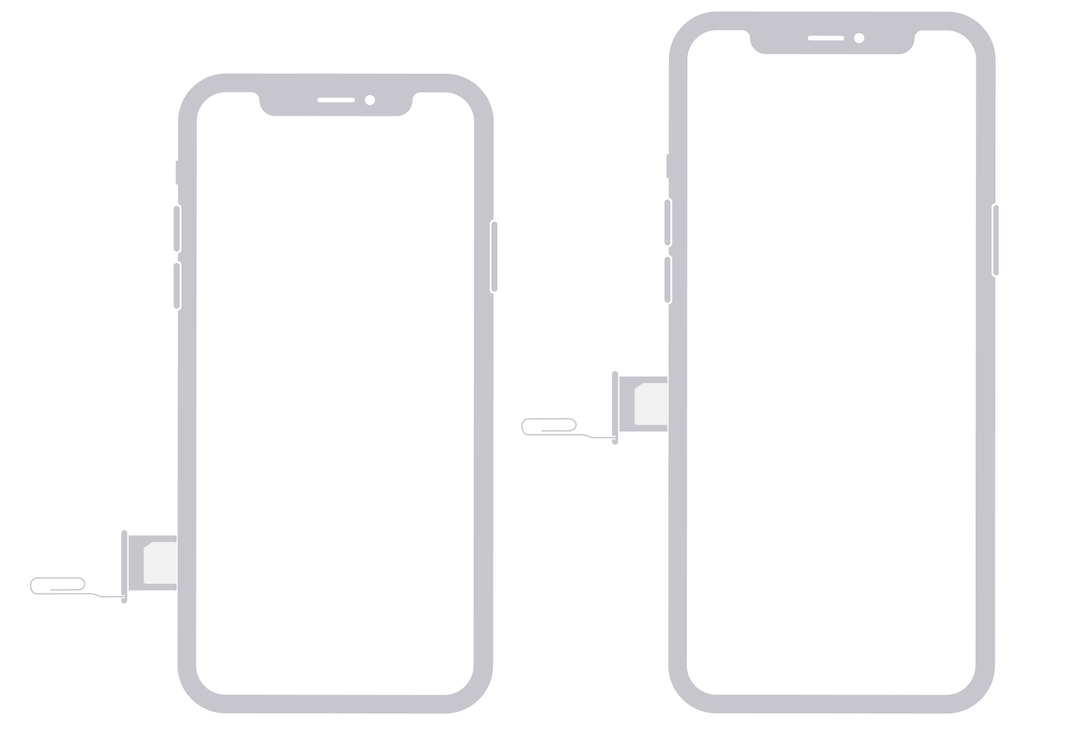
Image source: Apple
- Locate the SIM card tray on your iPhone. For iPhone 12 and newer, it should be on the left side of your phone; for iPhone 11 and older, it should be on the right side.
- Insert the SIM tool that came with your phone, or a thin paperclip, into the small hole on or near the SIM tray until it pops out
- Remove your old SIM card from the tray and replace it with your new SIM.
- Slide the tray back into your iPhone.
Change a Samsung Galaxy SIM card

Image source: Samsung
- Press the SIM removal tool (or a thin paperclip) into the tiny hole on the SIM card tray. Remove your old SIM card from the tray or slot.
- Insert your new SIM card into the tray or slot.
- Push the tray back into the phone.
Note: If you have an older Samsung Galaxy device with a removable backplate, you’ll find the SIM card tray next to or under the battery.
Change a Google Pixel SIM card
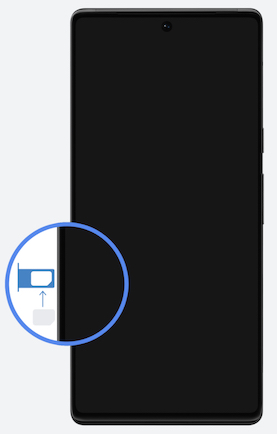
Image source: Google
- Locate the SIM tray near the bottom of your phone. For the Pixel 6/6 Pro, this is on the left side; older models may be elsewhere.
- Using the SIM tool that came with your phone—or a thin paperclip—push the tray until it releases and pops out.
- Remove the existing SIM and replace it with the new one, with contact details facing upwards.
- Push the tray back into the slot.
Change a Motorola SIM card
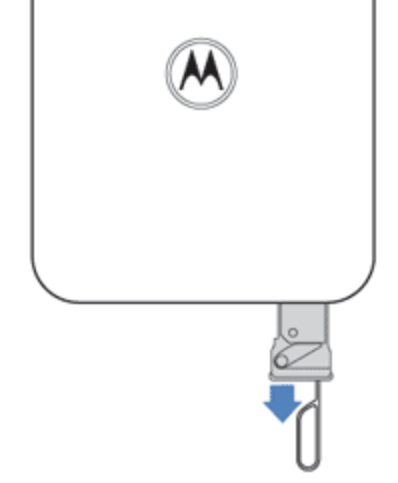
Image source: Motorola
- Locate the SIM tray on your Motorola model—its location may differ between devices.
- Use the SIM removal tool (or a thin paperclip) to push into the small hole next to the SIM tray to pop it out.
- Remove your old SIM card from the tray or slot and insert your new SIM.
- Replace the tray into the handset.
Note: The SIM card slot is beneath the cover if you have an older Motorola smartphone with a removable backplate.
Prepaid SIM Phone Plans
Some prepaid carriers—like Cricket Wireless, Metro by T-Mobile, and Mint Mobile—require a prepaid SIM card to access your chosen prepaid plan. Each SIM card typically comes with data, minutes, and texts already loaded on it to get you started. Once you deplete your allowance, you can simply top up the services you need without buying a new SIM card. Here are a few prepaid SIM plans from some of the most popular smaller carriers.
|
#1
|
Visible

$25 Visible Plan
$25.00/mo
Taxes & Fees included
|
|
#2
|
Mint Mobile

Unlimited Data Plan
$10.00/mo
$60 for 6 months of service
|
|
#3
|
US Mobile

Unlimited Starter Plan
$10.00/mo
|
|
#4
|
Spectrum Mobile®

Unlimited
$30.00/mo
+ $20 Upfront
|
|
#5
|
Cricket

Supreme Unlimited Plan
$55.00/mo
with AutoPay; $60 for the first month.
+ $9.99 Upfront
|
SIM Cards: FAQs
What kinds of SIM cards are there?
There are four different kinds of SIM cards in use today. Most modern devices use a nano-SIM card, which is the smallest SIM available. The other physical SIM options are the micro-SIM card and standard SIM card (the largest on market, only used in older handsets). Embedded SIM cards (eSIMs), which are stored on a chip inside your device, have more recently become standard on devices like the latest iPhones and Samsung Galaxy devices.
Do all SIM cards work on any carrier network?
No, each SIM card is tied to a specific carrier. That's why, when you switch carriers, you need to swap your SIM card with the new one provided.
What is dual SIM?
A dual SIM device can simultaneously use two different SIM cards—each with its own number and plan. These devices are particularly useful for those who need to juggle two numbers at a time, such as one for personal use and one for business use. In recent years, dual SIM support is showing up as a standard feature on flagship devices, including the iPhone.
Will my phone always need a physical SIM card?
Not necessarily. Many carriers have started adopting eSIMs, which are stored on a chip inside your smartphone and don't require removal in order to switch carriers—it's done digitally, instead. Although these aren't ubiquitous right now, many modern devices do support them, and they may well replace physical SIM cards entirely in the future.

Thousands of cell phone plans unpacked. All the facts. No surprises.





.png?w=280&h=280&usm=20&usmrad=0.8&fit=crop "The Best Cheap Phone Plans for 2026: We Tested Them All to Help You Save")


