

You’re not alone—everyone’s stared into a cracked phone screen at some point.
Luckily, there’s good news: No matter how minor or major your phone damage is, we can help you figure out what to do after you’ve broken your phone.
In this guide, we’ll cover everything you need to know about cracked phone screen repair—from fixing a cracked phone screen at home to more serious repairs that require professional help. We’ll also cover phone insurance, repair kits, and trading in cracked phones.
How to assess your damaged phone
First, assess your phone’s damage and usability:
- Minor damage: Small chips or hairline cracks that don’t impact functionality. No repair is necessary, but cosmetic fixes are available.
- Moderate damage: Larger cracks or multiple small ones that may affect touch sensitivity or visibility. DIY or professional repair is recommended.
- Significant damage: Deep cracks or shattered glass that impair functionality. Requires DIY or professional repair.
- Major damage: Severe structural harm—completely shattered screens or exposed internal parts, making the device unsafe or unusable. Requires professional repair or full phone replacement.
From there, you can evaluate what level of DIY repair solution you’re willing to take on versus what you’d rather have a phone repair expert handle. Finding an expert should be easy since cracked screens are so common. If you feel like the repairs aren’t worth the cost or hassle, or if it’s time to upgrade anyway, you’ll want to look at getting a replacement phone.
How to fix minor screen damage
If your phone’s damage is limited to small chips or hairline cracks, it’ll keep working with the proper care. Though these smaller cracks may seem harmless, they allow dust, debris, and moisture to enter the device and cause bigger issues. Taking precautions, like adding a screen protector, can help mitigate these risks and keep your phone in good working condition.
If you’re fine with using your phone with minor damage, you can simply clean it up, apply a new screen protector, and continue using it. However, a cracked screen can be frustrating and tough to ignore, so you may want to look into a few quick DIY screen repair tips below before applying a new screen protector.
Add a screen protector to prevent further damage
The best way to protect your phone screen from damage—whether it’s brand new or already has a few scratches—is by applying a screen protector, which helps protect and reinforce the screen while also providing a smooth touch surface.
You can find affordable screen protectors in plenty of retail stores or online. They start at around $5, or you can also find multi-packs for around $20. That way, you have backups if your new cover gets damaged.
Note: A piece of sticky tape can help hold your phone together and add minor protection until you get a more permanent solution—just avoid applying it too hard or leaving residue.
Do you have phone insurance or a warranty?
Phone insurance can reduce your overall cost of pricey repairs or replacements. Your actual cost and coverage depend on your carrier and phone model, but most plans handle accidental damage, theft, and sometimes even mechanical issues—just make sure to read the fine print to see what is and isn’t covered and what deductibles you might be on the hook for.
For example, AT&T’s Protect Advantage plan costs $14 or $17 a month, depending on your device, with a $29 deductible for screen repairs. That’s way cheaper than dropping $1,000+ on a new phone.
You may already be covered by other benefits from your provider, the manufacturer, or a third party (insurance, banks, etc). Check out our guide to phone insurance to learn more.
How to fix moderate screen damage
Got bigger cracks? Maybe a spider web of small ones is messing with your screen’s touch sensitivity or visibility? Any amount of broken glass can catch you with a cut at a bad time. And even if your phone still works fine, screen scruff and slightly off-kilter stuff can drive you nuts.

Image: Poravute
Rather than letting it bother you every time you use your phone, you might be able to handle the repair yourself without breaking the bank. You can polish your screen, purchase a repair kit, or buy a DIY replacement screen, but we recommend opting for professional repair if you’re uncomfortable with the risk of further damage.
Find specialized solutions
We don’t recommend using home products like toothpaste to buff out scratches—they may make your screen hazy or worsen your problems. Nail polish as a temporary glue has similar issues and may interfere with touch sensitivity.
If you do want to go the DIY route to get out scratches, you can grab a specialized phone screen scratch remover polishes and kits for about $15 and up. With these, you apply a small amount of solution and gently rub the scratch in circular motions, then wipe it clean. But don’t go too hard, or you might end up making your problems worse.
Significant screen damage fixes
Damage that impacts your ability to use your phone is considered significant. At-home repair kits that include full-screen replacements can be a more affordable option compared to professional repair or purchasing a new phone, though their effectiveness depends on your ability. If you consider yourself handy, it’s a worthwhile way to save money. If you’re not, we recommend using a professional.
We recommend checking with your manufacturer, phone insurance provider, or a certified repair service first, as professional repairs might be more cost effective and less hassle in the long run.
Use a DIY phone repair kit
DIY repair kits are great for minor to significant screen damage, like longer cracks or shattered sections that aren’t too deep or complex. These phone repair kits come equipped with tools to help fix common or easier-to-fix issues like cracked screens without professional help.
You can find basic phone repair kits (without screens) starting around $10, and they typically include tools like:
- Precision screwdrivers (Pentalobe, Phillips): To remove the specific screws in most smartphones.
- Prying tools and picks: For safely opening the phone without damaging the internal components.
- Suction cups: To lift the screen off the phone frame for repairs.
- Tweezers: To handle small, delicate parts inside the phone.
- Adhesive strips: For resealing the phone after repairs.
If a repair kit comes with a full screen, your phone’s make and model will also affect pricing; popular screen replacement kits usually range from $20–$30, and more premium kits from places like iFixit can go up closer to $60–$100 or more.
But fair warning: DIY repairs aren’t for everyone. If the damage is severe or you’re not confident in your repair skills, it’s probably better and safer to go the professional route. Not only could you make the problem worse, but you might also risk losing functionality—or cutting yourself on sharp glass edges.
Fixing major screen damage
If your phone is cracked to the point where it won’t turn on or your screen is filled with static, you’re looking at serious structural or internal damage. Maybe you’ve tried everything—patching cracks, replacing the screen—but your phone still isn’t working properly. Beyond cracking, you might have a loose connection, malfunctioning sensors, or water damage. All of these scenarios are considered major screen or phone damage.
DIY repairs aren’t recommended for major screen damage. Even a well-meaning fix could cause more harm than good when internal components are compromised. You might put a lot of effort just to waste your time and money. Instead, consider contacting your phone’s manufacturer to check if your device is still under warranty or explore their official repair options.
If the damage is too extensive, or the phone is deemed unsafe or beyond repair, it might be time to replace it altogether.
When to replace your cracked phone
Deciding whether to repair or replace your cracked phone can be tricky. If you’ve got minor to moderate damage on a relatively new device, repairs are usually the way to go. But if the costs are more significant, it might be worth buying a new device. Here’s our rule of thumb: If repairing your phone will cost around 50% of its value—or if your device is older and lacks modern features—opting for a new phone might be better in the long run.
Consider the different options available based on your phone’s manufacturer. If you have an iPhone, visiting an Apple Store might offer you the most seamless repair experience, complete with genuine parts and warranty options (whereas a third-party repair may void your current warranty). This is especially true if you have an AppleCare+ plan.
For Android devices, you can choose between authorized service centers or third-party shops, each offering varying levels of service quality and pricing.
Trade in or sell your cracked phone
Can you even trade in a phone with a cracked screen? The answer is “yes,” though it depends on the particular situation: If you’re considering trading in your phone for a good deal, some carriers and retailers accept phones with minor damage in exchange for credit toward a new device—but you likely won’t get anything for a heavily damaged device.
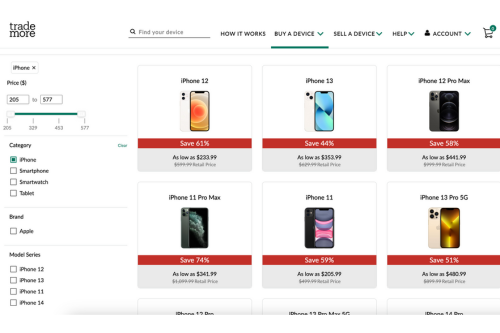
Image: Kevin Kearney
If your phone has damage, trading it in might still be an option, depending on its condition and the platform you use. For example, Trademore accepts phones in poor condition, offering payment through either a MasterCard gift card or PayPal deposit within 5–10 days of receiving and processing your device. The process can take some time, though, so it’s not the fastest solution if you’re looking for quick cash for a new phone.
You can always sell your phone independently on sites like Craigslist or Facebook Marketplace, but be sure to wipe your personal data before handing it over to a stranger.
Buy a new device
Once you’re ready for a new phone, you’ve got a few options. Buying directly from the manufacturer or carrier can give you perks like financing and trade-in deals, but those purchases cost more upfront. If you’re looking to save, checking out unlocked phones on Amazon or eBay is an option, too—just be mindful of warranties and phone condition since those will vary.
If you’re a frequent phone fumbler, some consideration for a phone’s toughness should come into play. Many of the new smartphones claim better durability than prior models, but they’re still made of mostly glass and require a case and screen protector for extra protection.
Some manufacturers design more rugged smartphones, which typically feature enhanced protection like Gorilla Glass Victus+ for better screen durability, military-grade toughness, and IP68 or better ratings for water and dust resistance.
- Best Rugged Android Phone: The Samsung Galaxy XCover6 Pro meets military-grade durability standards and boasts exceptional water and dust resistance. Its Gorilla Glass Victus+ screen offers nearly double the drop protection of standard screens, capable of withstanding drops from above head height. Plus, you can sign up for Samsung Care+ for $10/month to cover accidental damage and repairs.
- Best iPhone Upgrade: If you can, go for the new iPhone 16 Pro model with a titanium frame. And if you can’t, opt for a less expensive older or SE model—either way, you’ll want to protect the front and back with a screen protector and phone case if you’ve got butterfingers. And consider adding Apple Care+ while you’re at it.
Trevor Wheelwright

Thousands of cell phone plans unpacked. All the facts. No surprises.





.png?w=280&h=280&usm=20&usmrad=0.8&fit=crop "The Best Cheap Phone Plans for 2026: We Tested Them All to Help You Save")


