
If your iPhone is on the fritz, don’t despair (or throw it against the wall). You may be able to solve your issues—and save your wallet—with a simple battery swap, thereby maximizing the lifespan of your thousand-dollar investment.
Replacing your iPhone battery can help if your device won’t keep a charge or is operating too slowly. If your phone is still under warranty, or you pay for AppleCare+, a battery replacement is free. Even if your warranty has expired, though, it’s significantly cheaper than forking out $1,000+ for a brand new iPhone.
There are three ways to replace your iPhone battery:
- Send it in to an Apple Repair Center.
- Take it into an Apple Store in person.
- DIY it and replace your iPhone battery yourself.
We’ll go over everything you need to know about replacing your iPhone battery, including the exact cost for each model.
When should you replace your iPhone battery?
Does the thought of leaving home without an iPhone charger give you anxiety? Are your friends and family used to the fact that your phone is always dead? If you answered “yes” to either of those questions, then your iPhone battery is probably not doing so hot.
You should begin thinking about replacing your iPhone battery once its maximum capacity drops below 80%. The maximum capacity percentage tells you how much charge your battery can hold when charged to 100%. When new, this number should truly be 100% of your battery’s capacity. As your phone ages, the amount of power your battery can hold diminishes, as does your phone’s peak performance. The lower the capacity, the quicker your battery will drain after a full charge.
To check your iPhone battery’s maximum capacity:
- In your iPhone Settings, tap Battery.
- Tap Battery Health & Charging.
- Look for the Maximum Capacity percentage.
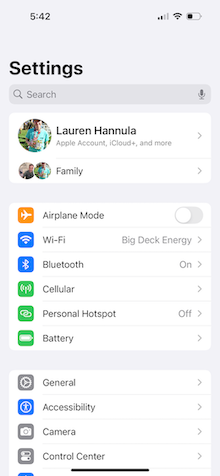
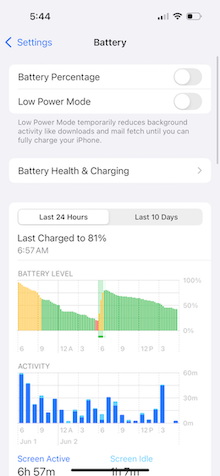
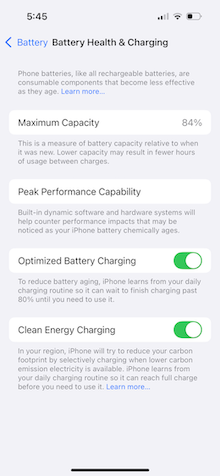
Image: Lauren Hannula | WhistleOut
You may also be experiencing other issues with your iPhone, such as overheating. This may or may not be related to the battery, but it won’t necessarily show up in your battery settings. Rather than immediately replacing the battery to correct the overheating issue, it’s best to take your phone into an Apple Store for diagnosis.
How to improve your iPhone battery’s maximum capacity
While there's no stopping the degradation of your battery over time, there are things you can do to extend your iPhone's overall battery life. Utilizing Low Power Mode, keeping your screen dim, and only selectively using location sharing capabilities with your phone's apps are just a few techniques that can help ease the burden on your phone's battery and keep its maximum capacity higher for longer.
(And no, charging your phone overnight will not kill your battery faster—this is a common cell phone myth.)
How to replace your iPhone battery
To replace your iPhone battery, you can:
- Send it in to an Apple Repair Center.
- Bring your iPhone to an Apple Store or Apple-authorized service location.
- Order an Apple iPhone battery replacement and try to do it yourself.
Many people prefer the second option, since you'll likely have a faster turnaround time.
Sending your iPhone to Apple for battery replacement
Sending your iPhone to an Apple Repair Center is a great option if you can't get to a store in person. You'll need to:
- Submit a shipment request (you'll need to log in with your Apple ID).
- Wait to receive a shipment box from Apple.
- Ship your iPhone back to Apple using the box provided.
Apple will replace your iPhone battery and send it back to you within 3 to 5 business days.
The obvious downside to this option is that you'll be without your iPhone for a period of time. If you prefer a same-day iPhone battery replacement, proceed to Option 2: Making your way to an Apple Store.
Replacing your iPhone battery at an Apple Store
If you can’t bear to part with your phone for a few days, we understand. (Honestly, same.) Thankfully, you can take it into an Apple Store or an authorized service location near you for a same-day battery replacement. Be sure to first make an appointment on Apple’s website so you can skip the standby line.
The good folks at the Apple Store should be able to replace your battery while you wait. For more complicated cases, Apple may need to send your iPhone to an Apple Repair Center. If this is the case, you'll need to wait 3-5 business days for your battery replacement.
DIY and third-party iPhone battery replacement options
For those brave souls willing to break into their own smartphones, Apple has launched its own “Self-Service Repair” program. Ostensibly, this program makes it easy to learn about and fix your own Apple devices. However, in practice, the program still needs a little work.
We found the manuals and instructions to be not very straightforward; worse, the website where Apple directs you to actually purchase replacement batteries is, at the time of this writing, giving us a “404 forbidden” error, preventing us from DIY-ing anything at all.
There are other third-party companies, like iFixit, that will send you a replacement iPhone battery, along with the tools and instructions to do the work yourself. Before opting for this, note that these companies are not vetted by Apple, and using them may void your warranty. That said, if you’ve got a little DIY spirit, this option can cost about half as much as an official battery replacement.
You may also find that certain large retail stores, such as Best Buy and Office Depot, offer battery replacement services for iPhones. Much like Apple, these third-party battery replacement services offer same-day replacement. However, we always recommend going straight to the manufacturer when possible.
How much does it cost to replace an iPhone battery?
An iPhone battery replacement is free if your iPhone is still under warranty, or if you’ve purchased AppleCare+ phone insurance. AppleCare+ members can even get a free replacement phone shipped to them so they don’t have to wait for repair.
Without a warranty or AppleCare+, though, an iPhone battery replacement will cost anywhere from $70 to $120, depending on your iPhone model.
Here’s a breakdown of Apple’s cost estimates for replacing an iPhone battery, organized by phone model.
iPhone battery replacement cost
| iPhone model | Cost with warranty or AppleCare+ | Cost without warranty or AppleCare+ * |
|---|---|---|
|
17 Pro, 17 Pro Max 16 Pro, 16 Pro Max |
Free | $119 |
|
17, 17 e 16, 16 Plus, 16e iPhone 15 series iPhone 14 series |
Free | $99 |
|
iPhone 13 series iPhone 12 series iPhone 11 series iPhone X series |
Free | $89 |
| All other iPhone models | Free | $69 |
* Excludes local tax. Prices are accurate as of 4/14/26.
Which iPhone has the best battery life?
On paper, the iPhone 17 Pro Max has the best iPhone battery life due to the size of its battery capacity. Truthfully, though, it's more complicated.
Apple typically doesn’t come out and say how long a battery should last on a single charge—mostly because it’s highly dependent on how, and how often, you use your iPhone, as well as how much processing power a given model takes to run all of its bells and whistles. Official figures refer to older devices ("iPhone A" has an hour more battery than "iPhone B") or the amount of time you can spend doing a certain activity (example: “16 hours of video”).
We've tested numerous iPhones over the years, so we've a fairly good idea of how they perform under typical usage—a robust (but not punishing) mix of messaging, emails, social media, music, video, and more. If you're Apple-inclined and looking for the best battery, consider one of these long-lasting iPhones.
iPhone battery life ranked by model
| Usage time | Capacity | |
|---|---|---|
| iPhone 17 Pro Max | 1.5 - 2 days per charge | 5,088mAh |
| iPhone 16 Pro Max | 1.5 - 2 days per charge | 4,685mAh |
| iPhone 16 Plus | 1.5 - 2 days per charge | 4,674mAh |
| iPhone 13 Pro Max | 1.5 - 2 days per charge | 4,532mAh |
| iPhone 15 Pro Max | 1.5 - 2 days per charge | 4,422mAh |
| iPhone 15 Plus | 1.5 - 2 days per charge | 4,383mAh |
| iPhone 14 Plus | 1.5 - 2 days per charge | 4,325mAh |
| iPhone 14 Pro Max | 1.5 - 2 days per charge | 4,323mAh |
| iPhone 17 Pro | 1.5 - 2 days per charge | 4,252mAh |
| iPhone 17e | 1.5 - 2 days per charge | 4,005mAh |
| iPhone 16e | 1.5 - 2 days per charge | 4,005mAh |
| iPhone 17 | 1.5 days per charge | 3,692mAh |
| iPhone 12 Pro Max | 1.5 days per charge | 3,687mAh |
| iPhone 16 | 1.5 days per charge | 3,561mAh |
| iPhone 16 Pro | 1.5 days per charge | 3,582mAh |
| iPhone 15 | 1.5 days per charge | 3,349mAh |
| iPhone 14 | 1.5 days per charge | 3,279mAh |
| iPhone 15 Pro | 1 day per charge | 3,274mAh |
| iPhone 13 | 1.5 days per charge | 3,227mAh |
| iPhone 14 Pro | 1 day per charge | 3,200mAh |
| iPhone 11 | 1.5 days per charge | 3,110mAh |
| iPhone 13 Pro | 1.5 days per charge | 3,095mAh |
| iPhone XR | 1.5 days per charge | 2,942mAh |
| iPhone 12 Pro | 1 day per charge |
2,815mAh |
| iPhone 12 | 1 day per charge | 2,815mAh |
| iPhone 13 mini | 1 day per charge | 2,406mAh |
| iPhone 12 mini | 1 day per charge | 2,227mAh |
| iPhone SE (2022) | Less than a day per charge | 2,018mAh |
When to upgrade your old iPhone
While we are major advocates for making the most out of the phone you already have, it's no secret that batteries slowly deteriorate over time. If you've gotten your iPhone battery replaced but you're still unhappy with how quickly your phone dies, it might be time to invest in a newer iPhone that has a longer battery life.
We still don’t think you should ever pay full price for a brand-new iPhone—not when there are excellent trade-in and buy one, get one free deals consistently available to help you get an iPhone at a steep discount (or even free). We keep track of the best iPhone deals to help you can get the lowest price possible from the carrier of your choice.
iPhone 16 128GB
- 6.1 inch display
- Rear Cameras: 48MP, 12MP
- Front Camera: 12MP
iPhone 18 Pro 256GB
- 6.3 inch display
- Rear Cameras: 48MP, 48MP, 48MP
- Front Camera: 18MP

iPhone 18 Pro Max 256GB
- 6.9 inch display
- Rear Cameras: 48MP, 48MP, 48MP
- Front Camera: 18MP


Lauren Hannula
Managing Editor

Thousands of cell phone plans unpacked. All the facts. No surprises.





.png?w=280&h=280&usm=20&usmrad=0.8&fit=crop "The Best Cheap Phone Plans for 2026: We Tested Them All to Help You Save")


