
Apple has announced the requirements for downloading Apple Intelligence to iPhones..
To get the new AI features, you’ll need a new iPhone 16 series device or one of the iPhone 15 Pro models. Your iPhone will also need at least 4GB of storage to download and run the software.
Apple Intelligence is available now by downloading iOS 18.1. It's initially available in English, though more languages will quickly follow. Early features will include writing tools, photo editing features, and Siri enhancements. The next set of features is expected to be released with iOS 18.2 in December of 2024.
Read on to learn if your device meets the Apple Intelligence requirements and how to download this new AI system on your iPhone.
Apple Intelligence iPhone models
Apple Intelligence will only run on the newest iPhone models, like the iPhone 16 and iPhone 15 Pro.
The iPhones eligible for Apple Intelligence are:
- iPhone 16
- iPhone 16 Plus
- iPhone 16 Pro
- iPhone 16 Pro Max
- iPhone 15 Pro
- iPhone 15 Pro Max
iPhone 16 128GB

| Description | |
|---|---|
| Screen Size | 6.1" |
| Available On | 160 Plans from 17 carriers |
| Available From |


|
| Priced From | $829.99 upfront |
| View Full Details |
 Apple's 2024 model featuring their new Apple Intelligence with the custom-built A18 Bionic chip and the new iPhone 16 camera system.

You’ll also need at least 4GB of storage for the initial Apple Intelligence release. Apple has also confirmed that further AI updates will require even more storage space. If your iPhone is already running low on storage, consider deleting unused apps or moving photos to iCloud. Check out our guide on saving iPhone storage space for more tips.
If you don't have a compatible iPhone, you can still get smartphone AI with the Google Gemini app. Check out how these systems compare with our Apple Intelligence vs. Google Gemini guide. You can also check out our thoughts on Apple Intelligence to see if you want to upgrade to a new eligible device now or wait until the system further improves.
What languages and regions will get Apple Intelligence?
The initial rollout of Apple Intelligence is only available in American English—that’s English (US) in your settings—in most locations around the world. In December, Apple plans to add British English support for countries like Australia, Canada, New Zealand, South Africa, and the U.K.
Apple has also said that support for the following languages will be available within the next year:
- Chinese
- French
- German
- Italian
- Japanese
- Korean
- Portuguese
- Spanish
- Vietnamese
You should note that iPhones in the European Union (EU) and China will not run Apple Intelligence. Apple is restricting its AI in the EU because of legislation designed to prevent monopolies. Visitors and residents will be unable to access Apple Intelligence within EU borders. They can, however, still access it if they leave.
China requires all AI software to be vetted by the government before release. Visitors to China and residents cannot access Apple Intelligence within Chinese borders. Additionally, iPhones purchased in China will not receive access even when traveling in another country.
Apple Intelligence support may come to the EU and China at some point in the future, but it’s strictly prohibited for now.
How to download Apple Intelligence
If you meet the device, language, and regional requirements, downloading Apple Intelligence will be easy. You simply need to download iOS 18.1 and any subsequent operating system releases.
Here’s how to upgrade to your iOS when an update is available:
- Head to Settings.
- Tap General.
- Tap Software Update.
- Choose Download and Install to obtain the most recent software release for your iOS device.
Check out our iOS updating guide for help with enabling automatic iOS updates or troubleshooting if the update fails.
Wondering if your iPhone iOS is up to date?
Follow our iOS guide! We constantly monitor Apple to offer up-to-date information on the newest version of iOS. You'll learn about the newest iOS features, which devices are eligible, and how to update your phone.
Apple Intelligence features in iOS 18.1
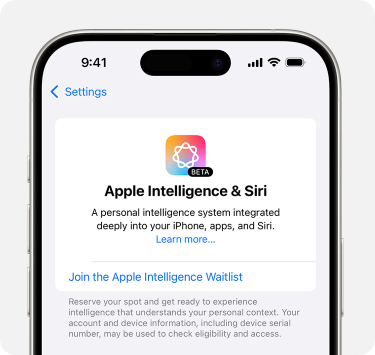
Image: Apple
Apple announced the initial Apple Intelligence features included with iOS 18.1 in October.
The features include:
- Writing Tools
- Clean Up in Photos
- Memory movie in Photos
- Natural language search in Photos app
- Notification summaries
- Reduce Interruptions Focus
- Intelligent Breakthrough & Silencing in Focus
- Priority messages in Mail
- Smart Reply in Mail and Messages
- Summaries in Mail and Messages
- Siri enhancements, including product knowledge, more resilient request handling, natural voice, the ability to type to Siri, and more
The initial rollout will focus on writing and photo editing. Apple Intelligence’s much-anticipated image-generating features—like Genmoji—will likely come out in the iOS 18.2 release. The next operating system is currently in public beta 1 with an expected release date in December.
Check out our Apple Intelligence guide for the full rundown of these features and how the system operates.
Max McCaskill
Sr. Staff Writer

Thousands of cell phone plans unpacked. All the facts. No surprises.





.png?w=280&h=280&usm=20&usmrad=0.8&fit=crop "The Best Cheap Phone Plans for 2026: We Tested Them All to Help You Save")


