
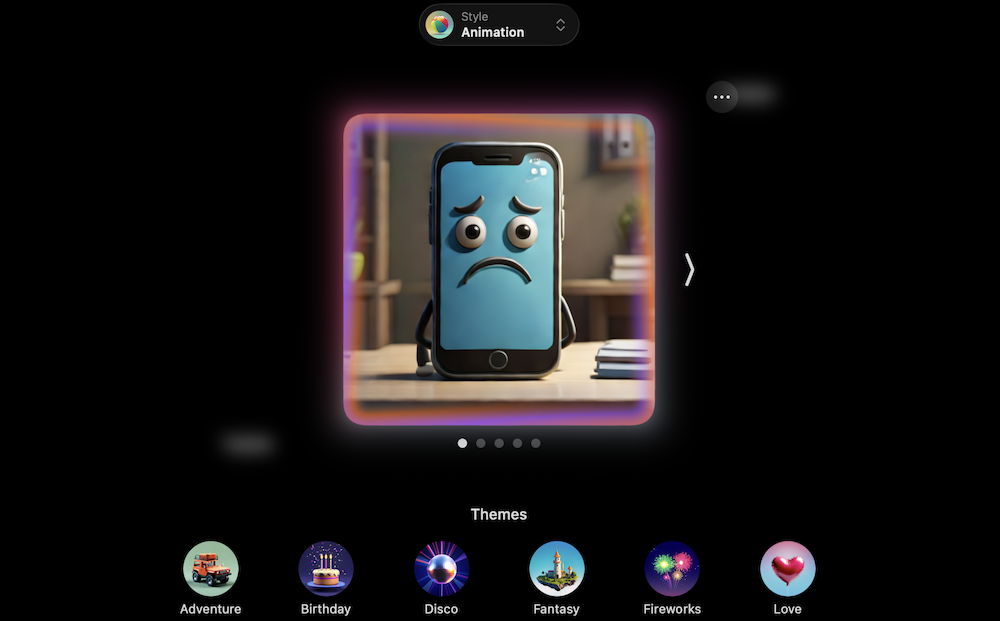
Image: Max McCaskill
After being released in October of 2024, Apple Intelligence has now been out for around a year. I’ve followed this technology and tested it throughout its rollout, and come to one disappointing conclusion: Apple Intelligence was over-promised and under-delivered. Despite Apple making it the centerpiece of its newest device launches and a primary excuse for customers to upgrade their iPhones, it remains incomplete and lags miles behind competitors like Google Gemini.
Apple claimed that its AI would help users express themselves and organize their lives, all while guaranteeing the privacy we’ve come to expect from an Apple product. While the privacy expectations have largely borne out, the rest of the suite has struggled or—in the case of features like personalized Siri—simply never materialized.
The prevailing sentiment across the web and among Apple fans is disappointment. Among our smartphone experts here at WhistleOut, none of them have found an everyday use case for Apple Intelligence yet. Speaking for myself, I’ve even disabled it on my eligible devices.
Still, while Apple Intelligence is a mess, don’t count Apple out just yet. I still think that its privacy-centered and on-device approach is the correct one, even if its features so far have not been what users want.
Where did Apple Intelligence go wrong? A slow rollout and broken promises
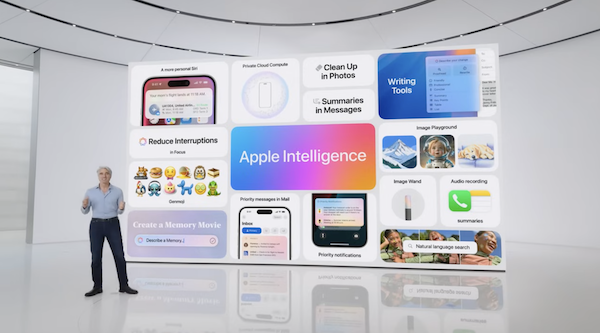
Image: Apple
When Apple Intelligence was announced in June of 2024 at the Worldwide Developers Conference (WWDC), the world took notice. Galaxy AI and early versions of Google Gemini had already premiered on Android devices, leaving Apple users in an unexpected lurch.
What Apple previewed was something different than its competitors. It promised privacy through on-device computing, Siri updates that would allow it to understand your unique personal context, smart organization features, and a slew of generative tools to help users express themselves.
It wasn’t meant to just be a series of features on your device. Instead, Apple Intelligence was positioned to become the chief way you used your device. Limited to the upcoming iPhone 16 and 15 Pro models due to strict device requirements, it was to be the next step of Apple’s technology revolution.
A delayed release of already-outdated features
Unfortunately, after the WWDC announcement, the problems started almost immediately. Apple Intelligence—the crown jewel feature of the iPhone 16 series—wasn’t ready when the new phones launched in September of 2024. Instead, Apple’s AI was released bit by bit through minor iOS updates.
Even worse, as the features trickled out, Apple fans—including myself—were baffled. What came in those first updates were things like writing tools and image generation (Genmoji and Image Playground). This was old news in the AI realm and something you didn’t need a specific device for. Even worse, my initial testing resulted in images and Genmojis that made no sense. Where were features like the updated Siri and Personal Context?
I spent those months after the release testing my friends' iPhone 16s and my Mac as the updates slowly rolled out. Eventually, I realized there just wasn’t enough for me to upgrade to a new phone. I was also not alone in this decision, as most of the WhistleOut team of smartphone experts came to the same conclusion.
Do you need a new iPhone to use AI?
Only if you want Apple Intelligence. It requires an iPhone 15 Pro or newer, and every model that supports it has at least 8GB of RAM, so no software update will bring it to older hardware. Those iPhones still get iOS 27, though, and they can run ChatGPT, Gemini, and other AI apps through the cloud. Our guide to whether you need a new phone for AI covers what you gain by upgrading and whether it's worth today's prices.
One year later and a brand-new iOS, but we’re still waiting
By the summer of 2025, it was clear the personalized features weren’t coming. Apple explained it needed more time to perfect them, and it was having enough issues with the features it had already released. Things like news summaries had to be rolled back and curtailed after the system began making up its own inaccurate headlines.
Hopes were dashed again with the recent release of the iPhone 17 series and iOS 26 in September of 2025. While it did include new AI features like Live Translation and Workout Buddy, Apple Intelligence’s promise to change the way you use your phone remains unfulfilled a year after its initial release.
iPhones that can run Apple Intelligence
Unlike Google Gemini, Apple Intelligence is limited to Apple’s newest releases. While it's available on Macs, iPads, and the Vision Pro, most users access it through their iPhones.
The only iPhones currently compatible with Apple Intelligence include:
- iPhone 17, 17 Pro, 17 Pro Max
- iPhone Air
- iPhone 16, 16e, 16 Plus, 16 Pro, 16 Pro Max
- iPhone 15 Pro, 15 Pro Max
If you’re in the market for a new device, check out our phone finder to see the most popular iPhones currently available and a list of carriers where you may score a deal.
You should also remember that even though Apple Intelligence specializes in on-device processing, it still needs mobile data for some tasks. Make sure to pick a phone plan that can handle it. Check out our best phone plans guide to find a plan that matches both your data needs and budget.
What Apple Intelligence features do people actually use?
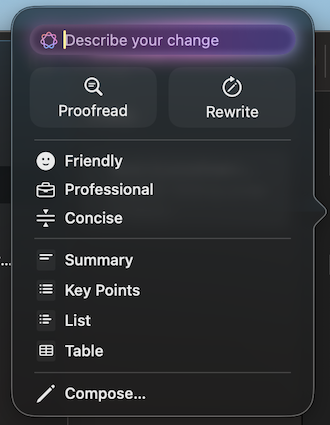
Image: Max McCaskill
To be fair to Apple and the few users out there who do use Apple Intelligence, the AI suite isn’t completely useless. While incomplete, a few elements of the AI appeal to some people. Based on most of what I’ve seen and experienced, those elements appear to be the writing tools (with ChatGPT integration) and smart notifications.
Reddit reports: Useful Apple Intelligence features
- “I’ve been using these ‘writing tools’ because they just work. As someone who’s not a native English speaker, they help me catch some of my grammar mistakes.” - u/The_real_bandito
- “For me, email summaries are a game-changer. I often have lengthy email chains for work, and it can be a real pain to sift through each email and figure out who sent what, what I said, or what someone else said. Email summary is a lifesaver! It gives you a quick overview of all the email chains and provides all the essential information you need to craft a well-thought-out reply.” - u/GuardingxCross
From there, things get bleak. As I’ve already alluded to, one of the biggest problems facing Apple Intelligence is that many of its core features feel like gimmicks instead of real tools to help you improve your life. Even worse, these features sometimes don’t even work correctly. Genmoji and Image Playground are probably the best examples of this.
Reddit reports: Genmoji and Image Playground
- “I’ve tried to use them in genuine use cases (pretty much all jokes) but I find they never look like the people I try to make them based off. The facial proportions and features are usually good but the hair is horrific. Many of my friends have multicolored or dyed hair and it NEVER gets their hair even close. It’s only fun if it actually looks like them, not just vaguely. Very disappointed.” - u/NinjaSquid9
- “I was so excited for Genmoji that I bought an iPhone 15 Pro…I feel like Genmoji and Image Playground are a joke. They can’t even fulfill very simple prompts. Just now I was asking for a sad face Genmoji and every result had smiling faces. I’m very disappointed and feel like a fool for expecting more.” - u/ChiMara777
This mirrors my own experience with these features. I discovered I rarely needed to create custom emojis, and many times the resulting images are unusable. Image Playground is also a major disappointment. In Apple’s effort to create an enclosed system, it added so many guardrails that it’s almost impossible to use.
With Gemini or ChatGPT, I can simply describe what I want. Image Playground requires you to add words or phrases individually, and there are words it simply doesn’t recognize. For example, I discovered when trying to create the main image for this piece that it can’t generate anything using the word “iPhone.”

Image: Max McCaskill
You can also see some of my other attempts to generate hero images for this piece in the photo above. Both of these images are the initial result of the same prompt, “sad smartphone with arms and legs.” Neither is perfect, but Gemini’s is much closer to a usable image from the start. Image Playground struggled with the task, as evidenced by the extra arm, and would require additional revisions.
TL;DR: Apple Intelligence just isn’t worth it right now
For lots of people—including myself—these kinds of features aren’t enough to justify wasting precious storage space or money to upgrade your iPhone. Even the more useful features, like the writing tools, will provide a lot of value only to folks who struggle with writing. Here at WhistleOut, with a staff of professional writers, we’ve found uses for Gemini, Claude, ChatGPT, and more in our work, yet none of us have been able to use Apple Intelligence in the same way.
Personally, I’ve disabled Apple Intelligence on my MacBook Pro and—after testing it on my friends and family’s eligible devices—have chosen to stick with my iPhone 14 Pro for the past three device releases. Unfortunately, I still deal with it frequently, as many of the people who let me test it have also asked for help in learning how to use it and—in some cases—eventually turn it off.
Apple Intelligence alternatives
As we’ve said, it’s not worth buying a new iPhone 17 just to access Apple Intelligence. Luckily, you don’t have to upgrade at all to get AI on your phone.
Check out our curated list of the 10 best AI apps to supercharge your smartphone. You’ll find apps like ChatGPT, Perplexity, and more to help you access the best AI features available with no fancy (or costly) device upgrades required.
Apple Intelligence and Gemini: A tale of two AIs
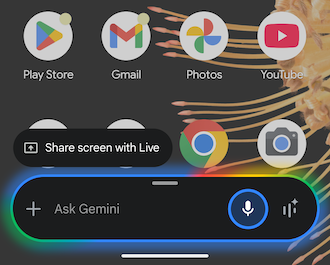
Image: Max McCaskill
Most of the features found within Apple Intelligence are also available on Google Gemini. When comparing the systems, it’s clear that Gemini’s features offer a better experience for users and it's easier to access. As you can see in the screenshot of my Google Pixel 6 above, you can access Gemini and speak to it with the press of a button. Apple Intelligence’s features are scattered throughout your devices, with elements locked in specific apps or behind extra menus.
While having access to ChatGPT and additional privacy features add value to Apple’s AI, it’s still not enough to win users over. To put it bluntly, many iPhone users have downloaded the Gemini app to their iPhone to use as their main AI tool instead of Apple Intelligence.
You can see how each system’s features compare below:
Apple Intelligence vs. Google Gemini
| Apple Intelligence | Google Gemini | |
|---|---|---|
| Primary focus | Personal creativity and privacy | Increasing productivity |
| Smartphone OS | iOS | Android |
| Processing method | On-device | Cloud based |
| Writing model | ChatGPT | Gemini |
| Image generation | Limited to specific terms and a small number of image revisions | Can use long, open-ended descriptions and continually refine images |
| Ecosystem integration | Largely limited to basic apps like Mail, Messages, Notes, Safari, and Photos | Widespread compatibility in Google Workspace, Chrome, Gmail, Google Maps, Photos, and Messages |
The future of Apple Intelligence: Ditch the gimmicks and make it useful
Apple Intelligence has shaken the carefully cultivated aura that Apple has built around its products. Fans are accustomed to sleek, refined technology that’s intuitive and easy to use. Apple Intelligence is none of those things. The company has even been hit with lawsuits claiming it engaged in false advertising and unfair competition when hawking the delayed AI features for the iPhone 16.
That said, I see clues about how Apple can still make its system work.
Users are getting the most value out of Apple Intelligence tools with writing help, ChatGPT integration, and notification summaries. Expanding these productivity features and moving away from things like custom emojis or AI-generated profile pictures is the answer. While those creative features may meet Apple’s “personal expression” ideas, they simply aren’t useful and are certainly not worth spending money on for an iPhone upgrade.
The Apple Intelligence pivot has begun, but will it be enough?

Image: Apple
To its credit, Apple seems to realize its users aren’t happy. iOS 26’s Apple Intelligence features are already a step in the right direction, with features like Live Translate. As a language translation feature for your smartphone, it’s a piece of AI technology that has a specific and useful purpose.
If Apple continues cultivating these kinds of tools and eventually releases its updated Siri with Personal Context, it stands a good chance of becoming the smartphone user’s favorite AI.
Personally, I’m looking for these kinds of features in future Apple Intelligence updates:
- Conversational Siri in the style of ChatGPT or Gemini.
- Removing the guardrails and weird interfaces from Image Playground and Genmoji to create a truly generative feature.
- Expanding access for a streamlined experience outside of Apple’s native apps.
Apple has the right idea, just fix the execution
Honestly, I don’t think Apple Intelligence needs all the extra capabilities of Gemini, Claude, or ChatGPT. Most people don’t need to vibe code or create massive projects. They simply want a smarter virtual assistant that can reliably complete tasks on their phone. Plus, while other systems like Gemini currently offer more features, Apple is still leading the way with AI privacy through its on-device computing.
In the long run, I think a slimmed-down but useful Apple Intelligence will be more palatable to most people than an all-encompassing model that creeps into every corner of your phone, gobbling up all your personal data and sending it off to a cloud server where who knows what can access it.
On the other hand, until these kinds of changes are made and the model works reliably, I have no intention of turning Apple Intelligence back on, and I’m sure many other users feel the same way.
Max McCaskill
Sr. Staff Writer

Thousands of cell phone plans unpacked. All the facts. No surprises.





.png?w=280&h=280&usm=20&usmrad=0.8&fit=crop "The Best Cheap Phone Plans for 2026: We Tested Them All to Help You Save")


