
When choosing how to secure your iPhone, Face ID is great for daily convenience, but your passcode is the only option that's protected by law.
Most people don't think about their lock method until their iPhone is stolen, or they're in a situation where someone demands they hand over access. While both types of iPhone locking systems are secure, it's worth understanding which one works best for your personal needs.
Let's talk about Face ID and numerical passcodes to figure out which method is right for your iPhone and privacy.
Face ID vs. passcode: iPhone security quick comparison
| Face ID | 6-Digit Passcode | |
|---|---|---|
| Odds of breaking in | 1 in 1,000,000 | 1 in 1,000,000 (with a random code) |
| Brute-force protection | 5 failed attempts, then requires your passcode | Escalating lockouts, optional device reset at 10 attempts |
| Defeated by twins or siblings | Increased risk (per Apple) | No |
| Works when device restarts | No, a passcode is always required first | Yes |
| Susceptible to shoulder surfing | No | Yes |
| 5th Amendment protection | Legally unsettled | Generally protected |
How does Face ID work?
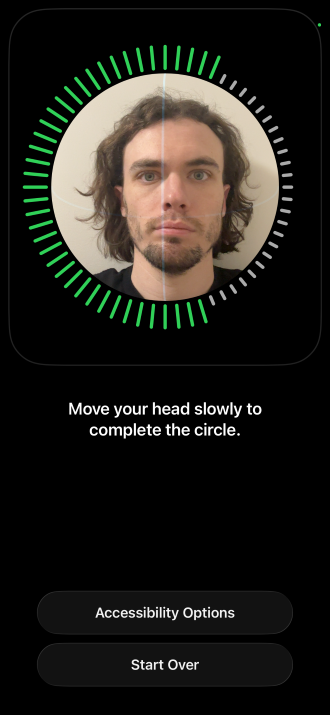
Image: Max McCaskill
Face ID uses a TrueDepth camera built into the top of your screen to project over 30,000 invisible infrared dots onto your face to build a 3D image. It converts that image into a numerical representation and saves it on your device. Every unlock attempt runs that process in real time and attempts to match the face looking at your iPhone with the number it has saved.
According to Apple, the odds that a random person in the population can unlock another user's iPhone are about 1-in-1,000,000 when using Face ID. While tricking Face ID becomes slightly more probable if you add additional facial profiles or if you have a twin, the system is still a safe and convenient option for most users.
What makes Face ID secure is:
- Your Face ID data never leaves your device: It's encrypted and stored only on your iPhone, and never backed up to iCloud.
- It adapts over time: The system can recognize a new beard, glasses, or makeup. Only a dramatic facial change (like swelling or an injury) may delay the system.
- Attention is required by default: It checks that your eyes are open and directed at the screen, so it can't be used on you while you're asleep.
- Failed access attempts require your passcode: Face ID will disable itself after five failed attempts, a device restart, 48 hours without an unlock, or triggering Emergency SOS.
While the system is built to be seamless, if Face ID is failing several times in a row, you may need to do some troubleshooting on your device. A bad facial capture, filtered sunglasses, a new haircut, or a dirty camera can make the system irritating and inconsistent to use.
How does an iPhone passcode work?
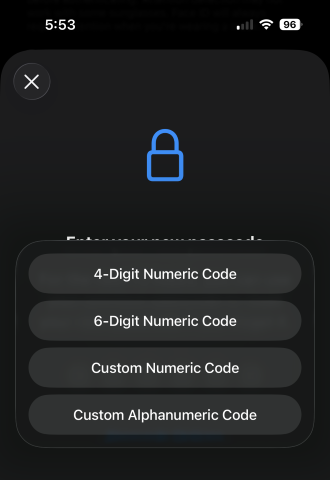
Image: Max McCaskill
Your passcode encrypts everything on your iPhone. Without it, the data on your device is essentially unreadable, even to someone who has the phone in their hands.
This secure setup happens because your passcode is combined with a unique encryption key baked into your iPhone's system that scrambles your data. That encryption means an attacker can't brute-force access into your phone on a separate machine. Every access attempt must happen on your specific device, with iOS locking down your data if the passcode fails.
Your iPhone has increasing timed lockouts after multiple wrong passcode attempts. After 10 incorrect attempts, your iPhone automatically lock all users out and disables itself. You can also enable an optional setting that resets the phone after 10 consecutive failures.
iPhones support four different passcode formats:
- Four-digit numeric: Legacy option and not recommended
- Six-digit numeric: Current default
- Custom numeric: Longer number-only code
- Custom alphanumeric: Longer code with letters and numbers
A random six-digit passcode has 1 million possible combinations, which should be extremely secure.
The problem with passcodes is that some people still use a four-digit PIN, and many others are bad at choosing unpredictable numbers. Common PINs like 123456, 000000, and 111111 are popular real-world passcodes. Plus, an attacker who knows your birthday may also have a very good chance of getting in. All of which makes PINs potentially much less secure.
If you've been using the same four-digit PIN for the past 10 years, it's time to change to a truly random six-digit PIN. If you've relied on Face ID so long that you can't remember your code to change it, here's what to do if you forgot your iPhone passcode.
Face ID, passcodes, and the Fifth Amendment
Apart from security statistics, one of the biggest differences between Face ID and passcodes is that your passcode is generally protected by the U.S. Constitution, while your Face ID is not.
The Fifth Amendment protects you from being compelled to testify against yourself. Most courts have held that your iPhone's passcode falls under that protection. Disclosing it to law enforcement requires revealing the contents of your mind, so they generally cannot force you to hand over your passcode if you don't want to. Add that fact to Apple's outstanding encryption, and it's unlikely that law enforcement will be able to brute force their way into your phone.
Biometrics—like Face ID and fingerprint scans—are currently in a legal gray area. Courts across the country have reached conflicting conclusions on whether forcing someone to unlock a device with a fingerprint or face scan violates the Constitution, and the Supreme Court has not settled the question. In many cases, law enforcement treats Face ID biometrics like fingerprints or DNA, meaning it's physical evidence they can force you to provide.
Note: None of this is legal advice. In any situation where law enforcement is asking for access to your iPhone, ask for a lawyer.
I'm not a criminal, so why should I care if the police can search my phone?
None of this is designed to help people break the law with their iPhone. That said, with increasing police presence across many U.S. cities, officers are seizing more phones from people than ever before. Even if you're not breaking the law, you may not want a police officer poking around in your private messages or personal photos.
However, you should note that the situation is different at the border. If you're returning to the U.S. from vacation, customs agents have broad authority to search your phone without a warrant, and can seize your device if you refuse. For this reason, we now recommend that most people travel with burner phones when going abroad.
Which method should you actually use?
For most people, the answer is both.
Face ID is best for everyday use. It's fast, passive, and the 1-in-1,000,000 false-match rate is strong for a typical threat. Most people don't need to worry about a sophisticated spoofing attack or having their device instantly seized. They're more worried about a stranger looking over their shoulder.
A truly random six-digit passcode is your next best defense. You'll need one anyway after your device restarts, and it's the only choice for legal situations where Fifth Amendment protections matter. If you think you're about to be in a situation where your phone could be seized, just press the power button 5 times in a row to temporarily disable Face ID and secure your device.
Face ID vs. passcode: FAQ
Is Face ID more secure than a passcode?
According to Apple, Face ID and passcode are similarly secure, with around a 1-in-1,000,000 chance of someone randomly breaking in for either option. That said, Face ID is more secure if you select a passcode using common numbers or your birthday.
Is Face ID safe?
Yes, Face ID is safe. It uses thousands of low-powered infrared dots to scan your face and generate a 3D map for unlocking your phone. You can't see the infrared light, and it's not dangerous to your eyes or skin.
How long should my iPhone passcode be?
Your iPhone passcode should be at least six digits long. Apple will allow you to create a longer passcode, but if you add too many extra digits, it's easier to forget or make mistakes when entering it. Do not use a four-digit passcode. These are out of date and not as secure.
Can a twin unlock an iPhone using Face ID?
It's possible that an identical twin can unlock your phone using Face ID, especially for teenagers and kids. However, it's still unlikely. Face ID uses over 30,000 infrared dots to map your face, and most adult twins have enough subtly different facial features that an iPhone can tell them apart.
Is your iPhone passcode saved in the Passwords app?
No, your iPhone passcode is saved directly in the settings of your phone and used to encrypt all your data. The Passwords app is part of your iPhone's internal privacy and security features. It's a password manager for things like online accounts, passkeys, and Wi-Fi connections.
Max McCaskill
Sr. Staff Writer

Thousands of cell phone plans unpacked. All the facts. No surprises.





.png?w=280&h=280&usm=20&usmrad=0.8&fit=crop "The Best Cheap Phone Plans for 2026: We Tested Them All to Help You Save")


