
Google Messages has real-time location sharing built directly into the app. You can share your live location without downloading anything extra, and without the other person needing a separate account. It takes about 30 seconds to set up, and works whether you're meeting up across town or keeping someone in the loop while you travel.
How to share your live location in Google Messages
- Open a conversation in Google Messages.
- Tap the + icon next to the text field.
- Select Real-time location.
- Choose your sharing duration.
- Tap Send.
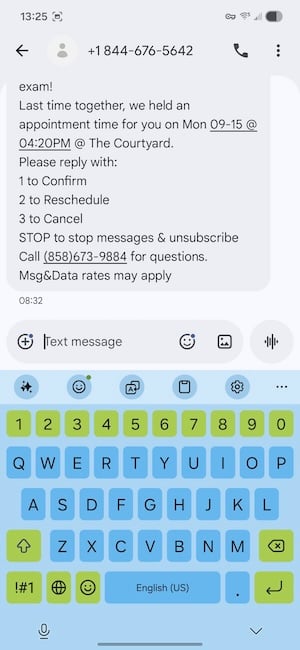
Image: Jessica Santero | WhistleOut
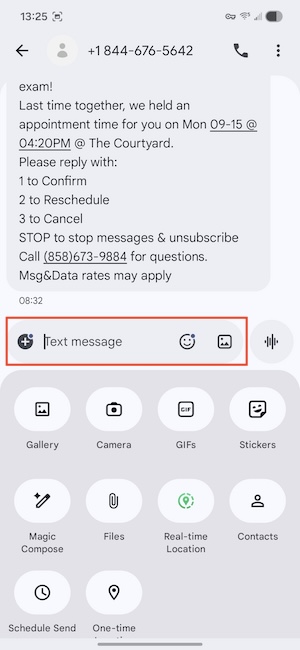
Image: Jessica Santero | WhistleOut
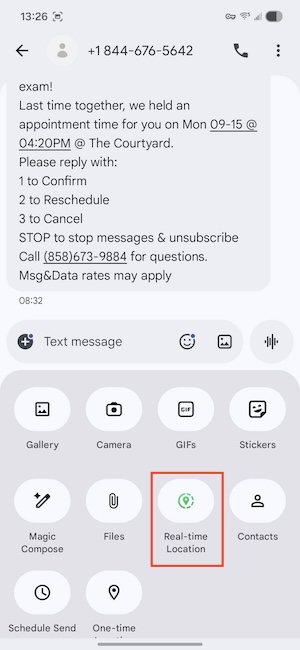
Image: Jessica Santero | WhistleOut
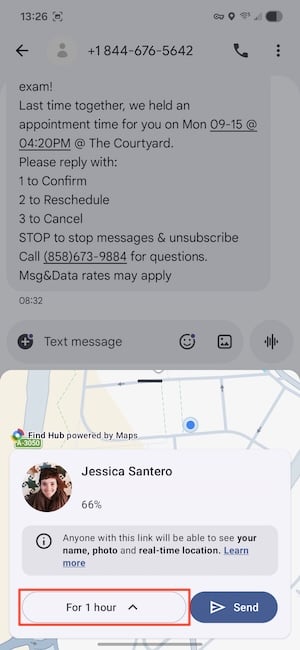
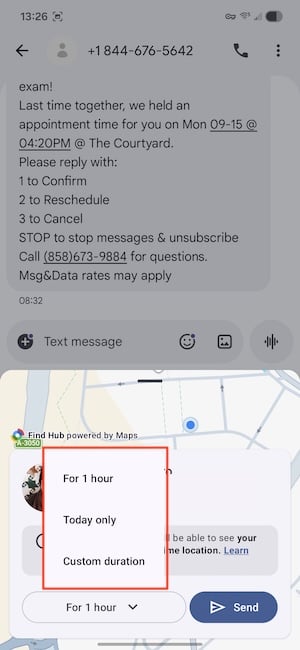
Image: Jessica Santero | WhistleOut
Your location appears live in the conversation. When the timer runs out, sharing stops automatically, so you don't need to go back in and end it manually.
Traveling internationally? Make sure your data goes with you.
You need a connection to send the initial location share, and roaming fees can rack up fast if you're not on the right plan. Check out the most popular carrier plans that already include international data so your phone bill isn't the thing that surprises you on this trip.
|
AT&T

Premium 2.0℠
$90.00/mo
+ $35 Upfront
|
|
T-Mobile

Experience Beyond 2.0
$100.00/mo
with Auto-Pay + Taxes and fees
|
|
Verizon

Unlimited Ultimate
$95.00/mo
+ Taxes & Fees. Price includes AutoPay & Paperless discount.
+ $40 Upfront
|
What to know before you share
Both people need to be on Google Messages
Real-time location sharing in Google Messages only works if both of you are using Google Messages. It won't cross over to iMessage, WhatsApp, or any other platform.
If you're trying to share your location with someone on iPhone, Google Maps is still your best option since neither person needs the app installed, just a Google account. For everything else, our guide to the best location sharing apps for travel covers what works across platforms.
The "Until I turn it off" option requires RCS
If you want to share your location indefinitely, your contact needs to have RCS enabled. RCS is the modern messaging standard that replaced SMS, allowing you to send messages via data. It's what gives Google Messages things like read receipts and better media quality, too.
Most newer Android phones have it enabled by default, but if that option isn't showing up for you, that's likely why. The timed options (one hour, that day, custom) work over regular SMS without any issue.
Send the link before you lose signal
You need data or Wi-Fi to send the initial share, but once it's active, your location keeps updating on GPS without any additional data. So if you're heading somewhere with patchy service (like a national park, a remote beach, a festival with terrible coverage), send the share before you leave the hotel Wi-Fi.
Your location will keep updating even if you lose signal after that, and it works in airplane mode once the share is already established.
Stopping a share early
Changed your mind? Go back into the conversation, tap the active location share, and stop it from there. It cuts off immediately for anyone following your location.
Paying too much for the same coverage?
MVNOs run on the exact same towers as the big carriers and charge a lot less for it. Here are the most popular T-Mobile network plans available right now.
|
Mint Mobile

Unlimited Data Plan
$10.00/mo
$60 for 6 months of service
|
|
US Mobile

Unlimited Premium Plan
$20.00/mo
|
|
Tello

Unlimited Text, Talk, and Data Plan
$25.00/mo
|
Sharing your location on Android: FAQ
Can I share my location on Android without an app?
Yes, you can share your location on Android using Google Messages. The built-in real-time location sharing gives you timed options as well.
Does sharing my location on Android use data?
You need data or Wi-Fi to send the initial share, but once it's active, location updates run on GPS and don't need an ongoing connection.
How long can I share my live location in Google Messages?
You can share for one hour, for the rest of the day, for a custom duration, or indefinitely until you turn it off—but the indefinite option only appears when your contact has RCS enabled.
Can an Android user share their location with an iPhone user?
Android users cannot share their location with an iPhone user through Google Messages. But Google Maps works across both platforms and only requires a Google account on the receiving end, not the app itself.
What is RCS, and do I need it for location sharing?
RCS is the modern messaging standard that replaced SMS, and you don't need it for basic location sharing in Google Messages. You do need it for the "Until I turn it off" option.
Jessica Santero
Staff Writer

Thousands of cell phone plans unpacked. All the facts. No surprises.

Related Articles


Related Topics
AndroidPopular Topics
Featured App Reviews iOS News Coverage Device Reviews Device Explainers Carrier Explainers App Roundups T-Mobile


Free iPhone 18 Pro, up to $1,200 off, with a trade-in in any condition or a line switch on Experience Beyond


.png?w=280&h=280&usm=20&usmrad=0.8&fit=crop "Best Cell Phone Deals for October 2026: Get the New iPhone 18 Pro for Free")





