
So you deleted a text message. Maybe it was an accident. Maybe you were clearing out your inbox and got aggressive. Either way, it's gone, and now you need it back.
The good news: On Android, deleted doesn't always mean gone forever—but your window for recovery is short. Every photo you take, app you download, or message you send overwrites storage space where that data might still be sitting. The sooner you try to recover, the better your odds.
In this guide, we'll walk you through the most reliable ways to recover deleted texts on Android. The steps may look slightly different depending on which Android version you're running, but the core process is the same across most devices.
Can you recover deleted text messages on Android?
Yes, you can recover deleted text messages on Android—but it's not guaranteed. Your chances depend on whether you had a backup in place and how quickly you're acting. Here are the methods to try, in order of reliability.
Restore texts from Google backup
If you had Google backup enabled before you deleted the messages, you can restore your phone to a previous backup that includes them.
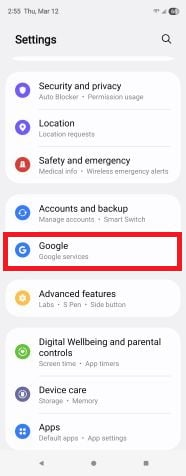
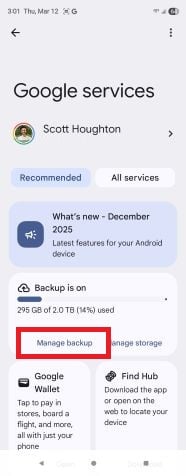
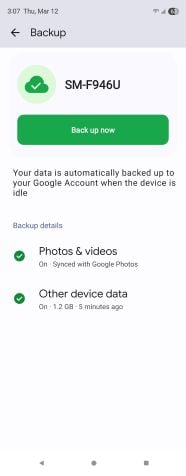
Your Google backup settings may be the quickest way to find out if recovery is even possible.
Image: Scott Houghton | WhistleOut
To check, go to Settings > Google > Manage backup > Backup. Then see when your last backup was made. If it predates the deletion, you're in business. Just know that restoring from a backup means you'll lose anything saved after that backup date, so weigh your tradeoff carefully.
To restore, you'll need to do a factory reset, follow the setup prompts, and when asked, choose to restore from a Google backup.
Restore texts from Samsung Cloud (Samsung devices only)
If you have a Samsung phone, you may have a second backup option. Samsung has its own cloud backup system that runs separately from Google, and it includes text messages.
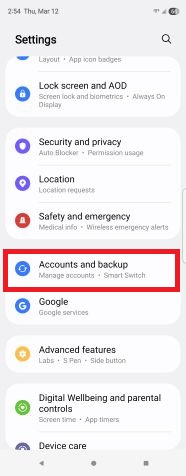
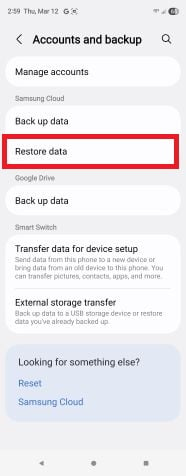
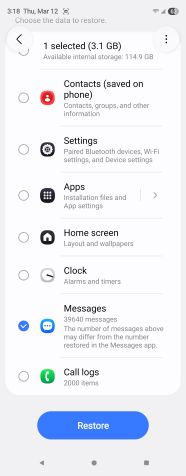
Restoring from a backup only takes a few steps once you've confirmed one exists.
Image: Scott Houghton | WhistleOut
Go to Settings > Accounts and backup > Restore data. From there, all you have to do is check the messages tab, then press restore.
Unlike restoring from Google, this doesn't require a factory reset, which means you won't lose any data you've saved since the backup was made. It's the least disruptive recovery option on this list, so if you have a Samsung device, try this one first.
Recover deleted texts from your carrier
Your carrier might also have a copy of your text history. Some carriers retain SMS records for a period of time, though access policies vary. Most won't hand over the actual message content, so what you're more likely to get is basic details like who you texted and when. Still, it only takes a quick call to find out what your carrier can do.
Use an Android text message recovery app
Several third-party apps claim to recover deleted texts directly from your phone's internal storage. SMS Backup & Restore and Dr.Fone are among the most widely used. These apps scan your device for recoverable data that hasn't been overwritten yet.
Results vary more here than with any other method on this list. They work best when you act fast, haven't used your phone much since the deletion, and you have a PC connection to run a deep scan. Our advice: Stick to well-known apps with strong reviews. There are a lot of sketchy options in this category.
What to do if you can't recover deleted messages
If none of these methods work, the data has likely been overwritten. At that point, your options are limited.
Try reaching out to the person you were texting. If the conversation was on their end, too, they may still have it. It's an easy step that's easy to forget when you're troubleshooting.
Beyond that, it's worth double-checking any third-party apps you use to communicate. Messages sent through WhatsApp, Messenger, or other apps are stored separately from your SMS inbox and may still be intact. Check those apps before you give up entirely.
How to avoid losing texts in the future
The best recovery method is not needing one. A few habits will save you a lot of headaches:
- Turn on Google Backup: Go to Settings > Google > Backup, then make sure it's enabled. Set it to back up daily.
- Use a messaging app with cloud sync: Apps like WhatsApp and others on our list of best messaging apps store messages in the cloud rather than just on your device.
- Back up your phone regularly: Whether you use Google, Samsung Cloud, or a PC backup, the routine matters more than the method. Here's how to back up and reset a Samsung phone if you need a starting point.
- Slow down before bulk deleting: Most Android phones ask you to confirm before wiping a conversation. Use that as a double-check to make sure you are deleting the right thing.
Recovering deleted texts on Android: FAQs
How long do deleted messages stay on an Android phone?
There's no fixed timeline for how long deleted messages stay on an Android phone. Once you delete a message, it remains in your phone's storage until that space gets overwritten by new data. That could be hours or weeks, depending on how much you use your phone.
Are there apps to restore deleted text messages?
Apps like SMS Backup & Restore and Dr.Fone are popular third-party options for restoring deleted text messages. They scan your device's internal storage for recoverable data. But keep in mind that success depends heavily on how quickly you act after deleting.
Are Android messages permanently deleted?
Once deleted storage space is overwritten by new data, deleted messages are gone for good. That's why speed matters more than anything else in the recovery process. The recovery process is similar on Apple devices, too. Check out our guide on how to retrieve deleted messages on iPhone.
Scott Houghton
Jr. Staff Writer

Thousands of cell phone plans unpacked. All the facts. No surprises.

Related Articles


Free iPhone 18 Pro, up to $1,200 off, with a trade-in in any condition or a line switch on Experience Beyond


.png?w=280&h=280&usm=20&usmrad=0.8&fit=crop "Best Cell Phone Deals for October 2026: Get the New iPhone 18 Pro for Free")




