

Clearing your cache on Android removes temporarily saved information. Since cached data doesn’t include crucial information such as logins or passwords, it’s an effective fix for speeding up a laggy phone or quickly freeing up space for things like Android app updates.
Because of tools built directly into the Android operating system (OS), cache clearing is pretty simple. Learn how to clear your cache on an Android phone to free up space.
How to Clear Your Cache on an Android
Sometimes, apps using a lot of storage also have a large cache. To view apps by size, hit the three-dot menu > Sort by size. Then, you can locate the largest apps and clear their caches to free up storage space. Here’s how:
- Head to Settings > Storage > Apps (Other Apps on Android 11 and earlier).
- Select the app cache you want to clear.
- Tap Clear cache.


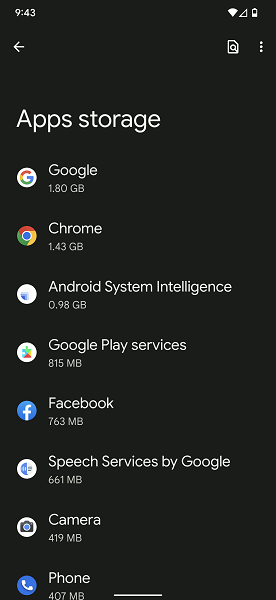
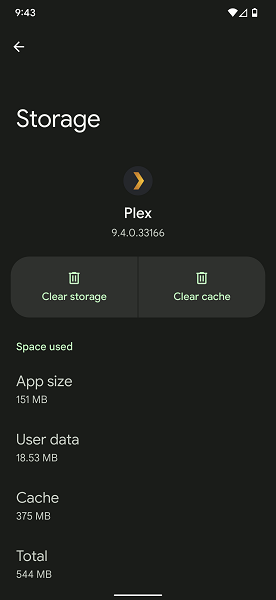
While on an app’s info page, you’ll notice a Clear storage option. Tapping "Clear storage" wipes all app data, effectively resetting a program to its original state when first downloaded from the Google Play Store. We suggest reserving "Clear storage" for extreme situations where an app is severely malfunctioning.
Android cache clearing apps
Although the easiest solution relies on native Android OS features, certain apps let you erase your cache data. A few of our favorite apps for the Android clear cache process include CCleaner, All-in-One Toolbox, and Droid Optimizer. Aside from clearing your Android cache, many Android optimizer apps offer additional amenities such as trash removal and freeing up RAM.
Generally, we suggest sticking to your phone’s onboard cache and data cleaning capabilities. Many of these Android optimization applications are ad-ridden or make preposterous claims about drastically speeding up your Android device.
What is cached data?
Cached data is information saved temporarily by an application, like pictures, text, or videos. Each app has its own cache, so HBO MAX won’t read Spotify’s cache and vice versa. Apps rely on cached data to quickly retrieve recently accessed details. For instance, the Netflix app cache might contain your recently watched videos or titles for easy access.
Outside the Android ecosystem, programs such as Google Chrome on a laptop or desktop also include cached data. The Chrome cache might include saved information such as your internet history or temporary images.
Why you should clear cached data
The main benefit of clearing an Android app’s cached data is freeing up valuable storage space. Additionally, clearing your cache could fix a malfunctioning app. Although you usually don’t need to clear your cache daily or weekly, it can be a useful step in device maintenance.
If you clear app data, not your cache, you’ll delete files necessary for everyday operation. Therefore, the clear data option will cause you to provide your login credentials in apps that use them.
Best Android Phones
Clearing your cache only goes so far if your Android phone is seriously low on phone storage. Adding a microSD card helps, but a new phone with more internal storage is often a worthy upgrade. Our favorite Android phones on the market include the Google Pixel 6 Pro, Samsung Galaxy S22 Plus, and Samsung Galaxy A32 5G. Generally, we vouch for most modern Google Pixel handsets and Samsung Galaxy smartphones. Lose your phone? Learn how to locate it with Find My Android.
Moto G 5G (2026) 128GB
- 6.7 inch display
- Rear Cameras: 50MP, 2MP
- Front Camera: 32MP

Galaxy A26 5G
- 6.7 inch display
- Rear Cameras: 50MP, 8MP, 2MP
- Front Camera: 13MP

Galaxy A27 5G 128GB
- 6.7 inch display
- Rear Cameras: 50MP, 5MP, 2MP
- Front Camera: 12MP

Galaxy A37 5G 128GB
- 6.7 inch display
- Rear Cameras: 50MP, 8MP, 5MP
- Front Camera: 12MP

Edge (2026) 128GB
- 6.3 inch display
- Rear Cameras: 50MP, 50MP, 10MP
- Front Camera: 50MP


The Android phone clear cache: FAQs
How to clear your cache on an Android phone?
You can clear your cache on an Android phone by navigating to Settings > Storage > Apps (Other Apps on Android 11 and earlier), selecting an app whose cache you want to clear, then tapping Clear cache.
Is it safe to clear your cache on an Android phone?
Yes! Clearing your cache on an Android phone is very safe. This process merely wipes temporarily stored data but leaves important information untouched.
What happens when you clear cached data?
Clearing cached files on an Android device deletes temporary app-specific information, freeing up phone storage space.
What does "clear cache" mean?
Clearing your system cache means wiping out temporary storage files known as a cache.
How do I clear the cache for all apps?
Many Android optimization apps, such as CCleaner, let you bulk clean your Android app caches.
Will clearing your cache delete pictures?
No, clearing your cache files will not delete pictures, even if you clear the cache of your image gallery app.
Will clearing your cache delete contacts?
No! Performing a clear on your cache will only remove temporary files, not stored contacts.
Moe Long
Senior Writer

Thousands of cell phone plans unpacked. All the facts. No surprises.





.png?w=280&h=280&usm=20&usmrad=0.8&fit=crop "The Best Cheap Phone Plans for 2026: We Tested Them All to Help You Save")


