
Image: Max McCaskill
The most boring part of most people's flight is the 15 minutes between when you turn on Airplane Mode for takeoff and when you can finally connect to your plane's Wi-Fi in the air.
You may think of Airplane Mode as just another outdated safety feature, but it's actually an incredibly useful travel setting for your phone. Using it correctly can even save you money when traveling abroad and maintain the health of your smartphone.
- Airplane Mode is the safest default setting when you land in another country to prevent expensive international roaming charges.
- It's also the best way to prevent your phone from draining its battery and potentially damaging itself by searching for a signal while in-flight.
Let's talk about why you shouldn't roll your eyes the next time the in-flight announcement says it's time to turn on Airplane Mode.
What Airplane Mode really does on airplanes
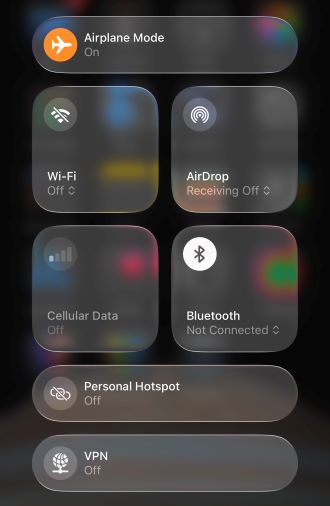
When you enable Airplane Mode on your smartphone, you're disabling your device's ability to connect to wireless radio signals. This includes cellular data, Wi-Fi, and Bluetooth.
While modern airplanes may seem technologically advanced, they still use radio signals for navigation and communication with other planes and the ground. Your smartphone uses similar frequencies and can cause interference.
Truthfully, it's unlikely that the interference from a single cell phone would cause enough problems to disrupt a plane's operations. However, the FAA and airlines have decided it's safest for everyone if Airplane Mode is still the law of the land during takeoff and landing.
To enable Airplane Mode on almost all iOS and Android smartphones:
- Swipe down from the top of your screen to open the quick connectivity settings.
- Press the Airplane Mode symbol.
Wait, why can I use Wi-Fi on planes?
In-flight Wi-Fi uses different radio frequencies than the navigation and communication systems in the cockpit, so it doesn't impact the plane's operations. Bluetooth falls in the same category, so feel free to break out your favorite headphones for your in-flight entertainment.
Why international travelers should use Airplane Mode
When you disable Airplane Mode after your plane touches down, your phone immediately begins searching for a signal. If you're traveling internationally, that means you're about to connect to a foreign network.
International roaming charges can be incredibly expensive if you haven't prepared for them.
- Travel pass coverage can cost up to $12/day from major carriers
- Pay-as-you-go rates can cost $2/MB or more (that's around $2,000 for 1GB of data)
Even worse, you may not have control of your phone's automatic background functions. Apps refresh, notifications sync, and updates start downloading, with all of them using up data and costing you money.
Airplane Mode prevents that automatic connection, so travelers should keep it on even after the plane lands.
It gives you a moment to decide how you want to use your phone before any cellular activity begins. That could mean using an international cell phone plan, or connecting to the local network using a travel eSIM.
Don't drain your battery: Your phone doesn't rest at 40,000 feet
An airplane's cruising altitude is too high for phone signals to reach. That said, when your phone has no signal during your flight, it doesn't just give up. It keeps searching.
Without Airplane Mode, your phone will repeatedly scan for a network connection it can't find. That process drains your battery and may damage the internal components of your device. Searching for a signal is actually hard on your phone, and it may overheat or wear down your processor.
Utilizing Airplane Mode disables the network search feature, saving your battery life and components. Plus, you'll also have more charge left when you land and actually need to use your phone.
You don't want to be forced to buy a travel burner phone from the airport after landing because your personal device destroyed itself on the plane.
Recap: Airplane Mode isn't just for safety
While it may feel unnecessary, Airplane Mode isn't going anywhere. It's a core safety feature for your smartphone and can be a great way to help you avoid costly mistakes when traveling.
Remember to keep Airplane Mode on through your entire flight so your phone doesn't burn through its battery mid-flight looking for a signal it's never going to find.
Additionally, if you're traveling internationally, keep Airplane Mode on until you've figured out your plan. Whether that's activating an international roaming plan, swapping to a travel eSIM, or jumping on airport Wi-Fi during a quick layover.
The charges that come from not doing these things can cost you hundreds of dollars before you've even grabbed your luggage from the baggage claim.
Max McCaskill
Sr. Staff Writer

Thousands of cell phone plans unpacked. All the facts. No surprises.

Related Articles


Related Topics
Operating Systems ExplainersPopular Topics
Featured App Reviews iOS News Coverage Device Reviews Device Explainers Carrier Explainers App Roundups T-Mobile


Free iPhone 18 Pro, up to $1,200 off, with a trade-in in any condition or a line switch on Experience Beyond


.png?w=280&h=280&usm=20&usmrad=0.8&fit=crop "Best Cell Phone Deals for October 2026: Get the New iPhone 18 Pro for Free")




