

APN (Access Point Name) settings determine how your phone communicates with the provider's network to access the internet, send messages, and use other data-dependent services. In tech jargon, APN settings are your phone’s network configuration parameters that allow your mobile device to connect to your carrier's cellular data network.
While most modern smartphones automatically configure APNs when you insert a SIM card or activate an eSIM, you may need to manually enter or modify them if you have connectivity issues or have recently switched carriers and brought your own phone. Let’s dive into why your APN settings are important and how to find and edit them.Why are APN settings important?
APN settings are the digital key that allows your device to connect to your carrier's network. These settings open the pathway to your carrier’s services, like using your mobile data or sending messages. Without the correct APN settings, you won’t be able to connect to the internet or use data to browse online or use apps.
Every carrier has specific APN settings. So every time you switch to a new carrier, your APN settings change. This is especially important for users who bring their own phone when they switch since old APN settings from a previous provider can completely block your data connection. While most newer cell phones automatically configure these parameters, some regional or international SIM cards require manual changes.
Knowing your phone’s APN settings helps you troubleshoot how to fix mobile data on iPhone or Android. Whether you're facing slow connections, failed media messages, or unexpected service restrictions, these iPhone and Android network configurations frequently hold the solution.
Though they operate invisibly, APN settings form the foundation of your mobile connectivity, ensuring seamless access to all your device's capabilities. When modifying your APN settings, make sure you have the correct information.
APN settings by carrier
Here’s our list of carriers and their step-by-step guides.
- AT&T APN settings
- T-Mobile APN settings
- Boost Mobile APN settings
- Consumer Cellular APN settings
- Cricket Wireless APN settings
- FreedomPop APN settings
- Google Fi APN settings
- Metro by T-Mobile APN settings
- Mint Mobile APN settings
- US Mobile APN settings
Get the same coverage for half the price
Many people don't realize that you can get the exact same coverage as you would from a major carrier by going with a much cheaper MVNO (mobile virtual network operator). These carriers use the same towers but don't have to pay the upkeep costs, so they can pass the savings on to you.
- Visible is our favorite Verizon network MVNO due to its unlimited hotspot data options and international benefits.
- Mint Mobile is our best T-Mobile MVNO because of its affordable pricing and premium data.
- US Mobile is the top AT&T network MVNO (Dark Star) given its truly unlimited premium data and global coverage.
Before you switch, make sure you choose an MVNO that suits your cellular needs. Check out some of the most popular options at the moment.
|
#1
|
Visible

$25 Visible Plan
$25.00/mo
Taxes & Fees included
|
|
#2
|
Mint Mobile

Unlimited Data Plan
$10.00/mo
$60 for 6 months of service
|
|
#3
|
US Mobile

Unlimited Starter Plan
$10.00/mo
|
How to view and edit APN settings on Android and iOS
You can easily view and change your phone’s APN settings within your device’s system, under your carrier or cellular network information.
How to change APN settings on Android
Follow these steps to view and edit APN settings for Android phones:
- Open Settings on your phone and tap Network & Internet or Connections.
- Select Mobile Networks or SIMs.
- If your phone shows SIMs, tap and select your SIM two times. Otherwise, skip to the next step.
- Tap Access Point Names to view your phone's APN settings. To update your APN settings, tap each field to enter your carrier’s specific APN settings.
- Restart your phone.
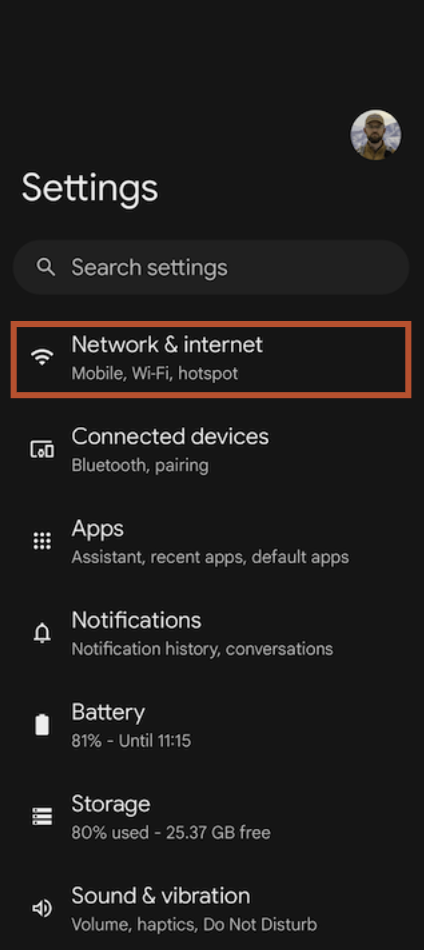
Image: Michael Konves | WhistleOut

Image: Michael Konves | WhistleOut
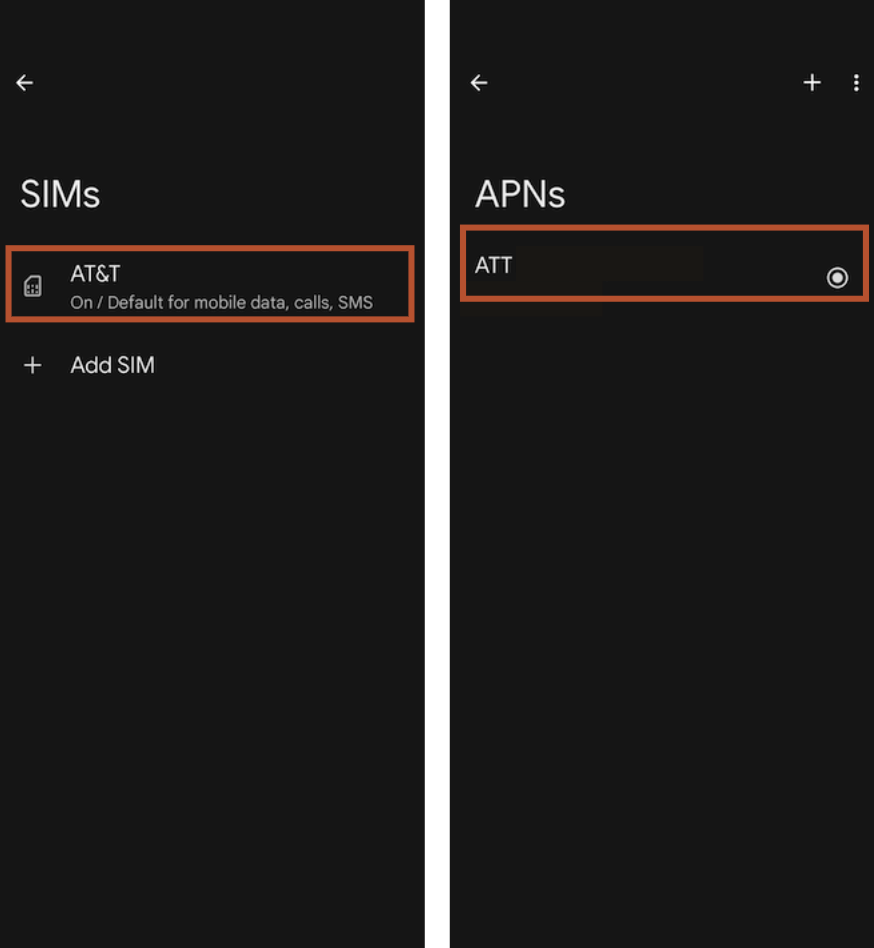
Images: Michael Konves | WhistleOut
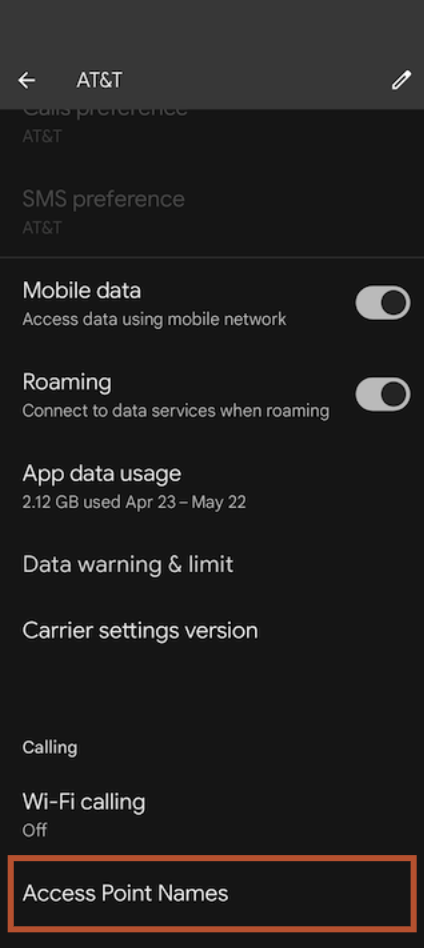
Image: Michael Konves | WhistleOut
How to change APN settings on iOS
Follow these steps to view and edit APN settings for iPhones:
- In your phone’s Settings, tap Cellular or Mobile Service.
- Tap Cellular Data Network or Mobile Data Network.
- Select your carrier’s SIM to view your APN settings.
- To modify your phone's APN settings, tap each field and input the correct carrier APN settings.
- Restart your iPhone.
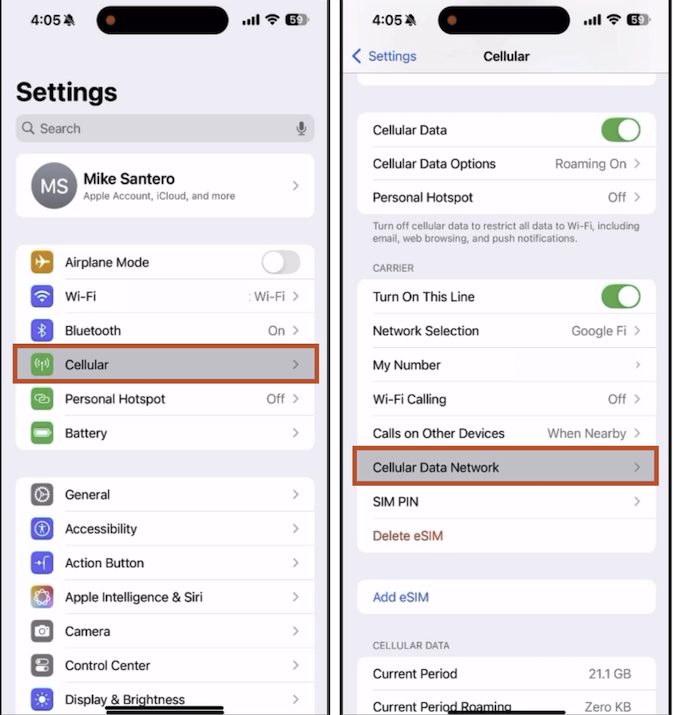
Images: Michael Santero | WhistleOut

Image: Michael Santero | WhistleOut
How to reset APN settings on Android and iOS
Resetting your APN settings restores your carrier’s default parameters on your phone. You may want to reset your APN settings if you are having any issues using your mobile data to access the internet. This process clears any incorrect or outdated configurations that may be disrupting your network access.
How to reset APN settings on Android
Reset your APN settings on Android phones by following these steps:
- Open Settings on your phone and tap Network & Internet or Connections.
- Select Mobile Networks or SIMs.
- If your phone shows SIMs, tap and select your SIM two times. If not, continue to the next step.
- Tap Access Point Names.
- Tap the three dots and select Reset to default.
- Restart your phone.
How to reset APN settings on iOS
To reset your APN settings on iPhones, follow these steps:
- Open Settings.
- Depending on your iPhone, tap Cellular or Mobile Data.
- Select your carrier’s SIM.
- Tap Cellular Network or Mobile Data Network.
- Scroll down and tap Reset Settings.
After resetting, your device will reconnect using the correct APN automatically. Just remember, if you’ve previously customized your APN for any reason, those changes will be erased during the reset. If these steps don’t work for your phone, reach out to your carrier’s customer support for further help.
APN settings: FAQs
What happens if I delete my APN settings?
Deleting APN settings disconnects you from your mobile data and messaging services. To restore them, you’ll need to re-enter your carrier’s APN settings or reset them.
Do I need to set up APN manually when switching carriers?
You might need to set up your APN settings manually when switching carriers if you brought your own phone. While most phones automatically configure APN settings, make sure to double-check your carrier’s settings after switching.
Are APN settings the same for every phone?
No, APN settings are not the same for every phone. Every mobile carrier has unique APN settings that facilitate the connection between the device and the carrier's network. These settings allow your phone to access the internet and use your cellular data.
What is APN on my phone?
APN on your phone refers to the APN (Access Point Names) settings, which allow your mobile device to connect to your carrier's cellular data network.
Jessica Santero
Staff Writer

Thousands of cell phone plans unpacked. All the facts. No surprises.


.png?w=160&h=160&usm=20&usmrad=0.8&fit=crop "Cell Coverage Near You: Who Has the Best 5G Network?")





.png?w=280&h=280&usm=20&usmrad=0.8&fit=crop "The Best Cheap Phone Plans for 2026: We Tested Them All to Help You Save")


