
Netgear Nighthawk
RAXE500

- Wi-Fi 6E
- Excellent single-router coverage
Netgear Orbi
RBK852

- Wi-Fi 6
- Solid whole-home coverage
ASUS ROG Rapture
GT-AXE11000

- Wi-Fi 6E
- Great gaming optimizations
Long-range routers let you enjoy a reliable wireless signal. Although Wi-Fi is more convenient than a hardwired Ethernet connection, moving further away from a router generally results in slower internet speeds.
Especially for larger homes or businesses, a solid wireless networking signal is tough to achieve. However, the right hardware overcomes that challenge. Our favorite long-range router overall is the Netgear RAXE500 because of its Wi-Fi 6E support and large coverage area. Continue reading to check out the other best long-range routers that made our list for strong, reliable Wi-Fi.
Best long-range routers
| Netgear Nighthawk RAXE500 | Netgear Orbi RBK852 | ASUS ROG Rapture GT-AXE11000 | |
|---|---|---|---|
| Wi-Fi version | Wi-Fi 6E | Wi-Fi 6E | Wi-Fi 6E |
| Coverage area (square feet) | 3,500D | 2,500/router or node | 3,100 |
| Maximum total throughput | 10.8Gbps | 6Gbps | 11Gbps |
| Ports | 4x Gigabit LAN 1 x 2.5 Gigabit Port aggregation support |
4x Gigabit LAN | 4x Gigabit LAN 1x Gigabit WAN 2x USB 3.2 |
| Advanced functionality | MU-MIMO Beamforming |
MU-MIMO Beamforming |
OFDMA Beamforming AiMesh Alexa IFTTT QoS |
| Other features | VPN Amazon Alexa Google Assistant |
VPN | VPN Gaming optimization |
| Security | Netgear Armor WPA3 DDoS SPI Firewall |
Netgear Armor 128-bit AES encryption with PSK |
Parental controls WPA3 |
| Learn more | View on Amazon | View on Amazon | View on Amazon |
Best Long-Range Routers Overall
Even the fastest possible internet falters without the right hardware. These are the routers with the largest coverage area.

WhistleOut Rating:
Netgear Nighthawk RAXE500 | Best long-range router overall
The Netgear Nighthawk RAXE500 is a solid tri-band Wi-Fi router. It sports Wi-Fi 6E for cutting-edge wireless networking. There’s great connectivity with four Gigabit Ethernet LAN jacks, a 2.5 multi-gig LAN host, and port aggregation support. You’ll also enjoy up to 3,500 square feet of coverage with up to 10.8Gbps of total throughput.
With support for up to 60 devices, you can connect all of your phones, computers, and streaming boxes with ease. Because of its Wi-Fi 6E, the Netgear Nighthawk RAXE500 lets you enjoy lag-free sessions of Diablo II: Resurrected and stream Stranger Things on Netflix in 4K.
Unfortunately, the RAXE500 lacks quality of service (QoS), which prioritizes web traffic—like gaming, streaming, or teleconferencing—to ensure a smooth experience for specific services over others (even with an overloaded network). Additionally, there’s a fairly hefty price tag. And its cybersecurity suite, Netgear Armor, requires a paid annual subscription. Nevertheless, the Netgear Nighthawk RAXE500 delivers excellent coverage with blisteringly fast internet speeds.
- Pros: Wi-Fi 6E, link aggregation support, 3,500 square foot coverage are
- Cons: Lacks QoS, Netgear Armor requires a paid subscription, pricey
WhistleOut Rating:
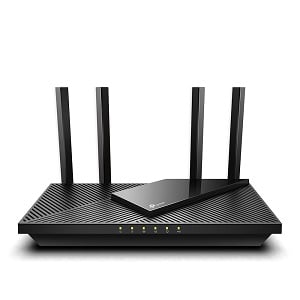
TP-Link Archer AX21 | Best customizable long-range router
The TP-Link Archer AX21 boasts an incredible price-to-performance ratio. It’s a dual-band Wi-Fi 6 router with up to 1.8Gbps total throughput. With TP-Link’s OneMesh, you can extend your existing router’s signal without switching access points. Although upload and download speeds take a slight hit, it offers a useful Wi-Fi boost.
Despite its wallet-friendly cost, the TP-Link Archer AX21 sports an array of features such as a VPN server and client support alongside Amazon Alexa compatibility. A virtual private network (VPN) makes it appear that your web traffic originates in a different area. VPNs are great for privacy, geo-unblocking (like streaming BBC programs in the United States), or accessing files on a remote server. Some routers let you install a whole-home VPN. Its Amazon integration includes controls for pausing Wi-Fi and Simple Setup for quickly adding Alexa smart home gadgets to your home network.
Disappointingly, though, the AX21 lacks full Gigabit LAN support. While there’s good throughput, the TP-Link is only a dual-band router. Nevertheless, the TP-Link Archer AX21 punches well above its weight class with options like beamforming (faster, more reliable Wi-Fi signals) and Alexa controls, making it a long-range router with good bang for your buck.
- Pros: Wi-Fi 6, great coverage, lots of Ethernet LAN ports
- Cons: Lacks Gigabit LAN support, only dual-band
WhistleOut Rating:
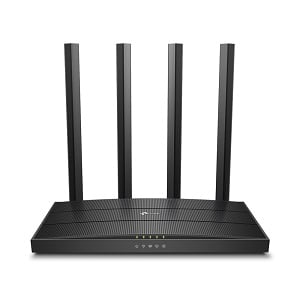
TP-Link Archer C80 | Best long-range Wi-Fi router on a budget
On a budget, it’s tough to beat the TP-Link C80. Although it’s just a Wi-Fi 5 router, you’ll get a total throughput of 1900Mbps (600Mbps over 2.4Ghz and 1300Mbps on its 5GHz network). TP-Link includes a bevy of benefits such as multiple-input, multiple-output (MU-MIMO), beamforming, and parental controls.
Multiple input and multiple output (or MU-MIMO) increase efficiency when connecting to many devices, which results in benefits like less video buffering or laggy calls. If you’ve got a lot of internet-enabled gadgets like streaming boxes, laptops, and smart home products on your network, MU-MIMO helps greatly. Thus, you can simultaneously stream 4K videos, play online video games with low lag, and enjoy video calls with friends without bogging down your network.
Boasting fast upload and download speeds without breaking the bank makes the C80 a compelling networking solution. You can watch Evil on Paramount+, join work Zoom calls, and stream Spotify to your Sonos speakers without overburdening your Wi-Fi. We’d prefer a USB port to set up a simple networked drive, but it’s hard to complain at this price.
- Pros: Wi-Fi 5, MU-MIMO and beamforming, 1900Mbps total throughput
- Cons: No USB port, only Wi-Fi 5
Best Long-Range Mesh Routers
Mesh Wi-Fi routers deliver the largest coverage area possible with scalable networks. Here are the best mesh wireless systems for whole-home networking.
WhistleOut Rating:
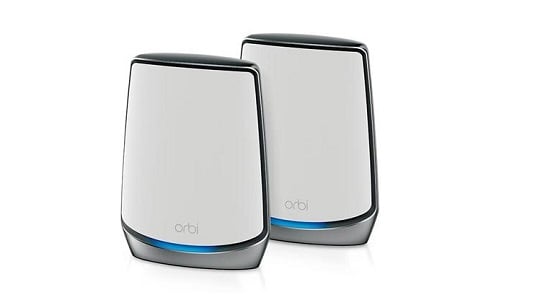
Netgear Orbi RBK852 | Best long-range mesh router overall
Netgear’s Orbi RBK852 is an incredible mesh wireless kit. As a Wi-Fi 6 tri-band router, the RBK852 covers up to 2,500 square feet with a single node. So, a router and single satellite extender offer 5,000 square feet of coverage.
Watching Star Trek: The Next Generation on Paramount+, catching up with friends on Google Hangouts, and syncing your Philips Hue smart bulbs scattered around the house all work flawlessly. Aside from terrific wireless connectivity, the Orbi RBK852 features four Gigabit Ethernet ports on each router or node.
Its ability to penetrate even thick walls and ceilings makes the Orbi RBK852 a phenomenal mesh router. But expect to shell out a lot of cash for this Netgear option. Additionally, its primary router and satellites are fairly bulky. Nevertheless, Netgear’s Orbi RBK852 is a superb mesh router with comprehensive home coverage.
- Pros: Mesh router, great wall and ceiling penetration, Wi-Fi 6
- Cons: Pricey, large footprint

WhistleOut Rating:
eero Pro 6E | Best user-friendly long-range mesh router
Amazon devices like Alexa smart home speakers and Fire TV streaming devices are high-performing yet user-friendly. Likewise, Amazon’s eero Pro 6E is a fabulous mesh router. You’ll enjoy Wi-Fi 6E, a built-in Zigbee smart home hub, and tri-band support.
For Gigabit and higher internet, such as Google Fiber, the eero Pro 6E is a fantastic choice. Its Wi-Fi 6E includes a 6GHz band which delivers lower latency and faster throughput than Wi-Fi 6. Set up is incredibly simple. Just download the eero app, plug in your devices, and wait for wireless optimization.
Sadly, the eero Pro 6E doesn’t come cheap. Moreover, users reported spotty 6GHz performance. That said, the eero Pro 6E is a user-friendly, feature-packed mesh router with an outstanding coverage area.
- Pros: Wi-Fi 6E, easy to use, Zigbee smart home hub built-in
- Cons: Expensive, uneven 6GHz performance

WhistleOut Rating:
Google Nest Wi-Fi | Best long-range mesh router on a budget
Google’s Nest Wi-Fi is a phenomenal mesh wireless router that won’t break the bank. These routers accommodate up to 200 connected devices like game consoles, streaming boxes, and phones. Each router or node also covers up to 2,200 square feet.
Onboard, each satellite or router sports a pair of Ethernet ports. You’ll appreciate user-friendly installation, great parental controls, and seamless smart home integration for Google Mesh or Nest products. However, Google’s Nest mesh system only runs Wi-Fi 5, not Wi-Fi 6 and the Nest router only features two Ethernet ports. But for the price, the Google Nest is a reasonably-priced wireless router.
- Pros: Extremely affordable, Google and Nest integration
- Cons: Wi-Fi 5 instead of Wi-Fi 6, only two Ethernet ports
Best-Long Range Gaming Routers
While most routers should suffice for streaming video, working from home, and enabling smart home devices, gamers require low-latency internet connections. These are the best gaming routers with wide coverage areas.
WhistleOut Rating:
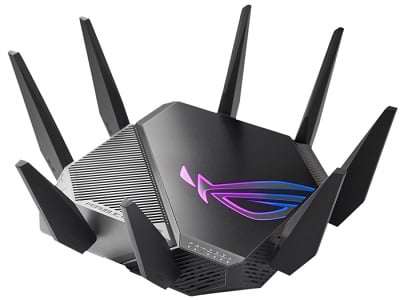
ASUS ROG Rapture GT-AXE11000 | Best long-range gaming router
The ASUS ROG Rapture GT-AXE11000 is an exceptional tri-band Wi-Fi 6E router. Because it supports Wi-Fi 6E, the GT-AXE11000 benefits from a 6GHz spectrum band that offers low-latency, high-throughput connections. It packs multi-gig support with a 2.5Gbps LAN port and link aggregation.
In addition to Ethernet jacks, the ROG Rapture GT-AXE11000 features a pair of USB 3.0 ports. Under the hood, there’s a 1.8GHz quad-core CPU with 256MB of flash memory and 1GB of RAM, which enable faster command processing, easier firmware updates, and better multitasking. You’ll notice these improvements when running apps like a VPN or gaming optimization service. You can comfortably engage in a Counter-Strike match-up while streaming King Kong vs. Godzilla in 4K with no issues. Advanced features include game acceleration and the ability to run a VPN for non-game apps concurrently. LED lighting accents provide a gamer chic flair.
As expected, the ROG Rapture is a large, heavy device with an equally large price tag. The design isn’t for everyone, although gamers may enjoy its bold design. For intense matches of Elden Ring or Tom Clancy’s Rainbow Six Extraction, the ASUS ROG Rapture GT-AXE11000 delivers the low-lag gaming players crave.
- Pros: Wi-Fi 6E, multi-gig support, advanced gaming features
- Cons: Large, expensive
WhistleOut Rating:
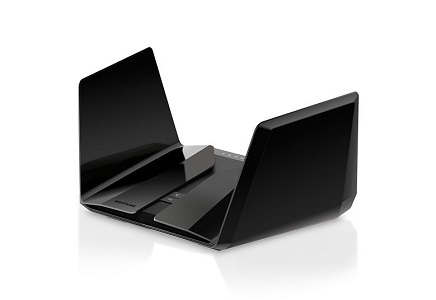
Netgear Nighthawk RAX200 | Best feature-rich long-range gaming router
Netgear’s Nighthawk RAX200 looks like a ship from Star Trek. It features striking design cues and impressive performance to match. You get Wi-Fi 6, two USB 3.0 ports, and five Ethernet jacks.
A fully loaded feature set includes MU-MIMO, QoS, and beamforming. If you’re working from home, you can set QoS to maintain better Zoom audiovisual quality while deprioritizing Netflix streams or Xbox Live connections. There’s also VPN support, robust parental controls, and reliable security software. It’s capable of covering up to 2,500 square feet of space, but the RAX200 comes with a high price tag. You could also consider the Netgear Nighthawk RAX120, which sports similar specs but is a dual-band, not tri-band, router.
- Pros: Wi-Fi 6, tri-band, multi-gig support
- Cons: Pricey
WhistleOut Rating:
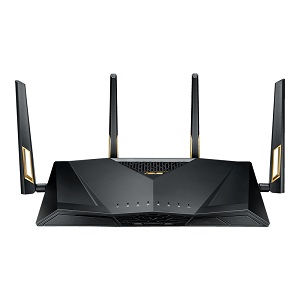
ASUS RT-AX88U | Best budget long-range gaming router
The ASUS RT-AX88U is a great value gaming router. It’s a dual-band Wi-Fi 6 system with Gigabit compatibility, as well as AiMesh functionality for establishing strong whole-home wireless networks. Blazing fast performance, simple setup, and a whopping eight Ethernet LAN jacks make the RT-AX88U a tremendous choice for reaching even the far corners of your home.
Despite a modest price tag, the ASUS RT-AX88U includes solid malware protection and fantastic QoS. For gamers, the Adaptive Quality of Service optimizes online gameplay. You’ll even find a few USB ports. While the ASUS RT-AX88U is a Wi-Fi 6 router, it’s only dual-band. Thus, you miss out on the 6GHz band for even lower latency and higher throughput. However, the ASUS RT-AX88U gets you a large coverage area further expanded with AiMesh.
- Pros: AiMesh support, lots of LAN ports, Wi-Fi 6
- Cons: Only dual-band
Methodology: How we picked the best long-range routers
Our internet experts leveraged proprietary data and real-world user feedback to select the best long-range routers for your home. We analyzed routers based on the Wi-Fi version, coverage area, internet signal support, and special features. In our research, we compared dozens of routers for various purposes including general-purpose use, mesh networking, and gaming. Then, we picked the top choices in each category by price point. Additionally, we performed hands-on hardware testing.
What to look for when picking a long-range router
Price
Routers start at as low as $50 for a basic model, but you could spend close to $500 for a premium router. Try to set a budget and select a router within that price range.
Coverage
A scalable mesh network lets you add more nodes or satellite routers to expand wireless coverage. Look at coverage by the square foot. Base your router purchase on the size of the area where you need Wi-Fi access.
Ports
While wireless networking is convenient, hardwired Ethernet ports let you hook up devices such as home servers, smart home hubs, or streaming boxes. Additionally, mesh routers can offer wired backchannel capabilities. And built-in USB ports let you configure networked drives for remote file access.
ISP compatibility
If you want to enjoy the fastest possible internet speeds, you’ll need a router that supports your internet service provider’s (ISP) full throughput. For instance, fiber plans from AT&T or Google Fiber give you 1 Gig or multi-gig internet packages, so you’ll want a router to match that.
Wi-Fi version
Wi-Fi 6 and Wi-Fi 6E give you faster, lower-latency internet speeds than Wi-Fi 5. Especially if you’ve got a fiber internet plan, pick a Wi-Fi 6 or 6E router. However, Wi-Fi 5 should be fast enough for most folks.
Number of bands
Routers come with different numbers of bands, and a dual-band or tri-band router is best. Dual-band routers include 2.4GHz and 5GHz spectrum networks. While 5GHz provides faster speeds, 2.4GHz offers a longer range. A tri-band router adds a second 5GHz network, allowing more headroom for devices operating on the 5GHz spectrum. Wi-Fi 6E routers sport a 6GHz band with even greater bandwidth than 5GHz.
Advanced functionality
Premium features let you maximize your wireless network. You may see options like MU-MIMO or QoS for handling more devices or prioritizing network traffic. Additionally, options like VPNs, security, and parental controls give you a better grasp on privacy and safety.
Best Internet Plans
When buying a new router, pair it with a high-quality internet plan. Which ISP and plan work best depends on your location, budget, and internet speed requirements. Below are some of the most popular internet plans on the market, but availability varies. To find out which providers are available in your area, use our handy internet search tool.
|
Xfinity

1 Gig
$50/mo
Internet price guaranteed for 5 years. Price includes $10/mo autopay and paperless discount.
|
|
Verizon Fios

300 Mbps
$30/mo
with AutoPay
+ $99 Upfront
|
|
Spectrum

Spectrum Internet® 100
$30/mo
for 1 year
+ $20 Upfront
|
|
Verizon

myPlan + 5G Home
$35/mo
with AutoPay and any Verizon mobile phone plan
|
|
Kinetic

100 Mbps
$19.99/mo
for 1 year with AutoPay
|
Best Long-range Routers: FAQs
What is the best router for long-range?
The best router for long-range is the Netgear Nighthawk RAXE500 with its Wi-Fi 6E support and 3,500 square foot coverage.
What router gives the best coverage?
A mesh router typically gives you the best coverage. Our favorite option is the Netgear Orbi RBK852, but we also recommend the eero Pro 6E and Google Nest Wi-Fi.
What is the strongest Wi-Fi router?
The strongest Wi-Fi router is the ASUS ROG Rapture GT-AXE11000, with its Wi-Fi 6E connectivity, multi-gig support, and beefy processor under the hood.
How can I get a long-distance Wi-Fi signal?
You can get a long-distance Wi-Fi signal by properly placing your router in your home. We suggest positioning it in a central location, open space, and high up. Alternatively, a Wi-Fi extender lets you expand your Wi-Fi signal.
How far can Wi-Fi 6 reach?
Wi-Fi 6 can reach approximately 300 feet.
Will getting a better router make my internet faster?
No, getting a better router won't make your internet faster. However, it might let you access faster internet speeds by tapping into the full potential of your ISP's incoming signal.
Do some routers have a better range than others?
Yes! Some routers have a better range than others. Generally, mesh routers offer a better range, although that's because a mesh network includes satellite routers.
How far can a router send a signal?
Most routers can send a signal over 100 feet and up to approximately 300 feet.
Can I have two routers in my home?
Yes! You can use two (or more) routers in your home. Mesh systems actually include satellite nodes which are akin to additional routers.
Do newer routers have better range?
Maybe. Depending on the hardware, a newer router may have a better range, particularly if it features a newer Wi-Fi version.
Moe Long
Senior Writer

Enter your address to find the best internet providers available in your area.

Related Articles


.jpg?w=160&h=160&usm=20&usmrad=0.8&fit=crop "Viasat vs Hughesnet Internet Plans Compared")
Related Topics
InternetPopular Topics
Internet Spectrum Internet Xfinity Research and Reports AT&T T-Mobile News Verizon MINTernet App ExplainersInternet Providers by State
- Internet in Alabama
- Internet in Alaska
- Internet in Arizona
- Internet in Arkansas
- Internet in California
- Internet in Colorado
- Internet in Connecticut
- Internet in Delaware
- Internet in District of Columbia
- Internet in Florida
- Internet in Georgia
- Internet in Hawaii
- Internet in Idaho
- Internet in Illinois
- Internet in Indiana
- Internet in Iowa
- Internet in Kansas
- Internet in Kentucky
- Internet in Louisiana
- Internet in Maine
- Internet in Maryland
- Internet in Massachusetts
- Internet in Michigan
- Internet in Minnesota
- Internet in Mississippi
- Internet in Missouri
- Internet in Montana
- Internet in Nebraska
- Internet in Nevada
- Internet in New Hampshire
- Internet in New Jersey
- Internet in New Mexico
- Internet in New York
- Internet in North Carolina
- Internet in North Dakota
- Internet in Ohio
- Internet in Oklahoma
- Internet in Oregon
- Internet in Pennsylvania
- Internet in Rhode Island
- Internet in South Carolina
- Internet in South Dakota
- Internet in Tennessee
- Internet in Texas
- Internet in Utah
- Internet in Vermont
- Internet in Virginia
- Internet in Washington
- Internet in West Virginia
- Internet in Wisconsin
- Internet in Wyoming


.jpg?w=280&h=280&usm=20&usmrad=0.8&fit=crop "Verizon Fios Internet vs. Optimum Internet")

.jpg?w=280&h=280&usm=20&usmrad=0.8&fit=crop "Viasat vs Hughesnet Internet Plans Compared")


.jpg?w=280&h=280&usm=20&usmrad=0.8&fit=crop "gFiber vs. AT&T Fiber: Which internet is better for you?")


