
An eSIM, or electronic SIM card, differs from a physical SIM card. Whereas physical SIM cards come in various sizes and must be inserted into the SIM card slot of a phone. Because eSIMs are digital-only, you can add one easily and quickly. Additionally, many carriers don't charge a fee for eSIMs.
While you can add an eSIM to your phone, you may also find the need to delete one. The process is painless on both Android and iOS. Let's look at removing or deleting an eSIM on your Android or iPhone.
What is eSIM technology?
An eSIM is a digital-only SIM card. Instead of a physical object that inserts into your phone's SIM tray, you'll add one by scanning a QR code. Many modern handsets support eSIM; some, like the Apple iPhone 16, even lack a physical SIM card slot.
eSIM cards make switching carriers a breeze, allow instant activation, and work great for travel since you can use a physical SIM card simultaneously. However, not all mobile devices allow for dual SIM functionality with eSIMs, and if your phone breaks, you can't simply pop out your SIM card for use in a backup phone.
How to delete or remove an eSIM
Whether switching carriers, selling an old phone, or taking advantage of a compelling trade-in deal, here's how to delete eSIMs. Removing an eSIM card doesn't cancel your cell phone plan, so you'll still need to contact your wireless provider.
How to remove an Android eSIM
On your Android phone:
- Navigate to Settings > Network & internet > Mobile network.
- Tap the eSIM you wish to delete.
- Hit Delete SIM.
- Optional: If there's a required password to delete your Android eSIM, head to Settings > Security > Advanced > Confirm SIM deletion.
How to delete eSIMs on iPhones
You can painlessly erase eSIMs on iOS:

- Open Settings > Cellular or Settings > Mobile Data.
- Select the eSIM you want to remove.
- Press Delete eSIM.
How to add an eSIM on iPhone and Android
Did you accidentally delete your eSIM? It happens. Or you may be activating your new service. Let's look at adding an eSIM on Android and iPhone.
On iOS:
- Go to Settings > Cellular or Settings > Mobile Data.
- Tap Add Cellular Plan.
- Scan your carrier-provided QR code and enter the confirmation code if you receive one.
On Android:
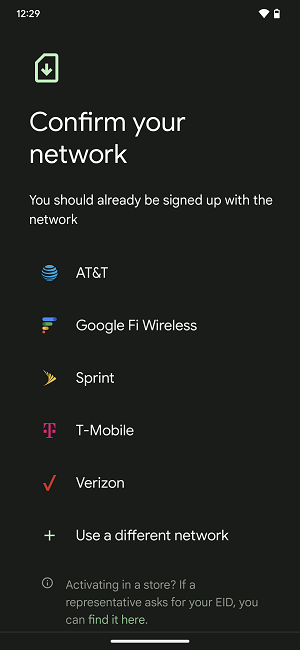
- Head to Settings > Network & internet > SIMs > Carrier > Download a SIM instead? > Don't have a SIM card?, and choose your carrier from the list.
- Scan the QR code.
- Tap Start to add your eSIM.
- Press Done when finished.
Can you remove a physical sim after eSIM activation?
Yes, you can safely remove your physical SIM card after your eSIM is activated. However, some carriers have specific policies, so check with your carrier before discarding a physical SIM card.
SIM cards also contain personal information like your phone number, so it's recommended that you cut them into small pieces with scissors or a shredder before throwing them away.
Best eSIM phones and plans
Most modern phones and carriers support eSIM cards. The first eSIM-only phone was the Motorola Razr, but Apple followed suit with its iPhone 14—at least in the United States. Our favorite eSIM-compatible phones are the iPhone 16, iPhone 15, iPhone SE (2022), Samsung Galaxy S24, and Google Pixel 9. The best dual SIM phones that support one physical SIM card alongside an eSIM include the Samsung Galaxy S23, iPhone 13, and Google Pixel 7.
Many cell phone companies, including all the major carriers—Verizon, AT&T, and T-Mobile—provide eSIM plans. The best eSIM-compatible smaller carriers are Mint Mobile, Visible, US Mobile, and Google Fi.
|
#1
|
Visible

$25 Visible Plan
$25.00/mo
Taxes & Fees included
|
|
#2
|
Mint Mobile

Unlimited Data Plan
$10.00/mo
$60 for 6 months of service
|
|
#3
|
Verizon

Simplicity Plan
$30.00/mo
+ Taxes & Fees. Price includes AutoPay & Bring a Number discount
|
|
#4
|
AT&T

Premium 2.0℠
$90.00/mo
+ $35 Upfront
|
|
#5
|
T-Mobile

Experience Beyond 2.0
$100.00/mo
with Auto-Pay + Taxes and fees
|
|
#6
|
US Mobile

Unlimited Starter Plan
$10.00/mo
|
|
#7
|
Spectrum Mobile®

Unlimited
$30.00/mo
+ $20 Upfront
|
|
#8
|
Cricket

Supreme Unlimited Plan
$55.00/mo
with AutoPay; $60 for the first month.
+ $9.99 Upfront
|
|
#9
|
Tello

Unlimited Text, 300 Minutes, and 2GB Plan
$8.00/mo
|
|
#10
|
Boost Mobile

Unlimited Plan
$10.00/mo
with AutoPay
|
How to add or remove an eSIM: FAQs
What happens if I delete an eSIM?
If you delete an eSIM from your phone, you'll lose access to that mobile network. However, your cellular plan remains active, so you'll still need to contact your carrier to cancel your service.
How do I recover a deleted eSIM?
If you accidentally deleted an eSIM profile, you can recover it by getting a new QR code from your carrier and scanning that on your Android or iPhone.
Does resetting an iPhone delete the eSIM?
Yes, factory resetting an iPhone—or Android, for that matter—deletes any stored eSIMs.
What phones support an eSIM?
Most modern phones from Apple, Google, Samsung, Motorola, OnePlus, and other manufacturers support an eSIM. For instance, the iPhone 14 series, Google Pixel 7, Samsung Galaxy S23 lineup, Motorola Edge+, and OnePlus 11 all work with eSIMs. Even budget devices like the Motorola Moto G Stylus 5G (2022) and Nord N20 5G accept eSIM.
Moe Long
Senior Writer

Thousands of cell phone plans unpacked. All the facts. No surprises.





.png?w=280&h=280&usm=20&usmrad=0.8&fit=crop "The Best Cheap Phone Plans for 2026: We Tested Them All to Help You Save")


